Garages often suffer from weak Wi‑Fi due to distance from the router, thick walls, and interference from tools and equipment. This guide highlights five top extenders that deliver strong signals to garage spaces, helping you stream, work, and monitor devices without dropouts. All options support dual‑band networks, and several offer Ethernet ports for a reliable wired connection to a router, computer, or security camera.
| Product | Brand | Key Benefit |
|---|---|---|
| TP-Link RE315 | TP-Link | Strong dual‑band performance with wide coverage |
| TP-Link RE550 | TP-Link | Gigabit Ethernet port and EasyMesh compatibility |
| TP-Link RE715X | TP-Link | Wi‑Fi 6 with robust coverage for large spaces |
| AOOEPU WiFi Booster | AOOEPU | Very wide reach and flexible modes |
| GEYILO Dual Band Extender | GEYILO | High coverage with dual‑band versatility |
Buying considerations: coverage area, supported speeds, number of devices, presence of Ethernet port, security features, setup ease, and compatibility with existing routers or mesh systems. The following selections balance garage coverage with realistic home Wi‑Fi needs, avoiding overly complex setups while delivering dependable performance.
TP-Link RE315: Reliable Dual‑Band Extender

Dual‑Band WiFi Extender with 1.2 Gbps total bandwidth. It provides 867 Mbps on the 5 GHz band and 300 Mbps on the 2.4 GHz band, with coverage up to 1600 sq. ft. and support for up to 32 devices. The external antennas optimize coverage and reliability, helping eliminate garage dead zones. TP-Link emphasizes security as a core feature, aligning with Secure‑by‑Design commitments.
TP-Link RE550: Gigabit Port for Wired Devices

AC1900 WiFi Range Extender with a Gigabit Ethernet port. Delivers up to 1300 Mbps on the 5 GHz band and 600 Mbps on the 2.4 GHz band, offering extended coverage to about 2100 sq. ft. External antennas enhance signal reach, and the device is EasyMesh compatible for expandable mesh setups. With robust security commitments, it’s designed to protect home networks as they grow.
TP-Link AX3000 WiFi 6 Extender (RE715X)

Wi‑Fi 6 range extender with up to 2400 Mbps total bandwidth. This model supports up to 64 devices and offers EasyMesh compatibility. Two high‑gain antennas with Beamforming improve coverage through walls, making it well suited for garages adjacent to main living areas. It is built with security commitments common to TP‑Link products.
Zelikovitz WiFi Extender: 6‑Antenna Coverage
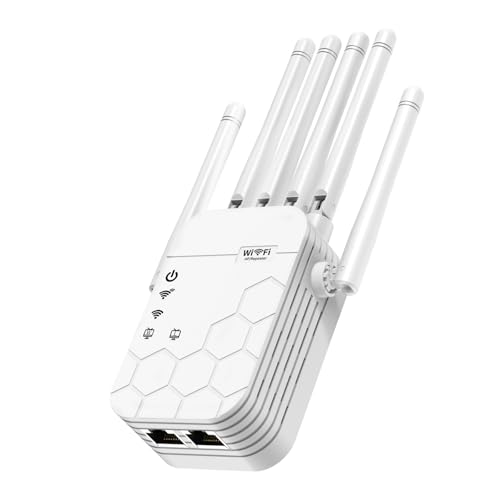
AC1900 Mbps dual‑band extender with six high‑gain antennas and beamforming. Coverage claims reach up to 12,880 sq. ft., which is ideal for larger properties and garages that are far from the router. Supports up to 105 devices and provides a balance of performance and broad reach, suitable for streaming and smart devices in a garage workspace.
GEYILO Dual Band Extender: Flexible Coverage

Dual‑band extender designed to cover up to 12880 sq. ft with reliable connectivity. It highlights 2.4 GHz and 5 GHz bands to support a range of devices, balancing throughput and distance. The product aims to simplify garage networking by providing dependable signal in challenging layouts where thick walls or metal surfaces can interfere with wireless performance.
eero 6 Mesh Extender: Wi‑Fi 6 Coverage

eero 6 mesh extender adds up to 1,500 sq. ft. of Wi‑Fi 6 coverage to an existing eero network. It requires an existing eero network and is managed via the eero app. The setup is designed to be quick, with ongoing management through mobile devices. This option suits users already invested in an eero ecosystem seeking garage coverage with mesh simplicity.
Buying Guide: Key Purchase Considerations
- Coverage area: If your garage is far from the main router, prioritize extenders advertising large square footage coverage or dual‑band with strong antennas. For multi‑story homes, consider models that advertise multi‑room reach or EasyMesh compatibility.
- Speed and devices: Look for extenders offering combined bandwidth of 1.2–2.4 Gbps and support for dozens of devices simultaneously. Dual‑band is common; Wi‑Fi 6 options deliver more efficient performance in dense environments.
- Ethernet port: A wired Ethernet port is valuable for a garage workstation, camera, or smart hub. Check if the port supports Gigabit Ethernet for low‑latency connections.
- Security and updates: Choose devices with vendor commitments to security patches and regular firmware updates. Secure‑by‑Design features help protect home networks.
- Ease of setup: USB/app‑based setup and guided installation reduce complexity. Mesh‑enabled extenders can simplify growing networks across multiple rooms and the garage.
- Compatibility: If you already use a mesh system (like eero) or a specific brand, confirm compatibility to maximize performance and minimize conflicts.
- Placement: For best results, place extenders halfway between the router and the garage, avoiding metal obstacles and big appliances that could create interference.
All options listed aim to provide reliable garage coverage without requiring extensive networking knowledge. When selecting, consider whether you prefer a standalone extender, a device compatible with an existing mesh system, or a high‑speed Wi‑Fi 6 model for future proofing. The right choice balances budget, coverage needs, and the number of devices connected in the garage area.