Finding a reliable wireless storage solution that works seamlessly with a Mac can be challenging. This guide highlights five drives that balance wireless access, cross-device compatibility, and simple backup options. Each option is evaluated for Mac usability, network features, and data security, helping you choose a portable or home NAS drive that fits your workflow.
The table below summarizes the selected products to help you compare at a glance.
| Product | Brand | Key Wireless / Cloud Feature | Capacity |
|---|---|---|---|
| SSK 2TB Portable NAS External Wireless Hard Drive | SSK | Own Wi-Fi hotspot, remote access, P2P transmission | 2TB |
| Seagate Portable 2TB External Hard Drive | Seagate | USB 3.0, plug-and-play for PC/Mac | 2TB |
| SSK 1TB Personal Cloud External Wireless Hard Drive | SSK | Wireless access, remote management, one-click backup | 1TB |
| SSK 4TB Personal Cloud NAS | SSK | NAS and DAS modes, Ethernet/USB interfaces | 4TB |
| Seagate Portable 5TB External Hard Drive | Seagate | USB 3.0, cross-platform compatibility | 5TB |
SSK 2TB Portable NAS: Wireless Cloud On The Go
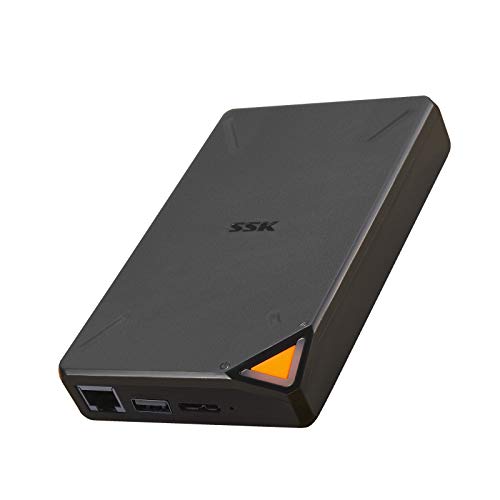
The SSK 2TB model offers an independent Wi-Fi hotspot and a personal cloud, enabling remote access from PCs, tablets, or smartphones without geographic limitations. It supports Point-to-Point confidential transmission to enhance data security and allows multi-user sharing within a LAN. The device is portable enough to fit in a pocket, making it suitable for travel or on-site work. The accompanying Smart App for iOS and Android provides one-click backup and easy remote management, with options to separate Private and Public Areas for data privacy.
Seagate Portable 2TB External Drive

This 2TB Seagate portable drive is designed for Windows or Mac use with USB 3.0 connectivity. It simplifies backups via drag-and-drop and requires no software for setup—just connect to a computer, and the drive is automatically recognized. It is a practical, travel-friendly option for Mac users needing dependable external storage with straightforward cross-platform compatibility.
SSK 1TB Personal Cloud: Wireless Travel Companion
The 1TB SSK personal cloud provides high-speed wireless transmission up to 300Mbps, enabling remote access and management via PC or mobile devices. It supports multiple user sharing and enables cross-device LAN interconnectivity through Samba and DLNA protocols. The drive can be divided into Private and Public Areas to enhance privacy, and its app supports one-click backup across phones, tablets, and computers, making it a compact option for Mac users who value mobility.
SSK 4TB Personal Cloud NAS: Home Networking Power

Designed as a home NAS with both NAS and DAS modes, this 4TB SSK model supports remote access over the internet and centralizes data through client software that works across iOS, Android, Windows, and Mac. It includes a 1000 Mbps Ethernet port for NAS mode and a USB 3.0 interface for DAS mode, offering flexibility for large file transfers. The device emphasizes data security with confidential P2P transmission and cross‑device compatibility for shared media across smart TVs, laptops, and mobile devices.
Seagate Portable 5TB External Drive

With 5TB of storage, this Seagate portable drive is built for cross-platform use with Windows or Mac computers. It emphasizes simple, drag-and-drop backups and quick setup via USB 3.0, making it a solid option for Mac users who need substantial local storage without wireless networking. The drive is plug-and-play and designed for reliable, on-the-go data expansion for multimedia libraries or work files.
Buying Guide: Key Purchase Considerations
- Wireless vs. wired access: If you need true wireless access, prioritize drives with built-in Wi‑Fi hotspots or cloud connectivity (e.g., SSK models). Wired-only drives require a computer or NAS networking to access data, which can limit flexibility.
- Capacity and growth: Choose a capacity that fits your current data footprint with room to grow. 2–5TB is common for multimedia backups on Mac, while 4–6TB provides ample future storage for photos, videos, and projects.
- Mac compatibility: Look for USB-C or USB 3.1/3.2 interfaces and OS-specific utilities or apps for easy backup and restore. Some drives offer Time Machine compatibility or native macOS password protection options.
- Security and privacy: Consider devices that offer user-level data separation (Private/Public areas), password protection, encryption, and secure transmission options (P2P, DLNA/Samba support) to safeguard sensitive files.
- Backup workflow: Evaluate whether the device supports scheduled backups, one-click backups from mobile devices, or automatic cloud syncing to a personal cloud. A smart app is beneficial for managing backups across multiple devices.
- Network setup: NAS-based devices provide centralized storage for households or small offices, with options for Ethernet networking and remote access. Portable wireless drives are ideal for travel and single-user scenarios.
- Device ecosystem: If you use smart TVs, laptops, or iOS/Android devices, consider compatibility with DLNA, Samba, and cross-device streaming to simplify media sharing across your home network.
- Security updates and support: Check for ongoing firmware updates and user support resources to address new security vulnerabilities and improve compatibility with macOS updates.