Choosing a reliable voice over IP (VoIP) phone system can transform how a small office communicates. The right IP phones provide clear audio, scalable lines, easy provisioning, and robust features like multiple SIP accounts, HD voice, and integrated Wi-Fi. This guide highlights five solid options tied to popular models and brands, helping you compare hardware capabilities, connectivity, and ease of use. Use the buying guide to weigh factors such as network requirements, power options, display size, and compatibility with cloud or on-premises call platforms. The table below summarizes the chosen products for quick reference.
| Product | Brand | Key Benefit |
|---|---|---|
| Yealink T31P IP Phone | Yealink | Two SIP accounts, compact display, PoE option |
| Grandstream GXP1620 IP Phone | Grandstream | Two lines, two SIP accounts, strong audio |
| Yealink T54W IP Phone | Yealink | 16 accounts, Wi‑Fi, flexible for mid-level workloads |
| Yealink T46U IP Phone | Yealink | HD voice, dual USB, robust features for managers |
| IP Phone Market SIP-T34W | IP Phone Market | VoIP with Wi‑Fi, PoE, multiple accounts |
Yealink T31P IP Phone Overview

The Yealink T31P is a compact IP phone designed for small to medium call volumes. It supports up to two SIP accounts and features a 2.3-inch graphical LCD with backlight for clear on-device information. Its dual-port 10/100 Ethernet switch enables simple network topology, while Power over Ethernet (PoE) support offers convenient cabling. With a straightforward user interface and reliable VoIP performance, it’s suitable for front-desk lines or administrative staff. This model emphasizes essential telephony, cost efficiency, and dependable call quality for busy workdays.
magicJack VOIP Phone Adapter

The magicJack VOIP Phone Adapter provides a flexible solution for unlimited calling without monthly bills. It supports local and long-distance calls across the U.S., Canada, Puerto Rico, and the Virgin Islands, with features like Caller ID, voicemail, call waiting, and conference calling. It’s well-suited for remote workers, home offices, or small teams seeking cost-effective VoIP connectivity. An accompanying mobile app extends calling capabilities beyond the desk, aligning with a blended work-from-anywhere approach.
Grandstream GXP1620 IP Phone
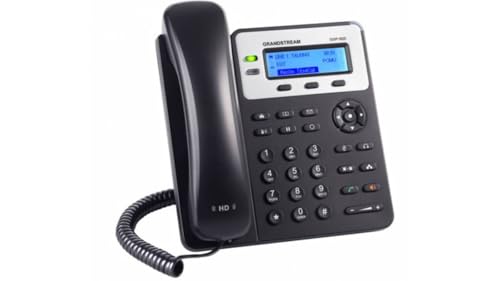
Grandstream’s GXP1620 IP Phone focuses on reliability for small offices requiring two lines and two SIP accounts. It supports HD wideband audio and a three-way conference capability, complemented by a user-friendly interface and XML programmable soft keys. The dual 10/100 Ethernet ports simplify wiring and network segmentation, while the phone’s durable build makes it a practical desk-based option for reception areas or team leads with moderate call loads.
IP Phone Market SIP-T34W WiFi IP Phone

The SIP-T34W by IP Phone Market blends VoIP capability with built-in dual-band Wi‑Fi and PoE support. It supports multiple accounts and offers a color display with a compact form factor. This model is suitable for users who want wireless connectivity on a desk phone or a flexible hybrid office, where power over Ethernet or a separate power adapter remains a consideration for deployment planning.
Yealink T54W IP Phone

The Yealink T54W is a mid-range IP phone designed for professionals with heavier call loads. It supports up to 16 VoIP accounts, a 4.3-inch color display, and built-in Wi‑Fi, enabling flexible work setups. Dual-port Gigabit Ethernet and PoE compatibility simplify office wiring, while USB 2.0 expands compatibility with headsets and peripherals. The T54W is positioned as a robust choice for managers and teams requiring a larger display and broader account support.
Yealink T46U IP Phone

The Yealink T46U targets more intensive desk use with a large 4.3-inch color display, dual USB 2.0 ports, and dual-port Gigabit Ethernet. It supports 16 VoIP accounts, Opus codec, and advanced scheduling via firmware features. The device emphasizes high-quality audio, easy input with a full keyboard, and efficient navigation for executives or teams with significant call activity and integration needs.
Buying Guide: Key Purchase Considerations
- VoIP account capacity: Match the number of SIP accounts to expected call volume and department size. More accounts provide routing flexibility and ease of extension.
- Display and usability: Larger color displays reduce misdialing and improve navigation. Consider backlit LCDs for low-light environments and shortcut keys for common tasks.
- Network and power: Determine whether PoE is available to simplify cabling. If not, ensure a power adapter or USB-powered option is viable.
- Connectivity: Dual Ethernet ports simplify network design and support desk setups. Built-in Wi‑Fi adds flexibility for wireless deployments but may affect power consumption and security considerations.
- Codecs and audio quality: Look for HD voice support and codecs like Opus for clearer calls, especially in busy offices or with remote staff.
- Firmware and ecosystem: Prefer models with regular updates and compatibility with your preferred call platform (cloud-based or on-premises). XML soft keys and programmable features aid customization.
- Security and management: Consider devices with secure provisioning, remote management, and encryption options to protect communications.
- Future-proofing: If you expect growth, select a phone with scalable features, easy provisioning, and smooth integration with your VOIP service provider.