Families often seek tablets that balance entertainment, learning apps, and parental controls. This guide highlights five kid-friendly tablets that suit preteens, emphasizing durable builds, reliable batteries, helpful safety features, and strong compatibility with educational content. Below, you’ll find quick picks, why they fit a 12-year-old’s needs, and how to choose the right model for your child’s goals.
| Product | ||||
|---|---|---|---|---|
| Amazon Fire HD 10 Tablet (Newest) | 10.1″ | 3 GB RAM, 32 GB | Parental controls with Kids profile options | Fast streaming and long battery life |
| Amazon Fire HD 10 Kids Pro (Newest) | 10.1″ | 32 GB | Robust parental controls, Kids space included | Ad-free content with curated kids content |
| COLORROOM Android 16 Tablet 11″ | 11″ | 32 GB + up to 1 TB expand | Google Kids Space supported | Expanded RAM and long-term versatility |
| COLORROOM 2026 Android 15 Tablet (Kids Space) | 10.1″ | 10 GB RAM, 64 GB | Google Kids Space, parental controls | High RAM for multitasking and AI features |
| SVITOO Android Tablet 10″ | 10″ | 20 GB RAM (3 GB + 17 GB), 64 GB | Parental controls via software; not GPS focused | Android 15 experience with expandable storage |
Note: The table above summarizes general attributes to help compare features quickly. Availability and exact specs may vary by seller and region.
Amazon Fire HD 10 Tablet — Newest Model

The Fire HD 10 balances streaming and learning apps with a durable, lightweight design. It features a 10.1″ Full HD display and an octa-core processor, plus 3 GB of RAM to support gaming and reading. With up to 13 hours of battery life and expandable storage options, this tablet suits long study sessions and entertainment alike. The device is designed for seamless media consumption and quick app launches, making it a versatile option for 12-year-olds who multitask between schoolwork and games.
Key features include: 25% faster performance than prior generations, a durable build, and strong viewing quality. Primary considerations include parental controls, app availability, and whether the 32 GB model meets your family’s storage needs or if you’d prefer to add a micro-SD card for extra space.
Amazon Fire HD 10 Kids Pro — Ages 6-12

The Fire HD 10 Kids Pro is designed for younger preteens with robust parental controls and a kid-friendly interface. This model includes 1 year of Amazon Kids+, giving access to a curated library of age-appropriate books, videos, apps, and games. The Amazon Kids Parent Dashboard enables remote control of screen time and content. It also uses ad-free content and updated safety features to help maintain a focused learning environment while still offering entertainment options for downtime.
Considerations include ensuring the subscription continuation after the first year and evaluating whether the included content aligns with your child’s learning goals and interests. The 13-hour battery life supports school days and after-school activities.
Amazon Fire HD 10 Kids Pro — Happy Day Theme

This variant mirrors the Kids Pro ecosystem with a focus on security and parental oversight. It includes the same core benefits as the standard Kids Pro but with a different aesthetic and packaging. The included Kids+ subscription ensures access to ad-free educational content tailored for children. Parents can remotely set time limits and content filters using the Parent Dashboard, aligning device use with family routines and school commitments.
COLORROOM Android 16 Tablet 11″

The COLORROOM 16 tablet delivers a larger 11″ display with a high-capacity RAM option and expandable storage. It runs on a stable Android 16 system with an octa-core CPU, providing smooth multitasking for classrooms, reading apps, and multimedia streaming. Features like a Widevine L1 for streaming and dual speakers support an immersive media experience. Eyes-protection display and automatic brightness help reduce eye strain during long study sessions. Google Kids Space compatibility offers kid-friendly experiences with parental controls tightly integrated via Google’s ecosystem.
Key considerations include ensuring parental control availability, app compatibility, and whether the extra screen real estate justifies the price for a 12-year-old who balances schoolwork with entertainment. Expandable storage up to 1 TB is a plus for multimedia projects and large ebooks.
COLORROOM 2026 Android 15 Tablet — Kids Space
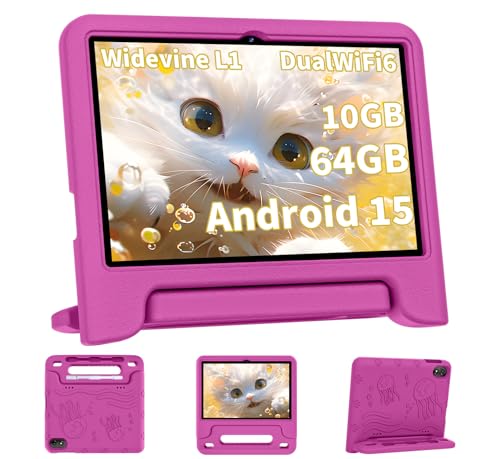
This upgrade emphasizes Android 15 with an 8-core CPU and 10 GB RAM, helping with multitasking and AI-enabled features. The 10.1″ display includes anti-blue-light technology to reduce eye strain during long reading or homework sessions. It comes pre-installed with Google Kids Space, offering age-appropriate learning apps and activities. The tablet also features a robust parental control framework that enables time limits and content filtering to support safe internet use and productive study time.
Data storage includes 64 GB with expandable options, allowing space for school projects, ebooks, and multimedia. For families seeking a high-performance option that still prioritizes child safety and educational content, this model is a strong candidate.
SVITOO Android Tablet 10 Inch
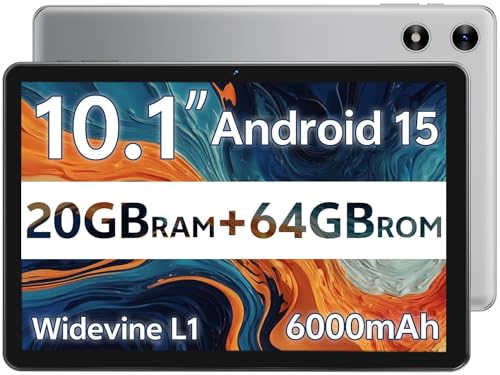
The SVITOO tablet uses Android Go Edition for a lighter system and optimized efficiency. It’s designed to be user-friendly for both kids and adults, with a 10-inch IPS display and dual cameras for simple video calls or projects. The device ships with a protective case and offers a 64 GB internal storage configuration with up to 1 TB expandable storage via microSD card. Android 15 features and robust privacy protections provide a secure online experience suitable for middle-school learning and entertainment.
Before purchasing, evaluate the balance between RAM, storage, and overall performance to ensure the tablet can handle school apps, video conferencing, eBooks, and light gaming without lag. Battery life and parental controls are important considerations for a device used throughout the school week and weekends.
Buying Guide: Key Purchase Considerations For 12-Year-Olds
- Parental controls and safety: Look for devices with built-in parental dashboards or strong family management apps. This helps enforce screen time limits, content filters, and app restrictions.
- Durability and design: A sturdy build, protective case compatibility, and a manageable weight are important for daily use by active preteens.
- Display and eye comfort: A larger, high-resolution display improves readability for homework and reading. Anti-blue light features can reduce eye strain during long sessions.
- Performance: Adequate RAM (3–10 GB) and a capable processor ensure smooth multitasking between school apps, video calls, and entertainment.
- Storage and expandability: Consider models with at least 32 GB internal storage and the option to expand with microSD, especially for storing assignments, ebooks, and offline videos.
- Content ecosystem: If your child uses specific apps or educational services, confirm compatibility and access, including any included subscriptions (such as Kids+ or Google Kids Space).
- Battery life: A long-lasting battery supports school days and after-school activities without frequent recharging.
- Prices and value: For a 12-year-old, prioritize devices that balance learning features with entertainment options, rather than opting for the most powerful model only.
Overall, the best choice depends on your child’s needs: robust safety controls for younger or more active users, larger displays for reading and projects, and easy access to both educational content and age-appropriate entertainment. The products listed here provide diverse options across budget, storage, and parental-control features, helping families tailor a device to fit a 12-year-old’s learning and media habits.