The right stylus can boost productivity on laptops, 2-in-1s, and touch-enabled devices. This guide highlights five reliable stylus options that emphasize precision, versatility, and ease of use across Windows, Android, and iOS ecosystems. Each pick features varied tip types, battery needs, and compatibility so you can choose a model that fits your workflow without fuss.
| Product | Brand | Tip Type / Notes | Primary Benefit |
|---|---|---|---|
| MEKO 3 in 1 Stylus Pens | MEKO | Disc tip plus dual rubber tips (0.18″ & 0.27″) | High sensitivity with 3-in-1 versatility |
| Lenovo Digital Pen 2 | Lenovo | Active tip, 4,096 levels, dual-side buttons | Precise, professional color and drawing control |
| Bopomofo Stylus (5 Pcs) | Bopomofo | Disc tip plus rubber tip, 2-in-1 | Affordable multi-pack with two different touch feels |
| Penyeah 4-in-1 Disc Stylus | Penyeah | Disc tip, mesh fiber tip, and two rubber tips | Versatile tips for drawing, signing, and note-taking |
| Stylus Pens for Touch Screens Power-Display | DOGAIN | Disc tip, magnetic cap, energy display | Battery status visibility and convenient magnetism |
Below are five selected stylus options tailored for laptops and all compatible touch devices. Each entry provides a focused look at how the pen performs in typical tasks like writing, sketching, note-taking, and navigation.
MEKO 3 in 1 Stylus Pens for Touch Screens

The MEKO 3-in-1 stylus builds on a dual rubber-tip design and adds a precise transparent disc tip with a protective cap. It’s designed for everyday tasks—tapping icons, writing notes, sketching, and casual gaming. The flexible 180° writing angle supports comfortable use from various hand positions, reducing strain during long sessions. The two rubber tips (0.18″ and 0.27″) deliver smooth interactions on a wide range of screens, with minimal fingerprinting and no screen scratches. This model is compatible with most capacitive devices and offers a dependable, affordable option for mixed-use environments.
Key specs and suitability:
– 3-in-1 design for writing, drawing, and tapping
– Highly visible disc tip improves target accuracy
– Dual rubber tips for different textures and finger sizes
– No charging required; universally compatible with capacitive screens
Lenovo Digital Pen 2 (Laptop)

Lenovo’s Digital Pen 2 offers an ultra-tactile experience with 4,096 levels of pressure sensitivity and an elastomer pen tip that provides a natural, pen-like feel. Its extended battery life supports prolonged sessions, and two side buttons enable customizable shortcuts for faster navigation. The pen’s frosted all-metal construction provides a premium grip and durability, making it suitable for artists, students, and professionals who rely on precise input for diagrams and handwritten notes on compatible Lenovo and Windows devices.
Highlights include:
– Wide compatibility with Lenovo and other touch-enabled laptops
– Smooth, natural feel with high pressure sensitivity
– Long battery life and easy-to-use side button controls
– Sleek, durable metal build
Bopomofo Stylus (5 Pcs)

This 5-pack from Bopomofo is a versatile, cost-effective option for classrooms or households. It combines a disc tip with a rubber tip, enabling two distinct tactile experiences to suit different apps and screen textures. The metal body is lightweight yet sturdy, designed for comfortable extended use. Since no charging is required, you can share across devices without setup, making it ideal for students and families who frequently switch between iOS and Android devices.
What to consider:
– 2-in-1 tip system for flexible control
– No battery needed; plug-and-use simplicity
– Multi-pack provides options for various hand sizes
Penyeah Stylus Pen, 4 in 1
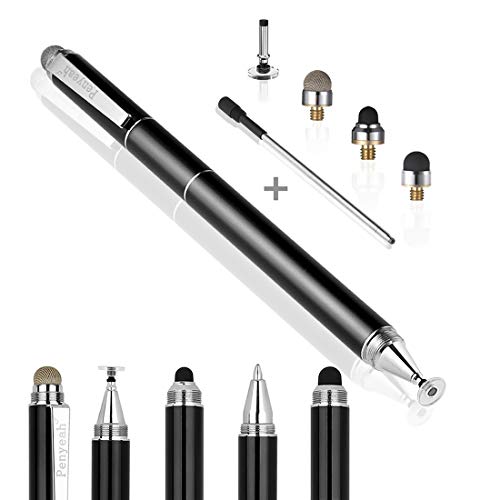
The Penyeah 4-in-1 stylus blends four interchangeable tips with a smooth black ink ballpoint for writing. The disc tip offers a precise drawing experience, while the mesh fiber tip enhances texture and shading. Rubber tips provide general navigation and note-taking across a broad range of devices. It’s universal and battery-free, with a slim, pocket-friendly profile and a metal construction designed for durability and long-term use on tablets, laptops, and phones alike.
Usage notes:
– Four replaceable tips deliver varied drawing and writing feels
– Battery-free and broadly compatible
– Sleek metal build with a pocket clip for portability
Stylus Pens for Touch Screens Universal Fine Point

This universal stylus from JXYHMY emphasizes broad device compatibility and a fine-point feel with magnetic adsorption for easy storage on certain iPad models. It uses a magnetic design to attach securely to the device’s side, helping prevent loss during travel or note-taking sessions. The one-touch switch simplifies power management, and note that some features may vary by device model. It’s particularly suitable for iPad and iPhone users who want a practical, magnet-ready option.
Considerations:
– Magnetic adsorption for quick access
– One-touch on/off for convenience
– Broad compatibility with iOS and Android devices
ChaoQ Stylus Pen for Touchscreen

ChaoQ offers a trio of high-sensitivity styluses designed for consistent performance without Bluetooth or charging. The dual rubber tips provide precise control for writing, drawing, or gaming on iPads, iPhones, Android tablets, and more. The ergonomic aluminum body minimizes fatigue and resists fingerprints. This set is ideal for gamers and students who want dependable input across multiple devices with two tip options for different tasks.
Key points:
– No batteries or pairing required
– Dual-tip for flexible use
– Aluminum body with comfortable grip
Buying Guide: Key Purchase Considerations
Purpose and device ecosystem: If you primarily use Windows-based laptops or surface devices, seek styluses with high pressure sensitivity and palm rejection. For iPad and iPhone users, magnetic adsorption and battery-powered active tips can add convenience for artists and professionals.
Tip variety and precision: Disc tips provide visibility of the contact point and high precision, while rubber tips offer a familiar feel. Some packs include mesh fiber or multiple rubber tips to accommodate different apps and textures.
Power, charging, and pairing: Battery-free options are ready to use but may lack palm-rejection features. Active styluses with Bluetooth pairing can deliver shortcuts and tilt support but require charging and device compatibility checks.
Build quality and ergonomics: A metal or frosted-metal body tends to last longer and feels more premium. Comfort, weight, and grip influence usability during long writing or drawing sessions.
Portability and storage: Magnetic attachments, caps, or pocket clips help keep the stylus secure when not in use. Consider whether you need multiple tips or a compact travel-friendly design.
Pricing and value: Multi-pack stylus sets are cost-effective for families, classrooms, or frequent device changes. Compare tip options, build materials, and compatibility to determine relative value rather than just upfront price.
Intended tasks: If your work involves precise handwriting, fine-line drawing, or diagramming, prioritize higher tip precision and pressure sensitivity. For casual navigation and note-taking, versatility and immediacy may be more important than maximum sensitivity.
Compatibility notes: Always verify device compatibility (tablet, smartphone, or laptop model) and whether a magnetic feature or specific iPad model support is required. Check for any limitations on latency, pressure curves, or palm-rejection features for your workflow.