Finding the right smart TV keyboard can simplify navigation, typing, and media control from your couch. This guide highlights five highly compatible options designed for TV-connected PCs, streaming devices, and smart TVs. Each keyboard combines built-in touchpads, media shortcuts, and wireless ease to enhance your living room setup. Read on to compare features, connectivity, and practical use cases to help you choose the best fit for your entertainment system.
| Product | Brand | Connectivity | Notable Feature |
|---|---|---|---|
| Arteck | Bluetooth | 7-color backlight, built-in touchpad | |
| (Backlit Version) REIIE H9+ Mini Keyboard | reiie | 2.4G USB | 73-key QWERTY, compact with touchpad |
| Arteck 2.4G Wireless Touch TV Keyboard | Arteck | 2.4G USB | Easy setup, long-range wireless |
| Arteck Universal 2.4G Wireless and Bluetooth Touch Keyboard | Arteck | 2.4G + Bluetooth | Multi-device switching, touchpad |
| Fosmon Mini Bluetooth Keyboard | Fosmon | Bluetooth | Compact with touchpad, wide device compatibility |
Arteck Universal Backlit 7-Colors Bluetooth Keyboard

The Arteck Universal Backlit 7-Colors Bluetooth Touch TV Keyboard combines wireless versatility with a built-in touchpad for intuitive control of TV-connected computers and smart TVs. It supports multiple operating systems, including Windows, Mac, Android, iOS, Chrome OS, and more, enabling a seamless experience across devices in a living-room setup. The 7-color backlight is helpful in low-light environments, with two brightness levels and an auto-sleep feature to conserve power. Its media hotkeys simplify play/pause, volume, and navigation without reaching for a remote.
REIIE H9+ Mini Keyboard With Touchpad

The REIIE H9+ Mini Keyboard offers a compact, plug-and-play 2.4GHz wireless solution for PC, Raspberry Pi, Android TV boxes, and smart TVs. With 73 keys and a built-in touchpad, it mirrors a standard keyboard layout while preserving handheld convenience. Users should ensure a USB port is available for the receiver and recharge the battery before initial use, as low power can impact pairing. The white backlight enhances visibility in dim media rooms, aiding navigation with one-handed control on the couch.
Arteck 2.4G Wireless Touch TV Keyboard

This Arteck model emphasizes straightforward wireless setup via a nano USB receiver, connecting to TV-connected computers, smart TVs, or HTPCs. It features a touchpad for cursor control and media keys for quick playback actions. The range extends up to 10 meters, offering couch-to-TV control without the need for a direct line-of-sight. Note that wireless performance can vary with the environment, so placing the USB receiver centrally in the room is recommended for best results.
Arteck Universal 2.4G Wireless and Bluetooth Keyboard
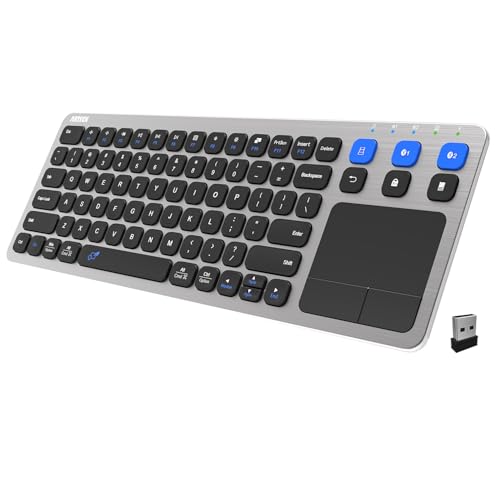
Arteck’s universal model pairs 2.4G wireless and Bluetooth connectivity with a built-in touchpad and media controls. It supports switching among up to three devices (two Bluetooth connections plus a 2.4G receiver) with a single key. This makes it ideal for users who frequently alternate between a TV-connected PC, a tablet, and a smart TV box. A 10-meter wireless range helps maintain a stable connection in larger living rooms, though environmental factors can influence performance.
Fosmon Mini Bluetooth Keyboard With Touchpad

The Fosmon Mini Bluetooth Keyboard emphasizes portability and compatibility with Apple TV, Amazon Fire Stick, PS4/PS5, HTPC, and VR devices. Its compact QWERTY layout includes a touchpad for cursor control, allowing easy navigation without a separate mouse. Bluetooth connectivity broadens device compatibility, while a reliable wireless range of about 33 feet ensures flexible placement. The device’s rechargeable battery supports extended use, and charging is straightforward via USB-C. This model suits travelers or users with multiple streaming devices in a single room.
Buying Guide
- Connectivity options: Consider whether you primarily need Bluetooth, 2.4G USB, or a hybrid setup. Bluetooth enables multi-device pairing, but 2.4G often offers lower latency and more stable connections in crowded Bluetooth environments.
- Built-in touchpad vs. external mouse: A touchpad streamlines navigation on the couch. Some users prefer a separate mouse for precision in apps or web browsing.
- Operating system compatibility: Ensure the keyboard supports your ecosystem (Windows, macOS, Android, iOS, Chrome OS). Some models list broader compatibility that can simplify setup across devices.
- Battery life and charging: Rechargeable options reduce ongoing costs, but check battery life estimates and charging time to fit your usage pattern. Auto-sleep features help conserve power.
- Backlight and visibility: If you watch in dim rooms, a backlit keyboard enhances visibility. Ensure brightness levels suit your lighting and power preferences.
- Size and layout: Mini keyboards are portable but may compromise keys or comfort for long typing sessions. Consider whether you need a full-size layout or a compact option.
- Range and interference: Wireless range up to 33 feet is common, yet walls and electronics can reduce performance. Place the receiver or ensure stable Bluetooth routing for best results.
- Compatibility with TV boxes and streaming devices: If you use devices like Apple TV, Fire TV, or Android TV, verify the keyboard supports them or offers universal compatibility for easy control without a separate remote.
In selecting a smart TV keyboard, balance connectivity, size, and navigation needs. For couch-friendly control with a built-in touchpad, the Arteck and Fosmon lines provide compact, versatile options. If you frequently switch between devices, models offering multiple connections and device switching, such as the Arteck universal variants, can reduce the number of remotes and adapters required. For users prioritizing battery efficiency, rechargeable keyboards with auto-sleep modes deliver longer uninterrupted use between charges.