Keeping your photo library safe while staying flexible on the go is essential. The following portable storage options are designed to back up, transfer, and expand storage across iPhone, iPad, Android, and PCs. Each product in this guide offers multi‑port compatibility, fast transfers, and practical features like one‑tap backup or built‑in encryption, helping you choose the right solution for photos and videos wherever you are. Below, compare five strong picks and how they fit different workflows.
| Product | Key Benefit | Ports & Compatibility |
|---|---|---|
| ROSPE MFi Certified 256GB | All‑in‑one, plug‑and‑play with one‑tap backup | USB, Lightning, Micro USB, Type‑C; iPhone/iPad/Android/PC |
| SUDEHO 256GB MFi 3‑in‑1 | Broad compatibility with straightforward backup | Lightning, USB, USB‑C; iOS, Android, PC/Mac |
| Techkey 256GB 3‑in‑1 | Compact, secure, easy file transfer | USB, Lightning, USB‑C |
| GNASEET 256GB USB Flash Drive | Secure private files with password protection | USB, Lightning, Type‑C (via included adapter) |
| iDiskk 2TB External Hard Drive | Large capacity with auto backup | Lightning/USB/USB‑C compatible via app |
ROSPE MFi Certified 256GB USB Flash Drive
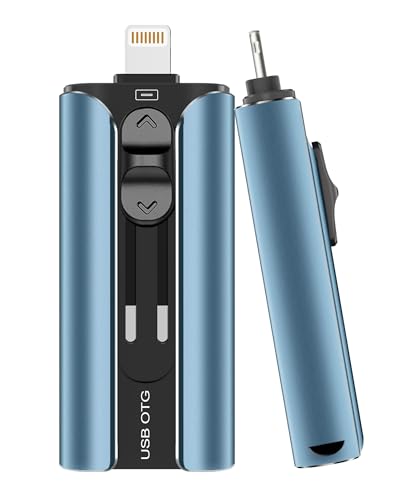
ROSPE’s MFi certified flash drive combines four interfaces—USB, Lightning, Micro USB, and Type‑C—into a single portable stick. The retractable aluminum design protects the connector when not in use, and a keychain attachment aids transport. iPhone users should install the required app, while Android users enable OTG. One‑tap backup lets you save videos, photos, and documents quickly, without copying files manually. This multi‑port solution reduces clutter by replacing multiple cables with one drive that works across devices.
SUDEHO MFi Certified 256GB 3‑in‑1 USB Drive

SUDEHO offers a 256GB, 3‑in‑1 memory stick with Lightning, USB, and USB‑C connectors, plus an included USB adapter. Officially MFi certified, it supports iOS devices with iOS 12.1 and above via the ROSPE app for automated backups. It can also function as a plug‑and‑play drive on Android and PCs. Available in 256GB and 512GB options, this drive enables easy cross‑device transfers and helps manage photo and video backups without internet access.
Techkey 128GB USB 3.0 3‑in‑1 Flash Drive

Techkey’s 128GB 3‑in‑1 drive features USB, Lightning, and USB‑C connectors, supporting iOS devices (iOS 12.1+), OTG Android phones, and PCs/Macs. It is MFi certified and built with robust metal construction for durability. A keychain keeps the device readily accessible, making it suitable for travelers who need quick backups of photos and videos without carrying extra cables.
GNASEET 256GB USB Photo Drive

GNASEET’s 256GB drive emphasizes secure storage with a dedicated password function in the app, ensuring private files stay protected. It supports one‑click backup for photos, videos, and contacts, and offers easy sharing to social platforms. The device is designed for cross‑device use and includes a compatible app to manage backups, adding convenience for users who want to guard personal media while on the move.
iDiskk 2TB External Hard Drive for iPhone & More

The iDiskk 2TB external hard drive provides a higher capacity solution for comprehensive photo libraries. It supports iPhone, iPad, Mac, PC, and Android, with in‑app features for automatic backup and optional password protection. The device emphasizes easy transfer workflows and scalable storage for users who accumulate large volumes of media, making it a practical option for long‑term photo storage alongside mobile backups.
Buying Guide: Key Considerations For Portable Photo Storage
- Compatibility: Look for drives that support your primary devices (iPhone, iPad, Android, PC, Mac). 3‑in‑1 or multi‑port designs simplify cross‑device transfers.
- Backup Method: Prioritize options with one‑tap backup or automatic backup to reduce manual steps and minimize data loss risk.
- Security: Consider drives with password protection or encryption for sensitive files, especially if you plan to store personal photos or work data.
- Capacity vs. Size: Higher capacities (128GB, 256GB, 512GB, 2TB) are great for large collections, but ensure the form factor fits your carrying needs.
- App Dependency: Some drives require companion apps for iOS backups; verify app availability and compatibility with your devices and OS versions.
- Durability: Aluminum bodies, retractable connectors, and keychain attachments improve portability and longevity during travel.
- Price and Value: Weigh price against features like multi‑port access, encryption, and backup speed to determine real value for your use case.
- Data Transfer Speed: USB 3.0 or higher speeds speed up backups; check supported protocols on your devices to maximize performance.
In choosing portable photo storage, align the device with your typical workflow: cross‑device transfers, on‑the‑go backups, or large archive storage. The products listed above cover a range of scenarios—from lightweight, multi‑port pendants to larger, high‑capacity drives—so you can pick a solution that keeps your memories secure and accessible wherever you are.