Choosing an ergonomic mouse can reduce strain on the wrist, forearm, and shoulder, making long workdays more comfortable. This guide highlights five top vertical and ergonomic mice designed to support a neutral hand posture and minimize repetitive-stress issues often linked to carpal tunnel symptoms. Each option is evaluated on grip comfort, DPI adjustability, battery life, and ease of connection, helping you compare without price distractions. Below is a quick product summary to help you decide which model fits your setup.
| Product | Brand | Adjustable DPI | Connectivity | |
|---|---|---|---|---|
| TECKNET Ergonomic Wireless Vertical Mouse | TECKNET | 4800 | 2.4 GHz USB Receiver | Long battery life; natural posture |
| TECKNET 2.4G Ergonomic Vertical Mouse | TECKNET | 800-4800 | 2.4 GHz USB Receiver | 5 DPI levels; Silent clicks |
| POJTK 3-in-1 Ergonomic Mouse | POJTK | 4800 | Bluetooth + USB A + USB C | Flexible cross-device connections |
| Lekvey Vertical Wireless Mouse | Lekvey | 800-1600 | 2.4 GHz USB Receiver | Colorful design with long battery life |
| TECKNET Multi-Mode Ergonomic Mouse | TECKNET | 1200-4800 | 2.4 GHz + Bluetooth | Triple-connectivity for multiple devices |
Use these options to reduce wrist deviation and keep your forearm in a more natural position. The following sections review each product in detail, with objective notes on fit, features, and intended use.
TECKNET Ergonomic Wireless Vertical Mouse

The TECKNET wireless vertical mouse emphasizes a natural wrist and arm position to reduce fatigue during long sessions. Its vertical orientation helps you maintain a comfortable posture, potentially easing shoulder and neck strain. A 600 mAh battery supports rapid charging via USB-C, with a runtime of up to about two months per charge under typical use. Connectivity uses 2.4 GHz with a reliable 10-meter range and a plug-and-play nano USB receiver that requires no drivers. Ideal for office work, home setups, and remote work environments seeking steady performance and ergonomic benefit.
TECKNET 2.4G Ergonomic Vertical Mouse

This model delivers five adjustable DPI settings (ranging up to 4800) for precise tracking across different surfaces, with a primary focus on a comfortable vertical grip. Its quiet-click design reduces noise by over 90%, which can be beneficial in shared workspaces. The vertical form factor helps align the forearm and wrist to minimize strain, making it suitable for users who perform repetitive mouse actions throughout the day. A compact 2.4 GHz connection ensures stable performance without frequent pairing issues.
POJTK Ergonomic Wireless 3-in-1 Mouse

POJTK offers a versatile vertical ergonomic design with a 58-degree desk angle intended to support a natural handshake posture. It supports three connection methods, including Bluetooth, USB-A, and USB-C, enabling seamless transitions between devices without constant dongle swapping. Five DPI levels reach up to 4800 for sensitive control, and the device emphasizes smoother movement and reduced wrist stress. The 2.4 GHz USB option ensures quick setup for devices with USB ports, while Bluetooth is ideal for devices without USB accessories.
Lekvey Ergonomic Vertical Wireless Mouse
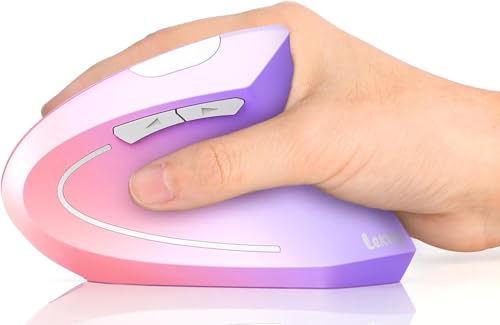
Lekvey’s vertical wireless mouse emphasizes a natural handshake grip with a slender profile and a rechargeable battery. It supports up to 150 hours of usage on a full charge and includes a Type-C charging cable. The device features 800/1200/1600 DPI levels for variable sensitivity and quiet-click buttons to maintain focus in quiet environments. A compact USB receiver plugs in quickly, delivering a straightforward plug-and-play experience for everyday tasks, browsing, and design work.
TECKNET Ergonomic Mouse Multi-Mode

This TECKNET model combines vertical ergonomics with versatile connectivity options: 2.4 GHz wireless plus Bluetooth. It supports six DPI levels (up to 4800) to adapt to different work surfaces and tasks. The device emphasizes energy efficiency with a rechargeable battery and auto-sleep features to conserve power. The multi-device capability is especially useful for users who switch between a laptop, tablet, and desktop, helping to reduce wrist strain across devices.
Buying Guide: Key Purchase Considerations And Comparisons
- Ergonomic design and grip: Look for a vertical or handshake-style controller that keeps the wrist in a neutral position. A higher angle can reduce forearm pronation and finger fatigue on long sessions.
- DPI range and customization: Wider DPI options (e.g., 800–4800) let you tailor sensitivity for precise tasks like design work or general navigation, potentially reducing unnecessary wrist movements.
- Connection method: USB receivers offer plug-and-play simplicity, while Bluetooth or multi-mode options provide versatility across devices. Consider how often you switch devices and available ports on each device.
- Battery life and charging: Rechargeable models with fast charging save downtime. Check whether a Type-C port is included and expected standby times to estimate daily use.
- Noise and click feel: Quiet-click designs can minimize distraction in shared spaces. If you need tactile feedback for precise clicking, test the click resistance and travel.
- Build quality and materials: Look for durable shells, a comfortable palm rest, and a scroll wheel designed for long-term use. Memory foam wrist rests can enhance comfort but may add bulk.
- Usage scenarios: Office work, design tasks, and travel all benefit from different weights, sizes, and port compatibilities. If you travel often, consider a lighter, more compact option with solid battery life.
- Compatibility: Ensure the device supports your operating system (Windows, macOS, or Chrome OS) and any required software for advanced customization.
In summary, selecting an ergonomic mouse with a vertical design, adequate DPI options, and reliable connectivity can help minimize carpal tunnel symptoms and improve daily comfort. Each model above offers a distinct balance of features, so users can weigh grip style, device compatibility, and battery strategy against personal work habits.