Choosing a modem router combo that supports DOCSIS 3.1 and WiFi 6 can unlock reliable performance for households using connections up to 500 Mbps and beyond. This guide highlights five compatible options, compares key features, and explains what to consider when selecting a device that fits your internet plan, home size, and device load.
Summary of Selected Products
| Product | Key Feature | WiFi Standard | Max Ethernet Ports |
|---|---|---|---|
| NETGEAR Nighthawk CAX30 | WiFi 6 AX2700, 2,000 sq ft coverage | WiFi 6 (AX2700) | 4 x 1 Gigabit, 1 USB 3.0 |
| Arris G18 | DOCSIS 3.1, AX1800, broad compatibility | WiFi 6 | Dual-band (internal) |
| NETGEAR C7000 | DOCSIS 3.0, AC1900, rental savings | WiFi 5 (AC1900) | 4 x 1 Gigabit |
| Motorola MG8702 | DOCSIS 3.1 with AC3200 router | WiFi 5/AC3200 enhancements | Integrated router, USB options |
| NETGEAR Nighthawk AX2700 (CAX30 Renewed) | AX2700, broad provider compatibility | WiFi 6 | 4 x 1 Gigabit, 1 USB 3.0 |
NETGEAR Nighthawk Modem Router Combo CAX30

The NETGEAR Nighthawk CAX30 combines a DOCSIS 3.1 cable modem with a WiFi 6 router. It covers large homes up to 2,000 square feet and supports up to 25 simultaneous devices. The AX2700 wireless speed and four 1-Gig Ethernet ports (with support for port aggregation) make it suitable for streaming, gaming, and smart-home networks. It includes a USB 3.0 port for external storage or printers. Compatibility extends to major cable providers such as Xfinity, Spectrum, and Cox, while avoiding bundled voice services.
NETGEAR Nighthawk Cable Modem and WiFi 5 Router Combo C7000

The C7000 provides DOCSIS 3.0 with an AC1900 WiFi router built in, ideal for cable plans around 800 Mbps. It replaces separate modems and routers and can help reduce rental costs. Note that it is not compatible with several providers and bundled voice services, so verify your service plan before purchase. It is designed to cover medium homes and supports multiple devices with stable WiFi connectivity.
Arris G18 Cable Modem Router Combo

The Arris G18 delivers DOCSIS 3.1 with AX1800 performance and strong Wi-Fi 6 coverage. This combo supports high-speed streaming, gaming, and everyday browsing, backed by a well-known brand used in millions of homes. It is suitable for households that demand fast, reliable wired and wireless connectivity across multiple devices, with secure, modern networking features included in the AX1800 class.
Motorola MG8702 DOCSIS 3.1 Modem + Wi-Fi Router
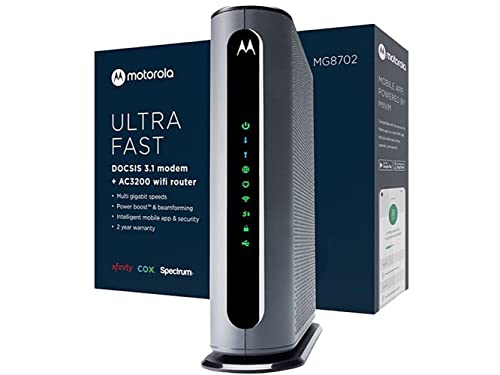
The Motorola MG8702 combines a DOCSIS 3.1 modem with an integrated high-speed AC3200 Wi-Fi router featuring Power Boost, Range Boost, and AnyBeam WiFi beamforming. This setup is designed for households seeking high throughput for streaming and gaming while potentially lowering rental costs. It supports Comcast Xfinity, Cox, and Charter Spectrum among major providers and emphasizes future-proof performance for growing home networks.
NETGEAR Nighthawk AX2700 (Renewed) CAX30

This renewed NETGEAR Nighthawk AX2700 CAX30 offers WiFi 6 with broad compatibility for major cable providers and coverage for large homes. It features four gigabit Ethernet ports, a USB 3.0 port, and robust concurrent device support. Renewed items provide a balance between modern features and value, suitable for users who want current technology at a lower upfront cost, while still delivering strong network performance for 500 Mbps plans and beyond.
Buying Guide
- <strong DOCSIS technology: For speeds around 500 Mbps, prioritize DOCSIS 3.1 modems for future-proofing and better efficiency, though DOCSIS 3.0 can still be viable if your plan is well below 1 Gbps.
- WiFi standard and coverage: WiFi 6 (802.11ax) offers better performance in crowded homes. Consider the coverage area and device density; larger homes may benefit from higher-gain antennas or extended coverage.
- Ethernet ports and features: Look for at least 4 Gigabit Ethernet ports and USB options if you plan to connect network storage, printers, or gaming consoles via wired connections. Port aggregation can help in some models.
- Provider compatibility: Confirm support for your service provider and avoid bundles that include voice services you don’t use. Some routers work with multiple major providers; others are more restricted.
- Rental savings versus upfront cost: Evaluate the long-term savings of owning a modem-router versus renting. Many models pay for themselves within a year or two depending on rental rates from your provider.
- Network load considerations: If you have many smart devices, streaming in 4K, or online gaming, prioritize devices with robust MU-MIMO support and reliable beamforming to maintain performance.
- Aesthetic and placement: Place the unit centrally to maximize coverage and minimize interference from walls or other electronics. Ensure proper ventilation to avoid overheating.
- Future-proofing: While a device may be labeled for 500 Mbps or more, service plans and provider upgrades can change. A DOCSIS 3.1 and WiFi 6 combo generally remains relevant for several years.
- <strongChoosing the right model: If you have a smaller home or fewer devices, a WiFi 5 or mid-range WiFi 6 device may suffice. For larger homes or dense device environments, lean toward WiFi 6 with better range and multiple Ethernet ports.
- <strongPlacement and optimization: Enable QoS where available for gaming or video calls, update firmware regularly, and secure the network with a strong password and WPA3 where possible.
- <strongSupport and renewals: Consider brands with robust customer support and clear warranty terms, particularly for renewed devices, to ensure reliability and timely replacements if needed.