Choosing the right modem for Cox Gigablast ensures you get the full 1 Gbps and beyond that the plan promises. The following modems are DOCSIS 3.1 and compatible with Cox, Comcast Xfinity, Spectrum, and other major providers. This guide highlights strong performers, straightforward setups, and reliable connectivity for households with multiple devices, gaming, and 4K streaming. Each option focuses on gigabit-ready performance without built-in Wi-Fi, so you can pair with your preferred router for maximum speed.
Summary of selected products
| Product | Brand | Key Feature |
|---|---|---|
| ARRIS SB8200 (Renewed) | ARRIS | DOCSIS 3.1, 1 Gbps max, 4 OFDM channels |
| Motorola MB8611 | Motorola | 2.5 Gbps Ethernet, DOCSIS 3.1 |
| ARRIS S34 | ARRIS | Multi-Gigabit DOCSIS 3.1, 2.5 Gbps |
| Hitron CODA56 | Hitron | 2.5 Gbps Ethernet, DOCSIS 3.1 |
| NETGEAR Nighthawk CAX30 | NETGEAR | WiFi 6 with AX2700, DOCSIS 3.1 |
ARRIS SB8200 Cable Modem (DOCSIS 3.1) — 1 Gbps Max

The ARRIS SURFboard SB8200 is a DOCSIS 3.1 cable modem designed for high-speed internet. It supports speeds up to 1 Gbps and is certified for multiple major providers, including Cox, Xfinity, and Spectrum. This model is built without a built-in wireless router or telephone capability, focusing on reliable modem performance. Installation is straightforward with cable service activation and pairing with a compatible router.
Key features include DOCSIS 3.1 technology, improved security, and low latency. Savings come from owning the modem vs renting, potentially reducing ongoing rental costs. The SB8200 is widely used for multi-device homes needing consistent gigabit performance. Ideal for gamers and 4K streaming when paired with a capable router.
Motorola MB8611 DOCSIS 3.1 Modem
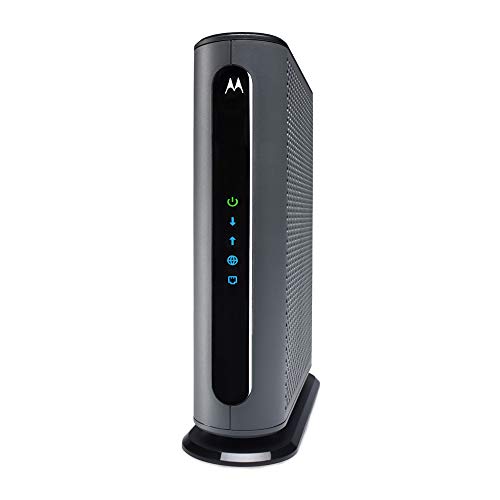
Motorola MB8611 pairs with any WiFi router to deliver true Gigabit-plus speeds via a 2.5 Gbps Ethernet port. It is approved for major providers including Cox Gigablast, Spectrum, and Comcast Xfinity, and remains backward compatible with DOCSIS 3.0. This modem is a solid choice for users who want high performance while using an existing router or a future WiFi 6/6E upgrade. It does not include a built-in wifi router or voice service.
With DOCSIS 3.1, users gain reduced latency and faster download speeds, making it suitable for gaming, streaming, and heavy network usage. The 2.5 Gbps port is a significant advantage for new router setups that can leverage multi-gig speeds, though actual speeds depend on service plan and network congestion.
ARRIS S34 Cable Modem — 2.5 Gbps DOCSIS 3.1

The ARRIS S34 is a fast DOCSIS 3.1 modem designed for multi-gigabit plans. It supports up to 2.5 Gbps and is certified with major providers like Xfinity, Cox, and Spectrum. As a modem-only device, it must be paired with a separate router for full home networking capability. Its setup emphasizes quick activation and reliable gigabit performance for households with multiple devices and high-bandwidth needs.
Its strong security and latency improvements with DOCSIS 3.1 make it a compelling option for gaming and streaming. Performance varies by plan and network conditions, so pairing with a capable router is recommended to maximize speed potential.
Hitron CODA56 Multi-Gigabit DOCSIS 3.1 Modem

Hitron CODA56 is designed for cable internet plans up to 2.5 Gbps and is certified with Xfinity, Charter Spectrum, and Cox. This modem-only device emphasizes a robust Ethernet interface (2.5 Gbps) to take advantage of high-speed routers or mesh systems. It requires a separate WiFi router to provide wireless coverage across the home.
Designed for speed and reliability, CODA56 is a practical choice for households that want to push gigabit-level performance with a modern router setup. Before purchasing, confirm your service plan supports the peak speeds and that your router can handle multi-gig throughput.
NETGEAR Nighthawk CAX30 — WiFi 6 Cable Modem Router Combo

NETGEAR Nighthawk CAX30 is a DOCSIS 3.1 modem-router combo with WiFi 6 (AX2700). It supports plans up to 2 Gbps and is certified with providers such as Xfinity, Spectrum, and Cox. This all-in-one device simplifies setup and can handle large households with many devices thanks to WiFi 6 efficiency and multiple Ethernet ports. It replaces separate modem and router solutions for some users, though some may prefer a dedicated modem paired with a high-performance router.
Considerations include coverage area (up to 2,500 sq. ft. in this model), device capacity, and the potential need for future-proofing with emerging speeds. The integrated solution offers convenience but may limit customization compared to a separate modem and router pairing.
Buying Guide: Key Considerations for Cox Gigablast and Similar Plans
- DOCSIS standard: Ensure the modem supports DOCSIS 3.1 to handle gigabit-plus speeds and lower latency on Cox Gigablast.
- Router pairing: If you need wireless coverage, decide between a modem-router combo and a separate router. Separate devices can offer more customization and future upgrades.
- Ethernet speed: A multi-gigabit Ethernet port (2.5 Gbps) is valuable when pairing with a high-speed router or mesh system and supports peak plan performance.
- Activation compatibility: Check that the modem is approved for Cox, Xfinity, Spectrum, and other providers in your area to avoid activation issues.
- Future-proofing: Consider models with proven performance, robust firmware support, and compatibility with newer WiFi standards (e.g., WiFi 6/6E) if you plan to upgrade your router soon.
- Budget vs. savings: Owning a modem can save rental fees over time, but upfront costs vary. Compare long-term savings against the initial purchase price.
- Warranty and renewal status: Renewed models can offer value but check warranty coverage and return options if performance doesn’t meet expectations.
Overall, the options above provide a range of choices for Cox Gigablast users. For maximum speed and flexibility, consider models with a 2.5 Gbps Ethernet port or a high-end WiFi 6 router to complement a DOCSIS 3.1 modem. If you prefer all-in-one simplicity, a WiFi 6 modem-router combination can be suitable, provided it meets your coverage needs and device density. Always confirm your specific plan’s speed tiers and provider compatibility before purchase.