The demand for compact, high-speed wireless cards has grown as more devices rely on fast, stable Wi‑Fi connections. This guide highlights top mini PCIe WiFi cards compatible with Windows, Linux, and various mini PC setups. Each option prioritizes performance, multi‑band support, and ease of installation, helping you choose the right card for upgrading an older laptop or a compact desktop build.
| Product | Brand | Key Benefit |
|---|---|---|
| Waveshare Wireless MINIPCIE AX210 NIC | waveshare | Wi‑Fi 6E tri‑band with Bluetooth 5.3 |
| WiFi 6 Card MPE-AX3000H | REKONG | Ultra‑fast speeds with OFDMA/MU‑MIMO |
| AX210HMW WiFi Card | EDUP | Tri‑band 6E with Bluetooth 5.3 |
| Intel 7260.HMW Dual Band Wireless‑AC | Intel | Reliable dual‑band AC performance |
| MQUPIN Dual Band Wirless 7260.HMW | MQUPIN | Broad compatibility with mini PCIe |
Note: Each card requires a compatible mini PCIe slot and appropriate driver support. Compatibility can vary by device model and motherboard BIOS settings. The listed features reflect the manufacturer descriptions and typical use cases for mini PCIe upgrades.
Waveshare AX210 MINIPCIE: Wi‑Fi 6E In A Small Form
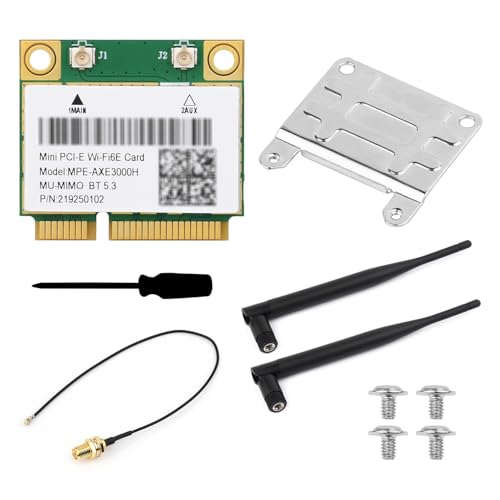
The Waveshare MINIPCIE AX210 NIC supports the latest Wi‑Fi 6E standard (802.11ax) with up to 2400 Mbps on 5 GHz and 6 GHz bands, delivering faster, more stable connections in congested networks. It offers tri‑band connectivity (2.4 GHz, 5 GHz, 6 GHz) and Bluetooth 5.3 for broader peripheral compatibility. This card is designed for mini PCIe slots and is a suitable upgrade for compact PCs and compatible laptops seeking PCIe-based wireless improvements.
WiFi 6 Card MPE-AX3000H: Dual‑Band With BT 5.2

The MPE‑AX3000H from REKONG delivers ultra‑fast Wi‑Fi 6 speeds up to 2.4 Gbps on 5 GHz and 574 Mbps on 2.4 GHz. It leverages OFDMA and MU‑MIMO to efficiently manage multiple devices, reducing lag in busy networks. Built‑in Bluetooth 5.2 expands peripheral connectivity for headphones, keyboards, and other devices, making it a strong choice for gaming and streaming on a compact system.
AX210HMW: Wi‑Fi 6E Card With Bluetooth 5.3

The AX210HMW is a Wi‑Fi 6E module featuring tri‑band support (2.4 GHz, 5 GHz, 6 GHz) and Bluetooth 5.3. It uses a mini PCIe interface, making it accessible for many laptops and small PCs. The card targets users seeking a straightforward upgrade path to 6E‑capable wireless networking with modern Bluetooth integration for peripherals and IoT devices.
Intel 7260.HMW Dual Band Wireless‑AC

The Intel 7260.HMW offers reliable dual‑band Wireless‑AC performance with support for 802.11ac standards. It is compatible with a wide range of devices and is well-regarded for stable connections and broad driver support. This card is a classic option for upgrading older laptops or mini PCs where a proven, widely supported solution is preferred.
MQUPIN 7260.HMW Dual Band Wireless Card

The MQUPIN 7260.HMW card concentrates on half‑mini PCIe compatibility with dual‑band 802.11ac and Bluetooth 4.0. It suits users who need a budget‑friendly upgrade path for compatible notebooks and mini PCs, while offering integrated Bluetooth for peripheral connections. Users should verify motherboard USB bus and BIOS support to ensure Bluetooth functionality is active.
Buying Guide
- Form factor compatibility: Confirm your device has a mini PCIe slot and that the card’s size and connector align with your motherboard or laptop model. Some older laptops may require BIOS settings adjustments.
- Wi‑Fi standard and bands: If you need the latest speeds and lower latency, prioritize Wi‑Fi 6E cards (6 GHz support). For general upgrades, Wi‑Fi 6 (AX) or Wireless‑AC can still deliver strong performance.
- Bluetooth integration: Check whether Bluetooth is included (5.2 or 5.3 is common) and whether it supports the peripherals you use (headphones, mice, keyboards, etc.).
- Driver and OS support: Ensure drivers are available for your operating system (Windows 10/11, Linux). Some cards have broad driver support, while others may require vendor‑specific installers.
- Multi‑device performance: Features like OFDMA and MU‑MIMO help manage multiple devices on the same network, reducing lag in busy homes or offices.
- Interference and channel width: Cards offering 160 MHz channels (where supported) can leverage wider bandwidth for higher data rates, especially on 5 GHz and 6 GHz bands.
- Upgrade scope: Mini PCIe cards are typically used in laptops and small form factor PCs. For desktops, a PCIe x1/x16 adapter may be needed if the motherboard lacks a dedicated mini PCIe slot.
- Driver sources and support: Prefer vendors with explicit Linux and Windows driver notes if you run a Linux workstation or dual‑boot setup.
When choosing, balance the desired wireless speed with compatibility and ease of installation. For users upgrading aging laptops, a Wi‑Fi 6E option can provide meaningful gains in crowded networks. For compact desktops or mini PCs, select a card that ships with clear installation guides and reliable driver support to minimize setup time.