The right audio setup helps teams communicate more effectively during virtual meetings. This article highlights five standout products that optimize voice pickup, reduce background noise, and deliver clear sound for Microsoft Teams and similar platforms. Each pick is evaluated on ease of use, audio quality, compatibility, and practical features for everyday meetings.
Summary of chosen products:
- Logitech for Creators Blue Microphones Yeti USB Microphone (Blackout) — Pattern selection, instant mute, real-time monitoring
- Microsoft Modern USB-C Speaker — Teams-certified, two-way compact stereo speaker
- AIRHUG Conference Speaker and Microphone — 360° pickup, plug & play, advanced noise reduction
- FIFINE USB Microphone K669S — Plug & play, gain control, easy on-desk placement
- Jabra Speak 510 MS Wireless Bluetooth Speakerphone — Portable, versatile, certified for Teams
Logitech For Creators Yeti USB Microphone

The Yeti USB microphone offers multiple pickup patterns and studio-level controls, making it a flexible option for teams that alternate between speaking, podcast-style updates, or one-on-one conversations in a meeting. It includes headphone monitoring via a 3.5mm jack to hear your own voice with zero-latency feedback, which helps prevent over- or under-speaking during calls. The built-in gain control and mute switch place essential audio management at your fingertips, reducing interruptions during meetings. This microphone is well-suited for desks where participants need clear, broadcast-quality voice capture without complex setup.
Microsoft Modern USB-C Speaker for Teams
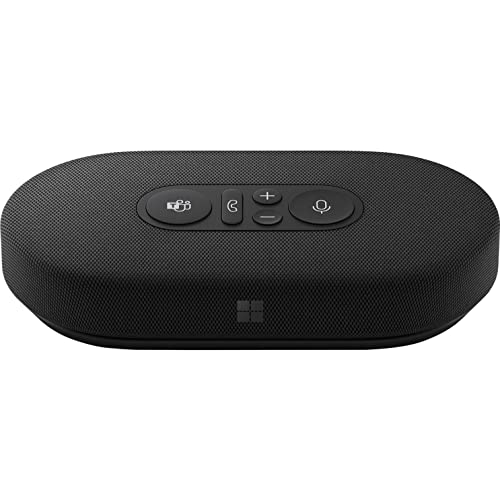
This compact stereo speaker is designed with Teams in mind and includes voice-oriented microphoning for better call clarity. It’s ideal for users who want a dedicated speaker solution on their desk rather than relying on a laptop’s built-in audio. The device emphasizes a clean, balanced sound profile that supports both calls and occasional background music or media during presentations. USB-C connectivity ensures quick, reliable setup for Windows and other systems, with simple call controls for muffled noise and interruptions.
AIRHUG Conference Speaker and Microphone

The AIRHUG device combines a Bluetooth speakerphone with a 360° voice pickup array, designed for rooms with multiple participants. It supports plug-and-play use via USB-C and Bluetooth, and claims improved noise reduction for clearer voices in mid-sized meetings. The product is positioned for quick deployment in conference spaces or smaller huddle rooms, with flexible connectivity that accommodates various operating systems. It’s suitable for teams needing a single, portable solution to enhance both audio input and output during collaborative sessions.
FIFINE USB Microphone K669S

The FIFINE K669S focuses on straightforward, plug-and-play usability and solid audio quality for virtual meetings. Its metal construction provides durability on a busy desk, and the front-facing gain knob makes it easy to adjust pickup levels without accessing software. This mic is designed for Zoom, Teams, and other platforms, delivering clearer voice capture with less noise specifically in a home or small office setting. It’s a practical choice for everyday meetings where reliability and space efficiency matter.
Jabra Speak 510 MS Wireless Speakerphone
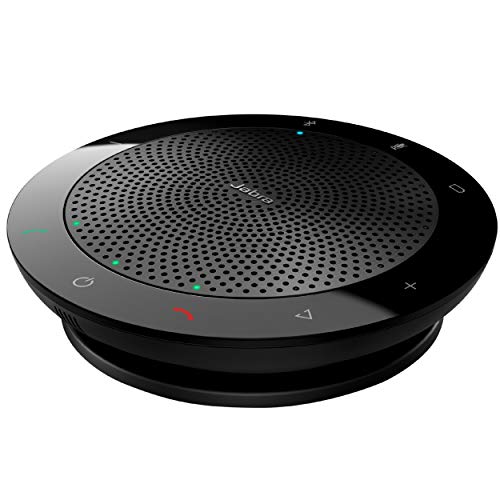
The Jabra Speak 510 MS is a portable conference speakerphone with Bluetooth and USB connectivity, certified for Microsoft Teams. It excels in delivering clear, intelligible audio for mid-sized meetings and supports easy, quick setup with minimal desk clutter. Its flexible connection options—USB or Bluetooth—make it a versatile choice for teams that toggle between laptops, tablets, and smartphones. The unit’s compact design supports travel or office use, maintaining reliable mic pickup and room-filling sound.
Buying Guide: Key Purchase Considerations
- Compatibility: Ensure the device supports your primary meeting platform (e.g., Microsoft Teams) and your operating system (Windows, macOS, etc.).
- Pickup Pattern and Coverage: For desk use, cardioid mics reduce background noise by focusing on the speaker; for small meeting rooms, 360° pickup devices can capture multiple voices.
- Ease of Use: Look for plug-and-play devices with intuitive controls (mute, gain, call answer) to minimize fiddling during meetings.
- Audio Output: If using a separate speaker, confirm compatibility and volume range to avoid feedback or distortion during calls.
- Portability: For remote or hybrid teams, consider USB-C or wireless options that travel well and are quick to deploy in new environments.
- Noise Reduction: Devices with built-in noise suppression or echo cancellation can dramatically improve clarity in busy offices or home environments.
- Durability and Build Quality: Metal housings and solid construction prevent damage from daily transport or desk use.
- Price-to-Performance: Balance features with cost, prioritizing essential functions like mute, gain control, and reliable connectivity.
The selection above covers a range of scenarios from compact desk setups to portable conference rooms. Users should evaluate their meeting size, room acoustics, and whether they require primarily input (microphone) or combined input/output (speakerphone) capabilities. Integrating any of these devices with Teams can improve the reliability and clarity of virtual discussions, feedback loops, and decision-making processes in a distributed workforce.