Finding convenient adapters that bridge older Micro USB devices with newer USB-C gear can save time and money. This guide highlights practical Micro USB to USB-C adapters, focusing on reliability, build quality, and data transfer capabilities. Each pick below expands your flexibility whether you’re at home, in the office, or on the go. A quick product summary table follows to help you compare key details at a glance.
| Product | Brand | Key Benefit |
|---|---|---|
| Adapter Micro USB to USB C (4 Pack) | Mepsies | OTG support; multi-pack for multiple locations |
| JXMOX USB C to Micro USB Adapter (4-Pack) | JXMOX | Charge and data sync; simple plug-and-play |
| 4 Pack Micro USB to USB C Adapter | Vanjua | Broad compatibility; durable build |
| QianLink Micro USB to USB C Adapter (8-Pack) | QianLink | Wide device compatibility; USB 2.0 data speeds |
| ULIFTUS USB-C to Micro USB Adapter (3-Pack) | ULIFTUS | Aluminum shell; durable and compact |
Note: The following sections summarize five carefully chosen adapters that align with typical user needs such as charging, data transfer, and compatibility across popular brands and devices.
Mepsies Micro USB to USB-C OTG Adapter (4 Pack)
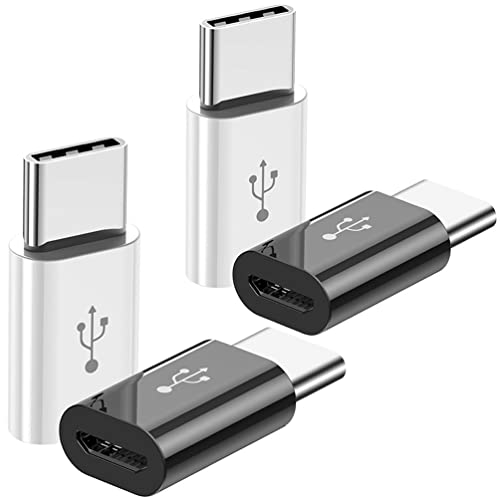
Mepsies offers a convenient 4-pack that converts Micro USB cables to USB-C male connectors. The adapter supports USB OTG, facilitating data transfer and device peripheral usage with USB-C devices. Its dual color set (two black, two white) helps you designate adapters for different locations. The build is designed to endure repeated plugging and unplugging, making it a practical choice for daily use with Samsung Galaxy, LG, Huawei, and other USB-C devices.
Key features
- Micro USB 2.0 to USB 3.1 Type-C compatibility
- OTG support for data transfer
- Pack of four with two black and two white adapters
JXMOX USB-C to Micro USB Adapter (4-Pack)

JXMOX’s four-pack provides a practical way to charge and sync Micro USB devices using a USB-C cable. The design emphasizes portability and ease of use, allowing you to reduce the number of separate cables you carry. Note that this adapter is not compatible with OTG connections like memory sticks or external drives, and is intended for charging and data transfer with micro USB devices when connected to USB-C power or data sources.
Key features
- Charge and data sync via USB-C to Micro USB connection
- Plug-and-play, no drivers required
- 4-pack in grey for versatile placement
Vanjua 4 Pack Micro USB to USB-C Adapter

Vanjua provides a durable option for bridging Micro USB devices to USB-C ports. The adapter is advertised as compatible with Samsung Galaxy series, LG devices, Moto brands, Nintendo Switch, and other USB-C devices. It supports charging and data transfer at USB 2.0 speeds up to 480 Mbps. The shell favors a robust aluminum or metal finish, with gold-plated connectors noted for better conductivity and corrosion resistance.
Key features
- Wide compatibility across smartphones, tablets, and select cameras
- USB 2.0 data transfer and charging support
- Durable outer shell with gold-plated contacts
QianLink Micro USB to USB-C Adapter (8-Pack)

QianLink offers a high-volume eight-pack aimed at users who want ample adapters for travel, office desks, or multiple rooms. The adapters convert micro USB to USB-C for charging and data transfer, though they are noted as not OTG-compatible in some listings. Compatibility covers a broad spectrum of devices including Galaxy S, Nexus, Google Pixel, and various USB-C laptops and tablets. It emphasizes ease of use and wide device support with standard USB-C cables.
Key features
- Micro USB female to USB-C male adapters
- Wide compatibility with USB-C devices
- Note: No OTG functionality on some models
ULIFTUS USB-C to Micro USB Adapter (3-Pack)
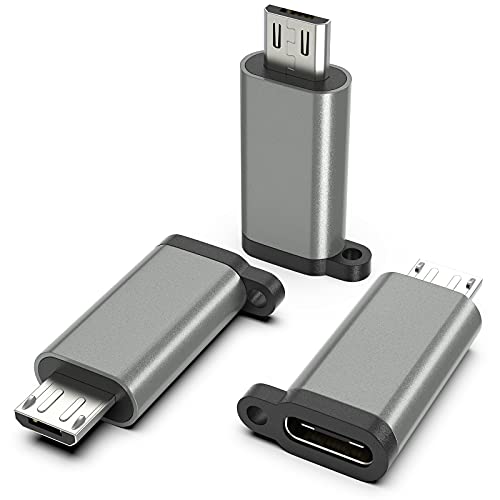
ULIFTUS provides a compact 3-pack aluminum-shell adapter designed to connect Micro USB devices to USB-C power sources or cables. It supports charging up to 3 amps and data transfer up to 480 Mbps, with a note that it does not support USB OTG connections or video output. The aluminum housing and non-slip embossing aim to improve durability and heat dissipation during charging sessions.
Key features
- Aluminum alloy shell for durability
- 3A charging capability and 480 Mbps data transfer
- Durable, heat-dissipating design
Buying Guide
When choosing a Micro USB to USB-C adapter, consider the following factors to balance cost, reliability, and use-case fit.
- Compatibility and OTG support: If you need OTG—for example, to run a keyboard or flash drive—the Mepsies and some other models emphasize OTG compatibility. If OTG is not required, most 2.0/3.1 USB-C adapters will suffice for charging and data transfer.
- Data transfer speed: Most adapters list speeds up to 480 Mbps (USB 2.0). For simple file transfers, photos, and documents, this is usually adequate. For larger media transfers, expect slower performance than USB-C to USB-C connections.
- Charging capability: Look for amperage specs. Many adapters support up to 2.4A or 3A; higher amperage enables faster charging when paired with compatible chargers.
- Build quality: Aluminum shells and gold-plated connectors tend to offer better durability and conductivity, especially with frequent plugging and unplugging.
- Pack size and selection: If you want flexibility across environments, choose a multi-pack (4-pack, 8-pack) so you have adapters at home, work, car, or travel bag.
- Brand support and return policy: Reputable brands with clear return policies reduce risk if an adapter fails or doesn’t fit your devices.
- OTG vs. data-only use: Clarify whether you need OTG compatibility. Some adapters are data-only and do not support OTG connections.
Overall, these adapters provide practical solutions for users transitioning from Micro USB devices to USB-C hardware, enabling charging and data sync without replacing existing cables. Selecting a multi-pack with durable construction and clear OTG specifications will help ensure long-term usefulness across various devices and scenarios.