Left-handed workstations benefit from specialized mice that fit the natural grip and posture of the left hand. The following five options emphasize ergonomic design, vertical orientation, and reliable wireless or wired connections to minimize strain during long days at the desk. Each model is suitable for Windows, macOS, and common work setups, offering multiple DPI settings and intuitive controls.
| Product | Brand | Key Feature |
|---|---|---|
| Logitech Lift Left Vertical Ergonomic Mouse | Logitech | Upright design with soft grip; quiet clicks; Bluetooth or Logi Bolt USB |
| KUNSI Left Handed Mouse | KUNSI | 2.4G wireless; 800/1200/1600 DPI; 6 buttons; left-handed vertical fit |
| Lekvey Left Handed Ergonomic Mouse | Lekvey | 3 DPI levels; plug-and-play; up to 10m wireless range; lefty comfort |
| MEETION Left-Handed Ergonomic Mouse | MEETION | Bluetooth 5.2 + 3.0 and USB-C options; RGB; rechargeable |
| Perixx Perimice-719L | Perixx | Vertical wireless; compact for small hands; 6 buttons |
Logitech Lift Left Vertical Ergonomic Mouse

The Logitech Lift is designed for left-handed use with a vertical orientation that promotes a natural forearm posture. It features a softly textured grip and a snug thumb rest, delivering day-long comfort and productivity. The device supports wireless connectivity options including Bluetooth and Logi Bolt USB, offering quiet clicks and a compact footprint suitable for small to medium left hands. This model emphasizes a raised, ergonomic stance to reduce wrist strain during extended work sessions.
KUNSI Left Handed Mouse

KUNSI offers a left-handed ergonomic vertical mouse that supports a natural handshake position to relieve wrist discomfort. It uses a built-in 2.4GHz wireless connection with plug-and-play setup and a maximum operational distance of about 10 meters. With 800/1200/1600 DPI options, users can tailor sensitivity for precise cursor control, making it suitable for office tasks, design work, and general productivity on laptops or desktops.
Lekvey Left Handed Ergonomic Mouse
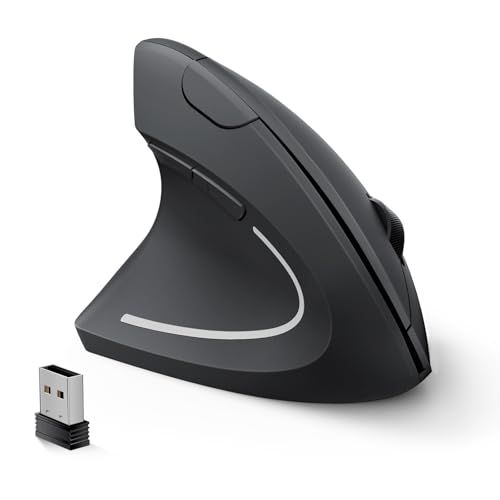
The Lekvey left-handed ergonomic mouse provides a neutral “handshake” posture to minimize wrist strain, designed specifically for left-handed users. It supports plug-and-play operation with a strong 2.4GHz connection (up to 10 meters) and offers three DPI levels (1000/1200/1600). Forward and back buttons aid web navigation and workflow, while the vertical design promotes a more natural arm position during prolonged work sessions.
MEETION Left-Handed Ergonomic Mouse

MEETION’s left-handed ergonomic mouse features a vertical design intended to reduce wrist and forearm strain. It offers versatile connectivity with Bluetooth 5.2, Bluetooth 3.0, and 2.4G wireless connections, enabling use across multiple devices and platforms. The device supports Windows and macOS and includes RGB lighting for a personalized look. A rechargeable battery reduces the need for disposable batteries, aligning with sustainable-use considerations in professional settings.
Perixx Perimice-719L
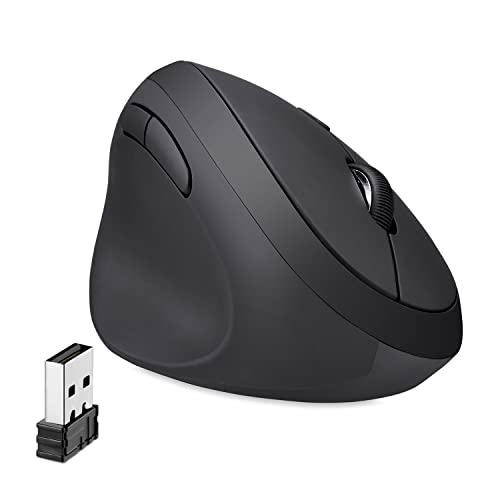
Perixx Perimice-719L is a left-handed wireless vertical mouse designed for small hands. It emphasizes ergonomic support with a natural handshake position to reduce RSI risk. The device includes six buttons and a 2.4GHz wireless connection for stable performance within roughly 10 meters. Its compact size makes it a practical choice for laptops and portable work environments, offering reliable control during tasks like data entry and document navigation.
Buying Guide
- Ergonomic design: Vertical or tilt-forward shapes reduce wrist pronation and can help prevent repetitive strain injuries. Look for a comfortable thumb rest and textured grip.
- Connectivity: Wireless options (Bluetooth, 2.4G USB receiver) offer flexibility across devices; consider a model with a rechargeable battery or USB-C charging for convenience.
- DPI range: A broad DPI range (e.g., 800–1600) supports both precise cursor control for detail work and fast navigation for general tasks.
- Left-handed orientation: Ensure the product is explicitly designed for left-handed users to guarantee button layout and ergonomics suit the left hand.
- Compatibility: Check compatibility with your operating system (Windows, macOS, iPadOS) and any required software for full feature access.
- Durability and build: A solid shell, reliable switches, and a comfortable palm profile contribute to longevity in a work setting.
- Portability: For remote work or travel, a compact footprint and lightweight design can improve ergonomic usability on the go.
- Price-to-value: Compare DPI options, battery life, and build quality to ensure a model matches your typical workday demands without overspending.
These options offer a range of left-handed ergonomic solutions tailored for work tasks such as document editing, spreadsheet navigation, design workloads, and general productivity. Each model balances comfort, control, and compatibility to support sustained desk work without compromising posture.