The iPad mini 6 and iPad mini 7 offer compact power, and a keyboard case with a built-in trackpad can transform them into portable workstations. This guide rounds up five of the best keyboard cases that pair reliable protection with smart features like backlit keys, 360° rotation, and multi‑gesture trackpads. Each option below emphasizes compatibility, usability in low light, and long-lasting battery life for productive on‑the‑go use.
| Product | Key Feature | Backlight | Rotation / Stand | Battery / Power |
|---|---|---|---|---|
| GreenLaw | Multi‑Gesture Trackpad | 7 Color | 360° Rotatable | Rechargeable |
| typecase | Trackpad Keyboard | 7 Color | 360° Rotation | Wiress (USB‑C) Recharge |
| Cousper | Detachable Keyboard | 7 Color | 360° Rotation Pro | Rechargeable |
| Arteck | Bluetooth Keyboard Case | Single/Standard Backlight | Laptop style via Magnetic | Rechargeable |
| MePadKey | Trackpad Keyboard | 7 Color | Detachable Stand | Type‑C |
GreenLaw Keyboard Case for iPad Mini 7 & Mini 6

The GreenLaw keyboard case combines a 360° rotatable hinge with a multi‑gesture trackpad, giving iPad mini users seamless notebook-like control. The smart trackpad supports precise navigation, editing, and web browsing, turning the tablet into a more capable productivity tool. A notable feature is its 7‑color backlighting, which has three brightness levels for working in dim environments. The case is designed for reliable protection while the keyboard remains easily accessible for on‑the‑go tasks, making it a strong option for students and mobile professionals who need quick, comfortable typing with laptop-like precision.
typecase Keyboard Case for iPad Mini 7 & Mini 6

This 8.3″ keyboard case supports 360° rotation and includes a protective cover with a pencil holder. Its 20,000‑cycle hinge is built for heavy daily use, making it suitable for students and commuters alike. The case provides full protection, including a detachable keyboard that can be used for laptop‑style work or easier tablet handling. The 7‑color backlighting adds visibility in low light, and the setup notes emphasize compatibility with iPad mini 7 (2025) and mini 6 (2021), ensuring a secure fit and stable typing experience in a variety of settings.
Cousper iPad Mini 7 Keyboard Case

The Cousper case highlights compatibility with iPad Mini 7 and Mini 6, including Pencil support. It features a detachable 7‑color backlit keyboard with a low‑profile design for comfortable typing on the go. A notable advantage is the long‑life rechargeable keyboard delivering extensive usage between charges, which is ideal for travelers or students who rely on a keyboard for extended sessions. The case maintains a precise cutout design to protect the device while offering easy access to all ports and controls.
Arteck iPad Mini A17 Pro Keyboard Case

The Arteck model pairs a standard Mac‑style keyboard with a rugged, shock‑proof case. The magnetic attaching style allows quick switching between case‑only and keyboard‑attached modes, providing a flexible laptop‑like experience. Bluetooth connectivity ensures a wireless setup, and the auto sleep/wake feature conserves battery when the case is closed. This option is suitable for users who prioritize a familiar typing experience and robust protection for both iPad mini 6 and the A17 Pro 8.3‑inch model.
MePadKey Magic Trackpad Keyboard Case
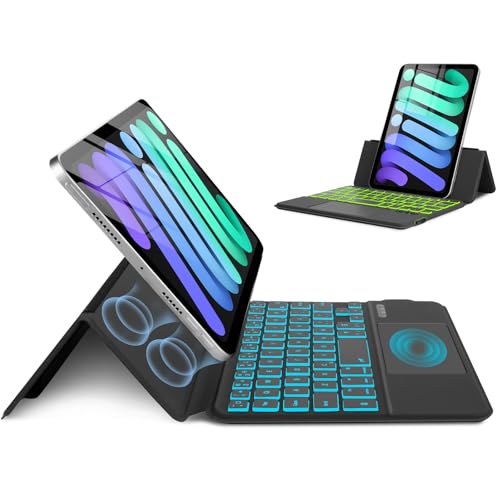
The MePadKey option emphasizes a slim magnetic folio design with a built‑in smart trackpad. It is compatible with iPad mini 7 (A17 Pro, 2025) and mini 6 (2021) at 8.3 inches. The keyboard is magnetically detachable, and the case supports 7 colors of backlighting for visibility in dim environments. The trackpad enables multi‑touch gestures, such as pinch and slide, supporting efficient document editing, web navigation, and file management on the go. The integrated stand allows both horizontal and vertical orientations for flexible viewing angles.
Buying Guide: How to Choose the Right Keyboard Case for iPad Mini 6 and 7
When selecting a keyboard case for the iPad mini 6 or mini 7, consider the following factors to match your use case and budget:
- Compatibility: Confirm the model year and generation (8.3″ screens on mini 6 and mini 7). Some cases are model‑specific and may not fit all mini variants.
- Typing Experience: Look for keys that mimic a laptop feel, with adequate key travel and spacing. Trackpads can vary in size and gesture support—check for multi‑finger gestures if you rely on precise navigation.
- Backlighting: Seven‑color backlights are common and helpful in dim settings. Consider brightness levels and color options if you work in low light often.
- Protection Level: A full‑coverage shell with precise cutouts protects the device from drops and dust. A detachable keyboard can offer flexibility for different tasks.
- Stand and Rotation: A 360° hinge or multiple viewing angles helps with typing, reading, or drawing. Ensure the stand supports stable orientation for your typical activities.
- Battery Life: Rechargeable keyboards are convenient for extended use. Check advertised hours of use per charge and charging method (USB‑C preferred for modern devices).
- Port Access: Ensure easy access to charging, cameras, and ports without removing the case. Pencil storage or magnetic holders can prevent loss during transport.
- Weight and Thickness: Slim, light designs improve portability. Heavier or bulkier cases may hinder travel and daily carry.
- Price vs. Features: Balance backlighting, trackpad quality, and protection with your budget. A slightly higher price can be justified by longer battery life and stronger construction.
In sum, the best keyboard case for your iPad mini 6 or mini 7 will depend on how often you type, whether you need a keyboard with a trackpad, and where you use the device most. The options above provide a range of combinations—from robust protective shells with multi‑color backlit keyboards to slim, detachable designs that preserve portability—so you can choose the setup that matches your workflow and environment. All five selections prioritize compatibility with the 8.3‑inch mini models and aim to deliver a productive, travel‑ready experience.