The following article highlights five versatile iPad docking stations and related speaker solutions available on Amazon. Each option combines charging or hub capabilities with audio output, helping you expand your iPad’s connectivity while enhancing sound for videos, calls, and music. Read on to compare features, formats, and usage scenarios to find the best fit for home, office, or travel setups.
Summary Table of Chosen Products
- DORNLAT Wireless Bluetooth Speakers, Portable Dock Speaker for iPad
- Bluetooth Speaker With Wireless Charging And Phone Stand (XIAOBAOLU)
- iPad Pro USB C Hub Stand, 9 in 1 (BKELHS)
- Versatile 11-in-1 USB C Docking Station For iPad (NEWQ)
- iPad USB C Hub Stand, 9-in-1 Multiport (NXPGKEA)
DORNLAT Wireless Docking Speaker For iPad

The DORNLAT model combines portability with a stand-friendly design, delivering true stereo sound from dual drivers. It supports wireless Bluetooth playback and includes a 3.5 mm auxiliary input for non-Bluetooth devices. With a compact footprint and stand integration, this dock is suitable for desks, nightstands, or travel setups where hands-free viewing is desired. Note that volume control is managed via the connected Bluetooth device rather than a dedicated dial on the speaker.
XIAOBAOLU Bluetooth Speaker With Wireless Charging

This multi-function device blends a wireless charging stand with a Bluetooth speaker, enabling 15W wireless charging for compatible devices and 5W for others. It includes a 2000 mAh battery, microphone for hands-free calls, and a 1.77-inch speaker with a dedicated bass diaphragm for clear sound. The back panel houses a volume control and mounting options, making it a compact all-in-one accessory for desks, living rooms, or travel scenarios where charging and audio are both needed.
iPad Pro USB C Hub Stand By BKELHS

This 9-in-1 USB C docking solution for iPad Pro models offers 4K HDMI at 60 Hz, a Gigabit Ethernet port, three USB 3.0 ports, SD/TF card readers, a USB-C PD port, and a 3.5 mm audio jack. It targets users seeking a compact, clip-style dock to expand connectivity without adding significant bulk. The device supports high-resolution video output, fast data transfer, and concurrent charging while maintaining access to peripheral devices. It is compatible with a wide range of USB-C devices beyond iPad Pro.
NEWQ 11-in-1 USB C Docking Station For iPad

NEWQ’s 11-in-1 docking station expands iPad connectivity with SD/TF readers, 4K HDMI at 60 Hz, Gigabit Ethernet, three USB 3.0 ports, USB-C PD charging, 3.5 mm audio, and more. It emphasizes an adjustable form factor for various iPad sizes, including large Pro models, and notes the importance of using a higher-wattery adapter to sustain peak power across ports. Users can connect external displays, data devices, and audio peripherals simultaneously while charging the host device.
HC Adjustable Tablet Stand With USB-C Hub
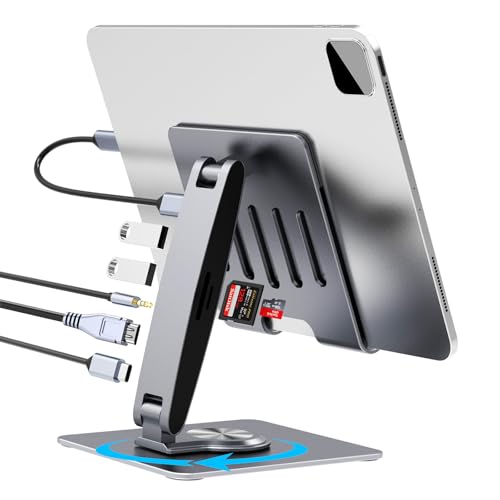
HC’s adjustable tablet stand combines a 7-port USB-C hub with a 4K HDMI output and 5G USB-C host port. It is designed to hold iPad models with USB-C and offers two USB-A ports, SD/TF slots, and a 3.5 mm audio jack. The stand provides a stable base and rotation options to optimize viewing angles, while delivering data transfer speeds up to USB 3.0 levels. This option suits users who want a versatile dock plus a sturdy stand for desk-centric workflows.
NXPGKEA iPad USB C Hub Stand, 9-in-1
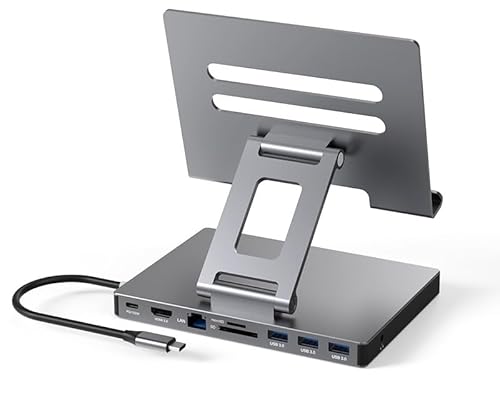
NXPGKEA’s 9-in-1 USB C hub for iPad covers essential ports including HDMI 4K output, gigabit Ethernet, three USB 3.0 ports, SD/TF card readers, a PD port, and a 3.5 mm audio jack. It emphasizes plug-and-play use with iPad models featuring USB-C, and supports high-speed data transfers without requiring drivers. It’s designed to deliver a compact, integrated solution for productivity tasks on the go or at a workstation.
Buying Guide: Key Considerations For iPad Docking Stations With Speakers
- Audio output options: Look for docks with built-in speakers or reliable Bluetooth connection, plus a 3.5 mm audio jack for wired headphones or external speakers.
- Power delivery and charging: Check PD or fast-charging support to ensure the iPad stays charged while in use, especially when running processors-heavy apps or video calls.
- Port variety and expansion: Favor docks offering a mix of HDMI, USB-A, USB-C, SD/TF card readers, and Ethernet to support displays, data transfers, and wired networks.
- Stand usability and form factor: If desk space is limited, choose clip-style or foldable stands that keep the device stable and accessible at comfortable viewing angles.
- Compatibility: Verify compatibility with your iPad model (USB-C vs. Lightning) and operating system version to avoid driver or connection issues.
- Port management and user experience: Consider whether volume controls are integrated on the dock or controlled via the connected device, and if there are dedicated power indicators or alarms.
- Build quality and portability: For travel or hybrid work setups, prioritize lightweight yet sturdy designs with durable materials and compact footprints.
- Price-to-value balance: Weigh the cost against the number of ports, charging speed, display support, and audio capabilities to identify the best overall value.
These products serve varied use cases, from casual media consumption on a sofa to professional tasks at a workstation. For users prioritizing audio quality, DORNLAT and XIAOBAOLU deliver robust speaker performance alongside portable docking features. For those who require extensive connectivity, the 9-in-1 hubs from BKELHS, NEWQ, and NXPGKEA offer multi-port versatility with 4K video support and fast data transfers. When choosing, align the setup with how you use your iPad—whether as a primary computer, a media hub, or a portable workstation.