In today’s hybrid and remote work environments, reliable headphones for Teams calls are essential. The right headset combines clear voice capture, comfortable wear for long meetings, and dependable connectivity across devices. Below are five top options optimized for Microsoft Teams and similar conferencing platforms, each chosen for noise reduction, battery life, and compatibility. Use this guide to compare features and pick a model that best fits your daily meeting routine.
| Product | Brand | Key Strength |
|---|---|---|
| AOC USB Headset with Microphone | AOC | Rotatable mic; 40mm drivers; lightweight |
| Logitech Zone Vibe 100 | Logitech | Wireless, multipoint; noise canceling |
| LEVN Wireless Headset (Single Ear) | LEVN | ENC; long battery life; dual connectivity |
| Gixxted Wireless Headset | Gixxted | Noise canceling mic; USB dongle; Bluetooth 5.4 |
| Yealink UH34 USB Headset | Yealink | Teams certified; comfortable design |
AOC USB Headset With Noise-Canceling Mic
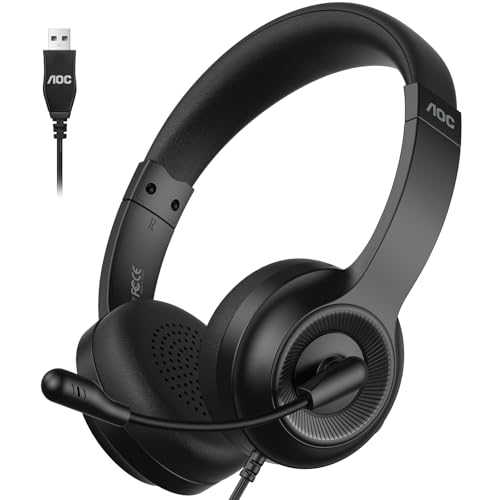
The AOC USB headset delivers clear voice transmission through a 270° rotatable noise-canceling microphone, designed to focus on your speech while reducing background noise. It works seamlessly with popular meeting platforms like Zoom and Microsoft Teams, ensuring natural-sounding calls even in busy offices. The 40mm drivers provide a balanced audio profile, helping voices come through clearly during online meetings. At only 160g, the headset remains comfortable for long workdays, with soft protein leather ear cushions that minimize fatigue during extended use.
Logitech Zone Vibe 100: Lightweight Wireless For Teams

Logitech Zone Vibe 100 offers a wireless, distraction-reducing experience with beamforming and DSP-based noise cancellation. Its compatibility with Microsoft Teams, Google Meet, and Zoom makes it a versatile option for mixed-device homes and offices. The multipoint Bluetooth headset supports easy switching between devices, which helps teams stay connected during back-to-back meetings. The design is professional enough for the office while maintaining casual comfort for home use, with a focus on clear, interruption-free communications.
LEVN Wireless Headset With Mic: Long-Lasting Battery
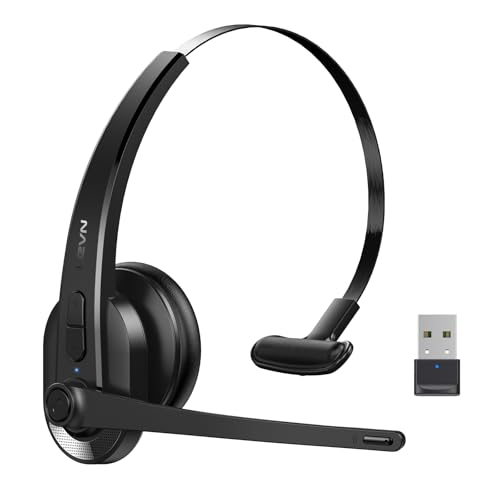
LEVN’s wireless headset emphasizes long battery life and flexible connectivity. It employs ENC to suppress background noise, ensuring your voice remains clear in noisy environments. Two connection methods—Bluetooth 5.3 and a USB dongle—offer stable, low-latency links up to roughly 50 feet. The model is designed for hybrid workers, call center staff, and multitaskers, with a two-hour quick charge yielding substantial talk time for a week of meetings. A mute button provides immediate privacy control during calls.
Gixxted 2026 Upgraded Wireless Headset

The Gixxted 2026 Upgraded headset features a high-performance noise-canceling microphone, capable of reducing ambient noise by a wide margin for clearer calls. It supports Bluetooth 5.4 and USB dongle connectivity, providing flexible pairing options that suit desk-based and mobile work. A USB-A interface is highlighted for compatibility with more traditional setups. Built-in mute and a visible mic indicator help prevent interruptions, making this model well-suited for busy call environments and home offices alike.
LEVN Wireless Headset With Mic For Work

This LEVN headset excels in blocking ambient noise with AI-based noise cancellation and offers a substantial battery life of up to 65 hours. It supports dual connectivity (Bluetooth 5.2 and USB dongle), with a charge base for easy recharging and a built-in USB adapter slot. The combination of long endurance, reliable wireless performance, and a mute feature makes it a strong option for mobile workers, remote teams, and busy office environments where uninterrupted calls are essential.
Yealink UH34 USB Headset With Mic

Yealink UH34 is Teams-certified and designed for VoIP and PC-based calls. It features a high signal-to-noise ratio speaker and an independent cavity design to minimize background noise. The headset is compatible with Windows and Mac systems, desk phones, and PCs, providing a versatile setup for various workflows. Replaceable leather ear cushions enhance comfort for long conference calls, and a 6.89-foot cable allows for comfortable movement around the workspace.
LEVN Bluetooth Headset With Microphone (60 Hours)
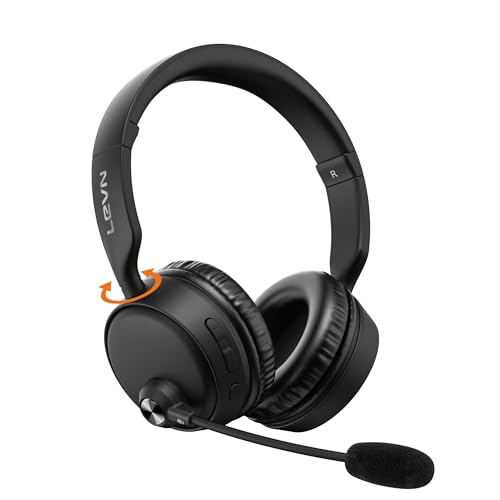
This LEVN model emphasizes AI noise cancellation and long battery life—up to 60 hours—ideal for extended periods of use between charges. It offers dual connectivity with Bluetooth 5.3 and a USB dongle for flexible device pairing. The headset supports two-device connections to switch between meetings and calls quickly. It is designed to deliver clear voice transmission and stereo audio for work, meetings, and music, suitable for Teams, Zoom, and other platforms.
Buying Guide: How To Choose The Right Teams Headset
- Voice clarity and noise reduction: Prioritize a microphone with active noise cancellation or ENC to minimize interrupting background sounds.
- Connectivity: Look for a mix of Bluetooth and USB dongle options for seamless switching between laptops, desktops, and mobile devices. Consider multipoint pairing if you work across devices.
- Listening comfort: For long meetings, prioritize lightweight design, cushioned ear cups, and an adjustable headband. Consider headsets with replaceable ear pads for longer life.
- Compatibility: Ensure Teams certification or broad compatibility with common platforms (Teams, Zoom, Google Meet) and operating systems (Windows, macOS, Linux).
- Battery life: Wireless models benefit from longer battery life, especially for remote workers and travelers. Check advertised talk time and standby duration.
- Durability and warranty: Office-ready headsets should withstand daily use and have a reliable warranty or replacement policy.
- Controls and privacy: Integrated mute, volume controls, and visual mic indicators help manage calls without fumbling for devices.
- Wired vs. wireless balance: If you need reliability with no charging, a wired USB headset is safer; for mobility, wireless with a solid dongle is preferred.
Overall, the best headset for Teams calls balances voice clarity, comfort, and device flexibility. The options above provide a range of wired and wireless designs to suit quiet home offices, bustling open workspaces, and hybrid setups. Consider your typical meeting length, device ecosystem, and whether you value portability or extended battery life most when making a choice.