Digital handwriting tablets blend the familiarity of pen-and-paper with the convenience of cloud-synced notes and multimedia. This guide highlights five notable options, spanning eco-friendly LCD pads, advanced color E Ink, and feature-rich tablet-notebook hybrids. Each entry covers the core use cases—note-taking, sketching, meetings, and study—so you can compare capabilities like handwriting feel, AI transcription, and offline storage. The summary table below helps you quickly scan the essentials and choose a model that matches your workflow and environment.
| Product | Type | Main Benefit | |
|---|---|---|---|
| HUION Note 2-in-1 | Note-taking / Digital paper | Bluetooth, app-based handwriting with paper feel | Vector capture to device; audio sync |
| XP-Pen 3 in 1 Color Digital Notebook | Android tablet with paper-like mode | High-refresh, anti-glare, versatile color modes | AG Nano-Etched Display; 90Hz |
| Penstar eNote 2 | E Ink style digital notebook | Pen-only display with real paper feel | AI voice-to-text and real-time notes |
| iFLYTEK AINOTE 2 | E Ink tablet | Compact, AI-powered transcription and translation | ChatGPT-5 AI integration for work |
| reMarkable Paper Pro Move | Portable digital paper tablet | Distraction-free handwriting with cloud sync | Searchable handwritten notes |
HUION Note 2-in-1 Digital Notebook

The HUION Note 2-in-1 combines a traditional A5 notepad with a digital pen and a companion app. It captures handwriting as vector lines on your device via Huion Note, bridging the tactile experience of pen-and-paper with digital convenience. The system supports audio notes that sync with your writing, helping you replay the process and ensure no detail is lost during meetings, lectures, or brainstorming sessions. This is a strong option for note-takers who want a physical note surface with digital backup.
Key aspects include: a battery-free pen for unlimited use, Bluetooth wireless connectivity, and an emphasis on preserving the “paper feel” while delivering digital copies. The integration with the Huion Note app enables cross-device access, making it suitable for students and professionals who switch between mobile and desktop workspaces.
XP-Pen 3 in 1 Color Digital Notebook

XP-Pen’s 3 in 1 Color Digital Notebook is designed as an Android tablet with a paper-mimicking experience. It features an AG Nano-Etched Display using TCL NXTpaper 3.0 technology to reduce ambient light interference, delivering a paper-like texture with anti-glare properties. A 90Hz refresh rate and a color-rich display ensure smooth writing and clear visuals during reading, note-taking, and meetings. The device supports multiple color modes and a magnetic folio, making it a versatile choice for writers, students, and professionals who want a more dynamic visual experience while taking notes.
Important considerations include its non-e-ink nature, real-time writing smoothness, and the balance between screen glare and readability in varying lighting. The device targets users who want a hybrid tablet that feels like writing on paper but also supports color notes and multimedia content.
Penstar eNote 2 – The Whitest Paper Tablet
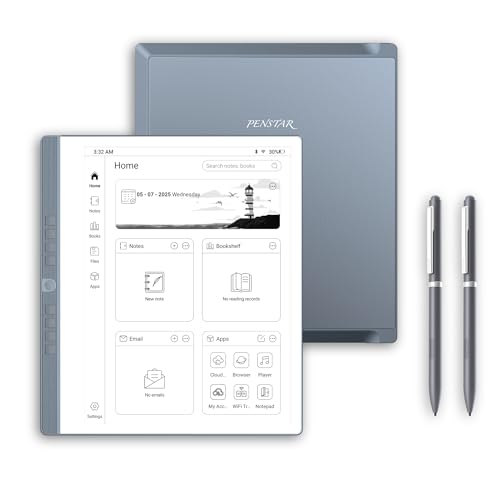
The Penstar eNote 2 offers a pure E Ink-like handwriting experience on a 10.3-inch display with 300 PPI. The pen-only screen reduces distractions, making it ideal for focused writing, note-taking, and reading. A notable feature is its ability to convert handwritten notes into editable text via MyScript technology, supporting organization and search for ideas. The device also includes AI-powered voice-to-text and translation capabilities in real time, enabling efficient meeting capture and multilingual comprehension. It’s a strong pick for professionals who value clarity and quiet focus during work sessions.
iFLYTEK AINOTE 2

The iFLYTEK AINOTE 2 is a 10.65-inch E Ink tablet designed for portability and productivity. It emphasizes an ultra-thin profile (4.2 mm) and light weight, making it easy to carry for travel or commuting. Its paper-like writing experience aims to minimize eye strain, with a high-refresh display for smooth handwriting. The device integrates AI-powered voice recording, real-time transcription, and multilingual translation support, enabling efficient note-taking and cross-language collaboration. It suits students and professionals who need quick, accurate transcription and seamless translation in everyday tasks and meetings.
reMarkable Paper Pro Move
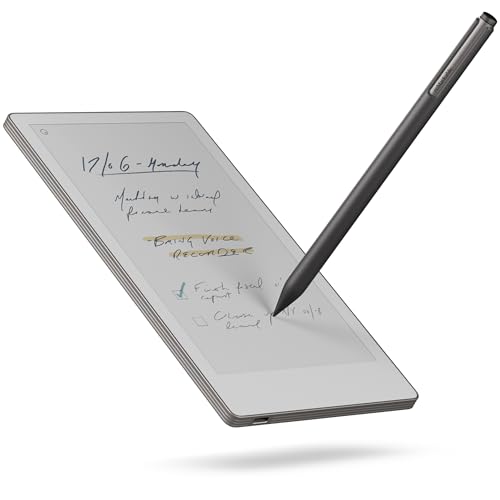
reMarkable Paper Pro Move emphasizes distraction-free writing on a 7.3″ color display, tuned for focus during meetings and deep work. Its ecosystem centers on cloud syncing and cross-platform access, with handwriting searchable after a Connect subscription. The included Marker Plus and spare tips support long-term writing sessions, and the device’s compact form factor makes it highly portable for on-the-go note-taking. While not a full multimedia tablet, it excels as a dedicated digital notebook with a strong emphasis on handwriting and organization, appealing to professionals who value an uncluttered digital workspace.
Buying Guide: Key Purchase Considerations
Display technology and handwriting feel: E Ink-like panels offer paper-like ink, reduced eye strain, and long battery life in some models. LCD/AG-etched displays improve color and responsiveness but may cause more eye fatigue for long sessions. Consider whether you prefer a pen-on-paper feel or a vivid color interface for diagrams and media.
Note-taking features: Look for real-time handwriting capture, audio sync, offline storage, and OCR transcription. Some devices convert handwriting to editable text or provide voice-to-text during meetings. If meetings or lectures are central, prioritize AI transcription, translation, and searchability.
Portability and battery life: Ultraportable notebooks are ideal for travel; however, some mirror a larger notebook with heavier weight. Battery life varies from device to device, with passive pens and paper-like modes consuming less power on certain models.
Ecosystem and compatibility: Check whether the device integrates with your preferred apps (cloud storage, note apps, or productivity suites). Cross-device syncing is valuable for users who work on multiple platforms (mobile, desktop, cloud). Some brands offer companion apps for iOS/Android, while others emphasize standalone operation with cloud access.
Price and longevity: More affordable LCD tablets can serve casual note-taking, but premium E Ink tablets or 3-in-1 devices may provide longer-term value for professionals who rely on handwriting and offline capture. Consider build quality, accessories (case, folio, extra pens), and warranty terms when evaluating total cost of ownership.