Finding a reliable charging station USB hub reduces clutter and speeds up charging across devices. This guide reviews five top options, highlighting design, power delivery, safety features, and compatibility for everyday home and office use. Each pick balances space-saving form with robust performance to support smartphones, tablets, laptops, and more.
Summary of selected products:
- Upoy Charging Station for Multiple Devices 40W — 6 ports, shared 6A, Type-C 3A
- Anker Desktop Charger, 60W 6 Port USB — PowerPort 6
- Roruite USB C Charging Station 10 Port — 200W GaN, 6x USB-C PD + 4x USB-A
- Upoy USB Charger Upoy 45W — 4 USB-C/2 USB-A ports, 6-port desktop block
- BREEKET [2026 Updated] USB C Fast Charger 100W GaN, 6 Port
Upoy 40W Desktop Charging Hub — 6 Ports
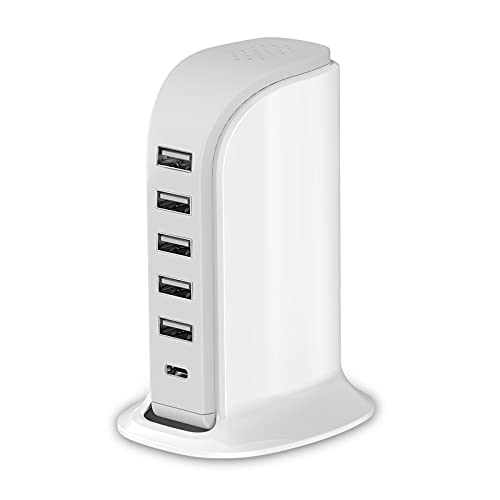
The Upoy 40W Desktop Charging Hub offers a compact sailboat-inspired design with six USB ports. It supports a total 40W output and can charge multiple devices simultaneously, making it suitable for home offices and shared desks. The design emphasizes heat dissipation and space efficiency, which helps maintain steady performance during extended charging sessions.
Key features include a 6-in-1 setup and a maximum single-port current of up to 2.4A, which supports quick charging for common devices. The shell uses a heat-resistant construction intended to prevent overheating during heavy use. This unit suits users who want a simple, multi-device solution without needing multiple adapters.
Anker 60W 6-Port USB Charger — PowerPort 6

The Anker PowerPort 6 delivers 60W across six ports using PowerIQ and VoltageBoost to optimize charging efficiency. Each port can provide up to 2.4A, with a total output capped at 12A. The device is designed for reliable, rapid charging of multiple devices while minimizing the risk of overcharging or overheating. Qualcomm Quick Charge is not supported, emphasizing a broad compatibility approach.
Design emphasizes travel-friendliness and organization, reducing the need for several wall adapters. It’s a practical option for households with several phones, tablets, and accessories needing steady power without clutter.
Roruite 10 Port USB C Charging Station — 200W GaN
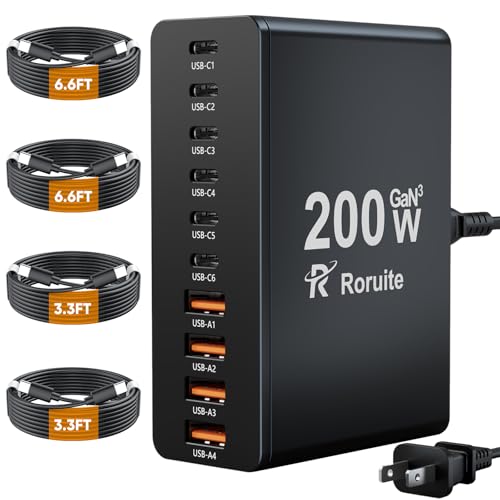
The Roruite 10-Port USB C charging station emphasizes high capacity with up to 200W total output. It includes six USB-C PD 3.0 ports and four USB-A ports for broad device compatibility. GaN technology is highlighted to improve efficiency and reduce heat, enabling fast charging for laptops, tablets, and smartphones concurrently.
With multiple USB-C PD ports and robust safety protections, this block targets power users who charge laptops and several peripherals at once. It’s a strong option for a busy desk, a shared lab, or a family charging hub where speed and capacity matter.
Upoy 45W USB Charging Station — 6 Ports

This Upoy model extends the brand’s multi-port strategy to a 45W total output with four USB-C ports and two USB-A ports. The compact tower design helps keep cords organized on a desk or countertop. The unit markets a balance of high efficiency and a small footprint, making it a practical option for travelers and home offices alike.
Features emphasize safe multi-device charging, compact form, and a flexible port mix for charging phones, tablets, wearables, and accessories. It provides a straightforward solution for users who want a dedicated hub without extra cables or adapters.
BREEKET 100W GaN 6-Port USB C Charger Block

The BREEKET 100W GaN charging block combines GaN efficiency with six ports, including three USB-C PD 3.0 ports and three USB-A ports. With 100W total output, it supports fast charging for laptops, tablets, and phones, while its GaN design helps reduce heat and improve energy efficiency. It’s advertised as a compact solution for power users who need high wattage from a single hub.
Universal compatibility spans laptops, smartphones, and wearables, with protection against overcharging and overheating. The device suits home offices and travel-heavy environments where speed and high port throughput are essential, and it minimizes clutter with a consolidated charger block.
Buying Guide: Key Considerations for a USB Charging Hub
- Total power and per-port output: Choose a hub with a high total wattage and adequate per-port amperage to support your most power-hungry devices (laptops, tablets, phones). GaN Technology often enables higher efficiency and cooler operation at higher wattages.
- Port mix and PD support: Look for a balance of USB-C PD ports for laptops and newer devices, plus USB-A ports for older gadgets. Ensure PD support aligns with your device charging needs (e.g., 30W, 60W, or 100W total).
- Safety and protection: Prioritize hubs with overcurrent, overvoltage, and temperature protections to guard devices. Certifications (UL, FCC) and reputable brands add credibility.
- Form factor and heat dissipation: Slim or tower designs help reduce desk clutter. Effective heat dissipation matters for sustained charging performance in hot environments.
- Cable management and length: Consider built-in cable management options and cord length to ensure a tidy setup and flexible placement.
- Device compatibility: Check compatibility lists for smartphones, tablets, laptops, wearables, and Nintendo Switch or other gaming devices you plan to charge.
- Future-proofing: A hub with multiple USB-C ports and higher total wattage can handle new devices as charging standards evolve, reducing the need for frequent replacements.
- Portability vs. desk setup: If you travel often, a compact, lightweight hub may be preferable; for a home or office desk, prioritize higher wattage and more ports.