Keep a gaming setup clean and distraction-free with cable management tools designed to hide, route, and protect wires under a desk. The following selections focus on no-drill or low-impact installations, sturdy construction, and user-friendly design suitable for desks used for gaming, streaming, and productivity. Below is a quick overview of five top options, followed by detailed product profiles and a practical buying guide.
| Product | Size / Capacity | Mount Type | |
|---|---|---|---|
| Cinati Under Desk Cable Tray | 13.4L x 4.6W x 3.1H in; holds up to 10 lbs | Clamp mounting | No drilling; anti-scratch mats |
| KEEGH No Drill Under Desk Tray | 28 in long; weight up to 70 lbs | Clamp or screw mount | Fabric cable hides wires; rubber desk pads |
| YECAYE 94.2 in Cable Organizer | Six 15.7 in sections | Adhesive backing (no-drill) | Outward-facing opening for easy access |
| Zilink 40″ No-Drill Tray | 40″ long; multiple levels | No-drill clamp or screw | Premium Oxford fabric; 7 belts included |
| Litwaro Under Desk Tray | Two-hole side access; supports 15 lbs | Clamp mounting | Sturdy carbon steel; rubber pads |
Note: Each product below is chosen for under-desk organization with a focus on gaming setups, durability, and ease of installation. All links in the headings point to their respective Amazon pages for quick reference.
Cinati Under Desk Cable Tray

This Cinati cable tray attaches to desk frames without drilling, making it a practical choice for renters or users who want to preserve desk integrity. It uses a clamp system and includes anti-scratch mats to prevent marks on the desktop. The tray is welded, powder-coated metal designed to resist rust and dust accumulation. It supports up to 10 pounds and fits desks from 0.4″ to 2.4″ thick, offering flexibility for a range of gaming setups. The tray can be mounted inward or outward, enhancing wire collection and organization.
KEEGH No Drill Under Desk Tray

The KEEGH cable management tray emphasizes a no-drill installation with clamp or screw mounting options. Its 28-inch length accommodates extensive power strips and adapters, helping to hide wires for a clean look. The fabric-based enclosure provides a modern, low-profile appearance while keeping cables organized. Rubber pads protect desk surfaces from scratches, making it suitable for metal, wood, or glass desks. It supports up to 70 pounds, offering ample weight capacity for heavier gaming rigs.
YECAYE 94.2-Inch Cable Organizer

Yecaye offers a modular, adhesive-backed cord management system with six segments totaling 94.2 inches. Each segment is about 15.7 inches long, designed to tame long runs of cables under gaming desks. The outward-opening design eases cable addition and removal, improving daily usability. The adhesive backing enables quick, tool-free installation on smooth surfaces, with the option to remove using heat without residue. This setup helps reduce tripping hazards and protects pets and children from exposed wires.
Zilink 40-Inch No-Drill Tray
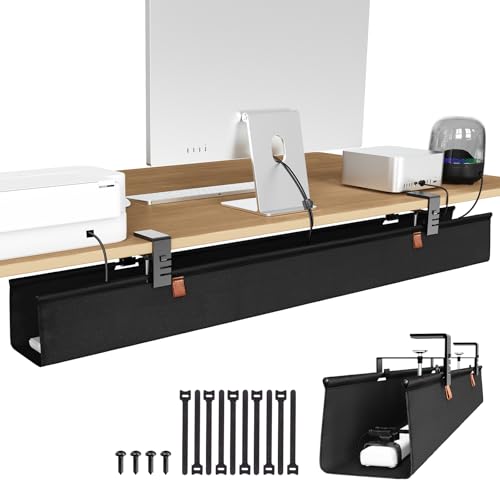
Zilink combines a large-capacity 40″ tray with two installation options: no-drill clamp and screw fixing. This dual-mode design suits desks with varying thicknesses from 0.4 to 2.4 inches. The tray uses premium Oxford fabric and sturdy metal clamps, supported by seven included belts to secure adapters and power strips. It emphasizes durability and ease of use, keeping cables neatly organized while maintaining a tidy workspace for gaming or home office tasks.
Litwaro Under Desk Tray

The Litwaro tray offers a no-drill mounting system with side-clips that clamp onto the desk edge. It is designed to pass cables through holes on the tray sides and has two side holes for flexible routing. The stainless-looking carbon steel construction supports up to 15 pounds, while soft rubber pads protect desk surfaces from scratches. This model suits gaming desks with modest cable needs and those who prefer a simple, tool-free setup.
Buying Guide: Key Considerations for Gaming Desk Cable Management
- Installation method: No-drill clamps are ideal for renters and temporary setups, but screw-mounted trays offer maximum stability for heavy equipment. Consider desk material and thickness to ensure compatibility.
- Weight capacity: Gaming setups with multiple peripherals can be heavy. Choose trays rated to handle at least 10–15 pounds, or more for extended rigs with power strips and adapters.
- Size and layout: Measure your desk width and the available under-desk space. Longer trays (30–40 inches) are great for sprawling rigs, while compact options fit smaller desks.
- Cable access and routing: Outward-facing openings and side-pass-through designs help with daily cable adjustments. Look for modular segments if you need to scale later.
- Protection and desk surface care: Rubber pads, anti-scratch mats, and soft clamps prevent desk damage. This is especially important for sensitive gaming desks with finishes you want to preserve.
- Ventilation and heat: Mesh trays and open designs improve airflow around power supplies and adapters, reducing heat buildup in some setups.
- Materials and durability: Powder-coated steel and high-quality fabrics resist rust and wear. Choose materials that match your desk aesthetics and long-term use expectations.
- Adhesive backings and removal: For no-drill options, check adhesive strength and residue-free removal to avoid wall or desk damage during repositioning.