Finding the right Bluetooth adaptor for a PC can boost audio quality, file transfers, and peripheral compatibility. This guide highlights five high-performing adaptors, focusing on speed, range, and plug‑and‑play ease. Each product below supports common Windows versions, multiple device types, and varying ranges to fit home, office, and on-the-go setups. Use the Buying Guide at the end to compare features and decide which dongle matches your needs.
| Product | Brand | Key Benefit |
|---|---|---|
| TP-Link UB500 | TP-Link | Bluetooth 5.4 with fast transfer and broad compatibility |
| UGREEN USB Bluetooth 5.3 | UGREEN | Stable connections, supports up to 5 devices simultaneously |
| TP-Link UB500 Plus | TP-Link | Long-range, adjustable antenna, high speed |
| TP-Link UB400 | TP-Link | Ultra‑small, plug‑and‑play, backward compatible |
| Techkey Long Range USB Bluetooth 5.3 | Techkey | Extremely long range for open spaces |
The products above were chosen for broad Windows compatibility, diverse range capabilities, and a mix of compact and extended-range designs. Each option is straightforward to install and supports a variety of Bluetooth peripherals, including mice, keyboards, headphones, speakers, and printers. The following sections present each product in detail to help you compare performance attributes and practical use cases.
TP-Link UB500: Fast, Flexible USB Bluetooth 5.4 Dongle

This USB Bluetooth 5.4 adaptor delivers broad compatibility across Windows 11, 10, 8.1, and 7. It supports EDR and BLE, enabling faster data transfer and more efficient power use. The device is designed to offer up to twice the speed and roughly four times the coverage of Bluetooth 4.0, making it well-suited for smooth audio streaming and stable connections with peripherals such as keyboards, mice, and headsets. Its compact, plug‑and‑play form keeps the desktop clean while providing robust performance for everyday tasks.
UGREEN USB Bluetooth 5.3: Stable, Multi‑Device Connectivity

The UGREEN Bluetooth 5.3 adaptor emphasizes stability and low interference with a BR+EDR design. It supports up to five different Bluetooth devices simultaneously, which is ideal for users who want to connect a keyboard, mouse, headset, and speakers without constant re-pairing. It is a plug‑and‑play solution for Windows 11/10/8.1, simplifying setup by avoiding driver installations. Note that it does not support macOS, Linux, or ChromeOS, so verify device compatibility before purchasing.
TP-Link UB500 Plus: Long‑Range Bluetooth 5.3 Dongle

The UB500 Plus extends on the original UB500 with a longer range and a more advanced antenna setup. It uses Bluetooth 5.3 with backward compatibility to older Bluetooth versions, delivering faster speeds and wider coverage for desktop or laptop use. This model targets users who need reliable connections across larger rooms or when peripherals are positioned far from the computer. It remains a plug‑and‑play option suitable for a variety of devices like keyboards, mice, and audio devices.
TP-Link UB400: Ultra‑Small USB Bluetooth 4.0 Dongle
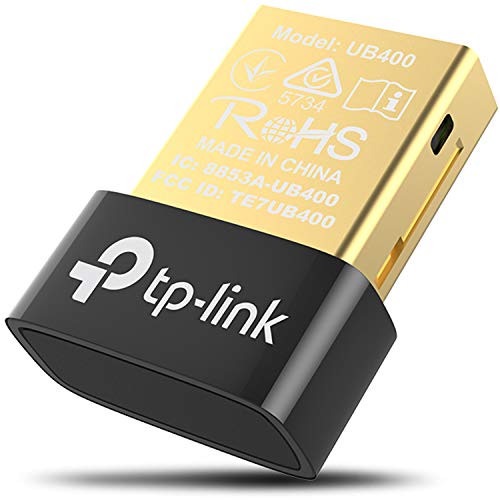
The UB400 offers a nano-sized, plug‑and‑play solution that turns non‑Bluetooth PCs into Bluetooth-enabled machines. It supports Bluetooth 4.0 with backward compatibility to older versions, and it is designed for quick setup without driver installations on Windows. While it is compact and discreet, it is best suited for standard peripheral connections rather than high‑bandwidth audio tasks. It’s a reliable option for basic input devices and simpler wireless accessories.
Techkey Long Range USB Bluetooth 5.3 Adapter

This adaptor leverages Bluetooth 5.3 plus EDR to maximize speed and coverage, using a Class 1 radio design for long open‑space range—up to about 328 feet (100 meters) in ideal conditions. It supports Windows 11/10/8.1 and focuses on low latency and strong anti‑interference performance. The plug‑and‑play design makes it convenient for expanding Bluetooth capability on desktops or laptops, particularly when connecting multiple devices such as keyboards, mice, and audio gear across a larger room. Real‑world range will vary with obstacles.
Buying Guide: Key Considerations When Choosing a Bluetooth Adaptor For PC
Selecting the right Bluetooth adaptor depends on how you plan to use it. Consider these factors to balance performance, compatibility, and cost:
- Bluetooth version and profile support: Newer versions (5.x/6.x) offer faster speeds, greater range, and improved power efficiency. Check that the adaptor supports common profiles you need (A2DP for audio, HID for keyboards/mice, HFP for headsets).
- Range and antenna design: For desktop setups with devices far from the computer, long‑range adapters or models with external or more powerful antennas deliver better coverage. Compact dongles are convenient but may have shorter range.
- Device compatibility: Most Windows versions are widely supported, but some adapters may lack macOS, Linux, or ChromeOS compatibility. Ensure your OS and peripherals are covered.
- Multi‑device connectivity: If you plan to connect several devices at once (keyboard, mouse, headset, speakers), look for adapters that support multiple simultaneous connections without interference.
- Plug‑and‑play vs. driver requirements: Some adapters install drivers for full functionality, while others are truly plug‑and‑play in Windows. Consider your comfort level with driver installation.
- Size and design: Nano dongles are discreet for laptops; larger units may be better for desktops with easier USB access and possible antenna enhancements.
- Backward compatibility: If you still use older Bluetooth peripherals, ensure the adaptor remains backward compatible with those versions.
- Quality of service and interference management: Look for features like BLE, EDR, and anti‑interference mechanisms to maintain stable connections in busy wireless environments.
In practice, enthusiasts and professionals might prioritize long‑range performance for conference rooms or large home setups, while casual users may value tiny form factors and straightforward plug‑and‑play installation. Matching the adaptor’s features to your devices—mice, keyboards, headsets, and speakers—will yield the most reliable results. Always confirm Windows compatibility and the supported Bluetooth profiles that your peripherals require.