Choosing the right audio interface can elevate podcast sound quality, simplify workflow, and ensure consistent, studio-like results. This guide highlights five top options, covering compact USB interfaces, reliable preamps, and bundle solutions ideal for solo podcasters or co-hosted streams. Each pick emphasizes clear conversion, versatile inputs, and easy integration with common recording software, so you can record and publish with confidence.
| Product | Brand | Key Benefit |
|---|---|---|
| Focusrite Scarlett 2i2 4th Gen | Focusrite | High dynamic range and Auto Gain for quick, safe levels |
| Arturia MiniFuse 2 | Arturia | Compact design with robust build and Loopback for easy audio capture |
| Focusrite Scarlett Solo 3rd Gen | Focusrite | Two high-headroom inputs with iconic preamps |
| M-AUDIO M-Track Duo HD | M-AUDIO | 24-bit/192kHz, USB-C, zero-latency monitoring |
| MAONO E2 Gen2 Podcast Bundle | MAONO | Two XLR inputs with built-in gain and handy sound effects |
Focusrite Scarlett 2i2 4th Gen USB Audio Interface

The Scarlett 2i2 4th Gen delivers studio-grade recording with a wide 120dB dynamic range and the same converters used in major studios. Its updated mic pres and instrument inputs support a variety of voices and guitars, while Auto Gain helps set optimal levels, reducing setup time. Clip Safe protection minimizes distortion, helping podcasters maintain a clean, professional sound even during unpredictable takes. Ideal for single-host or two-person podcasts, it pairs with popular DAWs and streaming setups for reliable performance.
Arturia MiniFuse 2

The MiniFuse 2 emphasizes reliability and portability with a robust build and a long 5-year warranty. Its compact USB interface is designed to capture voice, guitar, and synths with ease, offering quick plug-and-play setup for a fast start to podcasts or livestreams. Loopback functionality supports in-app or in-game audio, making it especially convenient for creators who need clean on-screen narration or voiceovers. The focus on high-quality sound ensures crisp vocal takes and transparent guitar tones.
Focusrite Scarlett Solo 3rd Gen

The Scarlett Solo 3rd Gen provides pro performance with high-headroom mic pre-amps and an Air mode for added clarity on acoustic sources. With two instrument inputs and precision Gain Halos, it’s easy to achieve clean guitar and vocal takes. Its converters support recording and mixing at up to 24-bit/192kHz, preserving the original sonic nuances from microphones and instruments. This makes it a strong fit for intimate solo podcasts or smaller broadcast setups seeking top-tier preamps in a compact package.
M-AUDIO M-Track Duo HD
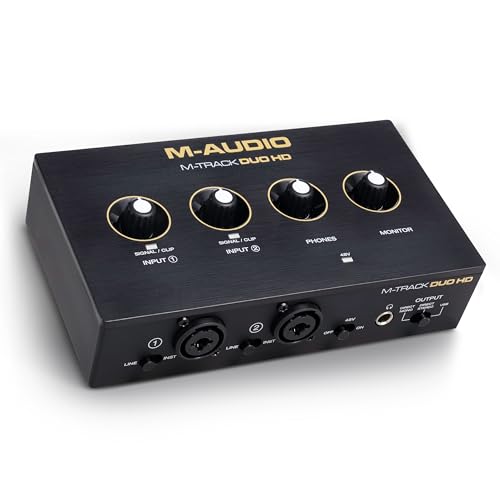
The M-Track Duo HD is built for versatile podcasting and streaming, featuring two inputs and two outputs with 24-bit/192kHz fidelity. Its USB-C interface supports zero-latency monitoring via a direct/USB monitor switch, enabling precise real-time monitoring without delay. Suitable for co-hosted podcasts or simple interview setups, it supports mic, guitar, or line-level sources while maintaining clarity and intelligibility across voices and instrumentation.
MAONO E2 Gen2 Podcast Bundle

The MAONO E2 Gen2 bundle is designed for quick podcasting and streaming with two XLR inputs and a built-in preamp offering up to 60dB gain. USB-C connectivity and a 3.5mm port enable easy pairing with phones and computers, supporting smooth and clear audio. Notably, the E2 Gen2 adds eight customizable sound effects to enhance engagement, making it a practical option for podcasters who want to insert short, branded audio cues without external gear. Noise reduction helps keep recordings clean, especially in home environments.
Buying Guide: Key Purchase Considerations
- Inputs and outputs: Match the number and type of mics, instruments, and line sources you plan to use. If you often record two people, prioritize interfaces with at least two mic inputs and the ability to add line/instrument channels.
- Preamp quality and noise: Look for low-noise mic preamps and a comfortable gain range. Interfaces with Air or Auto Gain features can simplify setup, especially for beginners.
- Monitoring and latency: Direct monitoring or zero-latency monitoring helps you hear takes in real time without feedback loops. USB-C reliability is a plus for modern laptops and desktops.
- Software ecosystem: Some interfaces ship with bundled software or DAW licenses; consider whether you’ll benefit from these tools for podcasting, editing, or music production.
- Portability vs. studio readiness: If you often record away from your desk, a compact, rugged unit with bus power can be advantageous. For studio setups, larger控制 interfaces may offer more routing options.
- Special features: Loopback for capturing system audio, built-in effects, and sound effect pads can add value for content creators who mix voiceovers with multimedia elements.
- Build quality and warranty: A longer warranty (such as a 5-year term) often reflects confidence in durability and long-term reliability, especially for travel or live-work environments.
Overall, the best choice depends on your hosting style, number of speakers, and whether you prioritize portability or expandability. The options above balance solid preamps, straightforward USB connectivity, and practical features that streamline podcast workflows while preserving audio integrity for engaging listener experiences.