The following guide highlights top 4×6 photo printers that work well with smartphones, offering fast, miniaturized printing for memories on the go. Each option uses dye-sublimation technology for durable, vibrant photos and connects via Wi‑Fi or Bluetooth for easy printing from iPhone, Android, or laptops. Compare features, paper options, and connectivity to choose a bundle that fits your needs—from pocket-sized travel printers to desktop-friendly models.
| Product | Brand | Highlights |
|---|---|---|
| Liene M100 4×6” Photo Printer | Liene | Wi-Fi hotspot printing, 100 sheets, 3 cartridges, compact portable design |
| KODAK Dock Plus 4PASS Instant Printer | KODAK | Docking charging, 2-in-1 home/gift use, wireless Bluetooth |
| YOTON Photo Printer | YOTON | 54 sheets, AR video printing, built-in Wi‑Fi |
| Liene Amber M110 Bluetooth Printer | Liene | Dual tray for 4×6 and 3×3, quick Bluetooth pairing |
| HPRT CP4100 Photo Printer | HPRT | Wi‑Fi, 20 sheets, ribbon, durable prints |
Liene M100 4×6” Photo Printer — 4×6 Instant Prints

The Liene M100 delivers compact, mobile printing with thermal dye-sublimation technology to produce vibrant 4×6 photos. The package includes 20 sheets of paper and one cartridge, plus an additional box containing 80 sheets and two cartridges. Its minimalist, magnetic design makes storage simple, while built-in Wi‑Fi creates a direct print path from smartphones. The printer supports iPhone, Android, and PCs and touts water-, scratch-, and fade-resistant photos thanks to a laminated protective layer. If you print often on the go, this model aims to balance portability with color fidelity.
Key considerations for this model include the reliability of the built‑in hotspot for direct device connection, the total paper capacity (100 sheets in the full kit), and the ease of head cleaning if prints smudge. It’s designed for casual use and family memories, offering straightforward operations without a PC tether.
KODAK Dock Plus 4PASS Instant Printer

The Kodak Dock Plus 4PASS integrates a docking station with wireless printing, enabling easy photo printing from iPhone, iPad, and Android devices. It supports Bluetooth connectivity and provides a convenient home or classroom printing solution. The 4PASS technology prints in durable, vivid color with a laminating final layer, producing photos that resist water, fingerprints, and fading. Bundled with a substantial sheet count, this model emphasizes cost efficiency and convenience for users who want to print memories at home or as a gift project.
Considerations include the ongoing cost per print, the ease of syncing devices with the dock, and how well it fits into a living space or desk. It’s a solid option for families or small offices seeking an affordable, straightforward 4×6 print workflow.
YOTON Photo Printer — 4×6 With AR Video Printing

The YOTON printer emphasizes compact portability with a 7.1″ x 4.9″ footprint and built-in Wi‑Fi to print from iOS, Android, or laptops. Utilizing advanced dye-sub printing, it yields vivid color, sharp details, and a durable finish; one ink ribbon typically prints 40–50 photos. A notable feature is AR video printing, enabling creative, interactive prints. The device targets travelers and social users who want quick, on-site photo prints without cables, pairing performance with a sleek design.
Key choices to weigh include print speed, the balance of cost per photo with the included sheets, AR printing availability, and whether the device’s size matches your typical travel or desk footprint.
HPRT CP4100 Photo Printer

The HPRT CP4100 offers Wi-Fi printing with a compact, portable footprint and a bundled 20 sheets of photo paper plus a ribbon. Its dye-sublimation printing yields layered color with a protective laminate for resistance to water, fingerprints, and fading. The device is designed for quick smartphone prints—from iPhone to Android—directly from a wireless connection, making it suitable for on-the-go use or small gatherings. The bundle approach helps control ongoing costs by including essentials for a period of use without immediate refills.
Considerations include the total print cost over time, how often you’ll replace ribbon and paper, and how the planner handles large batches. The CP4100 is positioned as a practical option for casual home printing and event snapshots.
HP Sprocket Studio Plus 4×6 Printer
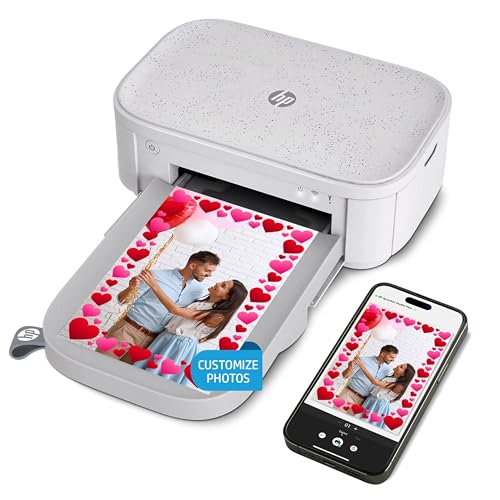
The HP Sprocket Studio Plus focuses on creative photo printing with 4×6 size and wireless printing directly from a smartphone. It promotes customizable outputs—stickers, frames, and filters—for unique prints. The printer prints quickly and aims to deliver high-quality color in a compact form suitable for home use or small classrooms. Its app ecosystem supports editing and personalization before printing, which is attractive for social sharing and scrapbooking projects.
Important factors include how much control you want over post-processing within the app, the durability of prints, and the availability of additional consumables that keep the printer ready for creative sessions without frequent reordering.
KODAK Dock ERA Plus 4PASS Instant Printer
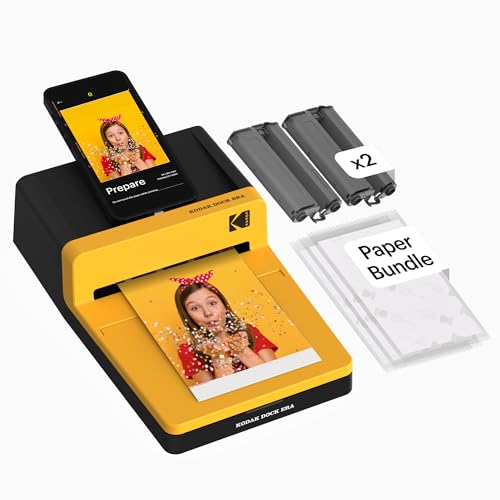
The Dock ERA Plus combines ease of use, docking charging, and wireless Bluetooth for quick printing from iPhone, iPad, or Android devices. It adheres to Kodak’s 4PASS technology to produce durable, vivid 4×6 photos with a laminate-like finish that resists water, fingerprints, and fading. The device is designed for convenient home use and can be a practical entry point for those who want a reliable, straightforward printing routine alongside occasional gift projects. The era of desk-friendly dock printers remains appealing in family settings or shared spaces.
Key considerations include how often you’ll dock devices for charging vs. printing, the total cost of consumables, and whether the dock’s footprint fits your workspace. The Dock ERA Plus is a solid option for consistent, reliable home printing with a user-friendly experience.
Buying Guide: Key Purchase Considerations
Printing needs differ by user, so consider these factors to choose the right 4×6 printer:
- Print technology and durability: Dye-sublimation yields vibrant colors with a protective laminate. If you value longevity and resistance to water or fading, this is often a top criterion.
- Connectivity: Look for direct Wi‑Fi hotspot, Bluetooth, or dock charging features. Direct connections reduce network interference and simplify mobile printing from iPhone, Android, or laptops.
- Paper and cartridge availability: Check the total sheets included in bundles and the cost of replacement media and ribbons. Some models include large starter packs, while others rely on ongoing purchases.
- Portability vs. workspace: Compact devices suit travel or small desks, while larger models may offer higher capacity and faster prints for home use or events.
- Ease of use: User-friendly apps, quick setup, and reliable print heads contribute to fewer headaches during everyday printing.
- Multi-format support: Some printers offer 3×3 or sticker media options in addition to standard 4×6 prints. Consider whether you want dual trays or single-media setups.
- Value and bundles: Bundles that include a mix of sheets and ribbons can reduce the total cost of ownership, especially if you plan frequent printing.
Multifunction considerations include whether you prefer a dedicated desk-based printer or a portable option for trips or events, the level of color fidelity you expect, and the overall cost per print over time. By aligning these factors with your typical use—family albums, travel photos, or scrapbooks—you can select a 4×6 printer that best matches your needs.