When it comes to taking notes digitally, having the right iPad or compatible accessory can make a huge difference in productivity and creativity. From professional-grade Apple Pencils to versatile Android tablets with stylus support, this guide covers the top tools designed to enhance your note-taking experience. Below is a summary table highlighting the key features of the selected products for quick comparison.
| Product | Key Features | Compatibility |
|---|---|---|
| Samsung Galaxy Tab S6 Lite (2025) | Includes S Pen, crystal-clear display, Dolby Atmos, long battery life | Android Tablet |
| Apple Pencil (2nd Generation) | Pixel-perfect precision, tilt & pressure sensitivity, magnetic charging | Selected iPad Pro, iPad Air (4th/5th gen), iPad mini 6th gen |
| Apple Pencil (USB-C) | Low latency, tilt sensitivity, USB-C charge & pairing | Wide iPad Pro, Air (generations 4 & 5), iPad mini, iPad 10th gen |
| HUION Note 2-in-1 Digital Notebook | Digital pen & A5 pad, Bluetooth, audio recording & sync | iOS/Android devices, independent notebook use |
| XPPen 3 in 1 Color Digital Notebook | Three color modes, anti-glare LCD, high refresh rate, paper feel | Standalone digital notebook, compatible with multiple OS |
Samsung Galaxy Tab S6 Lite (2025) Android Tablet

The Samsung Galaxy Tab S6 Lite provides an excellent Android alternative for note-taking enthusiasts. Its included S Pen offers smooth and precise writing, allowing for seamless note taking, document editing, and creative drawing. The 10.4-inch crystal-clear display makes reading and writing more enjoyable, complemented by Dolby Atmos surround sound for multimedia needs.
This tablet boasts expandable storage and a long battery life, making it ideal for students and professionals alike. Its sleek and lightweight design in stylish colors ensures portability, making it perfect for on-the-go use.
Apple Pencil (2nd Generation) for iPad

The Apple Pencil (2nd Generation) is engineered for users seeking pixel-perfect precision and responsiveness. It supports tilt and pressure sensitivity for detailed sketches, notes, or annotations. The feature-rich pencil attaches magnetically to compatible iPads for wireless pairing and charging.
This stylus works flawlessly with various iPad models, including the Pro 12.9-inch and 11-inch versions, as well as the iPad Air (4th and 5th generation) and the iPad mini (6th generation). Its flat edge and tap feature allow users to quickly switch between tools, enhancing note-taking efficiency.
Apple Pencil (USB-C) for iPad Note Taking
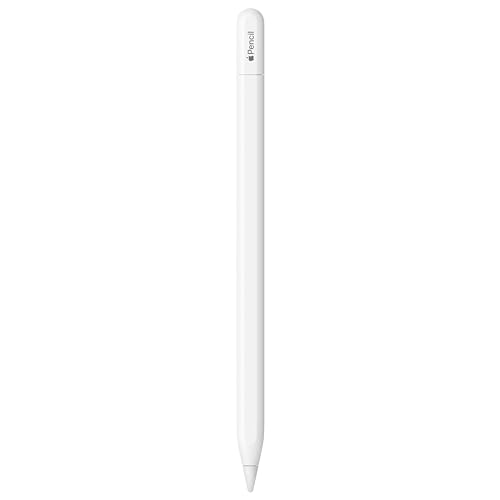
This Apple Pencil (USB-C) version is compatible with a broad range of newer iPads, including the latest Air, Pro, mini, and standard iPad models. It excels in providing low latency and tilt sensitivity, essential for natural handwriting and drawing.
The USB-C connectivity allows for easy charging and pairing without needing additional cables. It magnetically attaches to compatible iPads, making it convenient to carry and store while maintaining seamless integration within your workflow.
HUION Note 2-in-1 Digital Notebook with Wireless Pen

The HUION Note 2-in-1 Digital Notebook combines a traditional pen-and-paper feel with modern digital note-taking technology. Its battery-free digital pen captures handwriting on the included A5 notepad and transfers it instantly to mobile devices via Bluetooth.
With the companion app, users can store, organize, and share notes effortlessly. Unique features like audio recording synchronized with notes enhance meeting or lecture retention, providing a holistic note-taking experience that bridges analog and digital worlds.
XPPen 3-in-1 Color Digital Notebook

The XPPen 3-in-1 Digital Notebook stands out with its three color modes—monochrome, light color, and nature color—enabling users to customize the display to their preferences. The AG nano-etched LCD provides a realistic paper-like experience with reduced glare and smooth visuals.
Its 90Hz refresh rate ensures fluid interactions, while the extensive pressure levels of the battery-free pencil support precise writing and drawing. This device serves well for note-taking, reading, meetings, and study sessions, offering versatility for various users.
Buying Guide for iPad and Digital Note-Taking Devices
Choosing the right device for note-taking depends on multiple factors. Here are critical points to consider when selecting an iPad or accessory for your needs.
Compatibility and Ecosystem
Ensure the stylus or tablet is compatible with your existing devices. For Apple users, the Apple Pencil (2nd Generation or USB-C) pairs seamlessly with specific iPad models, providing a native experience. Android tablets like the Samsung Galaxy Tab S6 Lite offer their own stylus support through the included S Pen. Third-party pens can expand compatibility but verify device pairing before purchase.
Precision and Sensitivity
For detailed handwriting or artistic work, choose a pen with pixel-perfect precision and pressure sensitivity. Tilt sensitivity enhances shading and line variation, emulating real pencil strokes. The Apple Pencil series excels in these features, while other digital notebooks offer varying degrees of responsiveness.
Battery Life and Charging
Look for devices with long battery life or convenient charging methods, such as magnetic wireless charging or fast USB-C charging. Battery-free pens like those from HUION and XPPen eliminate charging worries but usually require specialized displays.
Display Quality and Size
The screen size and quality impact the comfort of note-taking. Larger displays provide more writing space, while high-resolution and anti-glare screens reduce eye strain and glare. Tablets often have vibrant displays with multimedia capabilities, whereas digital notebooks focus on paper-like screens optimized for writing.
Portability and Design
Sleek, lightweight designs are preferable for students and professionals on the go. Consider the device’s weight, thickness, and color options based on your daily routine and style preferences.
Note Management Features
Apps and software that sync, organize, and share notes elevate the note-taking experience. Features like audio recording linked to notes or real-time syncing to smartphones and tablets are beneficial for lectures and meetings.
Budget Considerations
Prices vary widely between tablets, styluses, and digital notebooks. Assess your budget against the features you need most to find the best value. Sometimes, investing in a quality stylus for an existing device can be more cost-effective than purchasing a new tablet.