Choosing the best wireless network adapter for gaming is key to achieving lag-free, high-speed internet connections on your PC or laptop. For gamers, dual-band Wi-Fi adapters equipped with strong antennas and the latest wireless standards ensure smooth online gameplay without interruptions. Below is a summary table showcasing the five top-rated wireless adapters selected for reliable performance, speed, and compatibility.
| Product | Brand | Speeds | Dual Band | Compatible OS |
|---|---|---|---|---|
| TP-Link AC600 USB WiFi Adapter (Archer T2U Plus) | TP-Link | Up to 433 Mbps (5 GHz) | Yes (2.4 & 5 GHz) | Windows XP to 11, Mac OS 10.9-10.14 |
| Nineplus 1300Mbps Dual 5Dbi Antennas USB WiFi Adapter | Nineplus | Up to 867 Mbps (5.8 GHz) | Yes (2.4 & 5.8 GHz) | Windows XP to 11 |
| TP-Link WiFi 6 USB Adapter (Archer TX20U Plus) AX1800 | TP-Link | Up to 1201 Mbps (5 GHz) | Yes (2.4 & 5 GHz) | Windows 10 & 11 |
| TP-Link AC1300 USB WiFi Adapter (Archer T3U) | TP-Link | Up to 867 Mbps (5 GHz) | Yes (2.4 & 5 GHz) | Windows XP to 11, Mac OS X 10.9-10.14 |
| NETGEAR Nighthawk WiFi 6E USB 3.0 Adapter (A8000) | NETGEAR | Up to 3 Gbps (Tri-Band) | Yes (2.4, 5 & 6 GHz) | Windows PC |
TP-Link AC600 USB WiFi Adapter for Desktop With Dual Band

The TP-Link AC600 USB WiFi Adapter offers long-range and lag-free connections, enhancing any desktop or laptop to 802.11ac standards, which are three times faster than wireless N speeds. It supports simultaneous dual-band 2.4 GHz and 5 GHz frequencies, allowing speeds up to 200 Mbps on 2.4 GHz and 433 Mbps on 5 GHz. Equipped with a high-gain 5dBi antenna, this adapter ensures stable connections ideal for gaming, streaming, or surfing without buffering. It supports multiple Windows versions alongside Mac OS, providing wide-ranging compatibility and secure Wi-Fi encryption methods like WPA2.
Nineplus Dual 5dBi Antennas USB WiFi Adapter 1300Mbps

The Nineplus Wireless USB WiFi Adapter supports dual-band technology with speeds up to 1300Mbps, delivering 867 Mbps on 5.8 GHz and 400 Mbps on 2.4 GHz. Its strong dual 5dBi high-gain antennas significantly improve Wi-Fi reception and transmission, making it perfect for overcoming weak Wi-Fi signals in larger spaces or bedrooms. This wireless adapter is ideal for upgrading older desktops or laptops with malfunctioning Wi-Fi cards, offering stable connections for gaming, HD streaming, and online meetings without interruptions.
TP-Link WiFi 6 USB Adapter (Archer TX20U Plus) AX1800

The TP-Link Archer TX20U Plus brings WiFi 6 (802.11ax) technology to desktops, delivering AX1800 wireless speeds with up to 1201 Mbps on 5 GHz and 574 Mbps on 2.4 GHz. This adapter requires a USB 3.0 port for optimal performance and includes a high-gain dual-band 5dBi antenna to provide strong, lag-free connections. Advanced WPA3 security support enhances wireless protection. It’s perfect for gamers who demand cutting-edge speeds and reduced network congestion on Windows 10 or 11 systems.
TP-Link AC1300 USB WiFi Adapter (Archer T3U) with MU-MIMO

The Archer T3U AC1300 WiFi Adapter supports strong dual-band connections with speeds up to 867 Mbps on 5 GHz and 400 Mbps on 2.4 GHz. Featuring MU-MIMO tech and beamforming, it provides stable, lag-free Wi-Fi ideal for online gaming and streaming. Its USB 3.0 interface delivers 10 times faster data transfer than USB 2.0. Compact and portable, this adapter supports a variety of Windows versions and Mac OS, making it an easy connectivity upgrade for both desktops and laptops.
NETGEAR Nighthawk WiFi 6E USB 3.0 Adapter A8000 Tri-Band
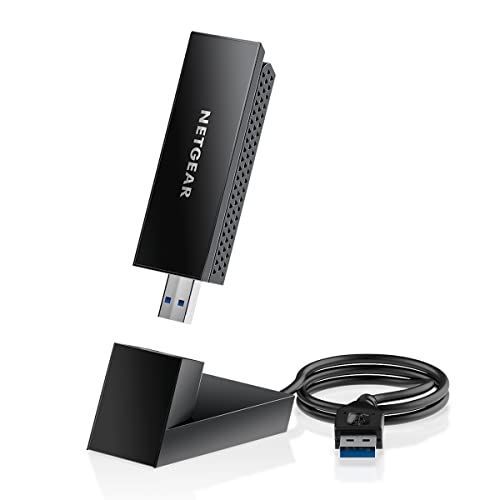
The NETGEAR Nighthawk A8000 is a premium WiFi 6E tri-band adapter offering speeds up to 3 Gbps, featuring exclusive access to the 6 GHz band, as well as 2.4 and 5 GHz bands. This adapter is designed for high-definition video conferencing, gaming, and streaming with a flippable antenna to find the strongest Wi-Fi signal and maximize coverage. Easy plug-and-play with any WiFi 6 or 6E router, it’s an excellent choice for users seeking next-level wireless speeds on Windows PCs.
Buying Guide for Wireless Network Adapters for Gaming
When selecting a wireless network adapter for gaming, consider several critical factors that affect performance, connectivity, and compatibility.
Speed and Wireless Standards
Look for adapters supporting the latest Wi-Fi standards such as 802.11ac (Wi-Fi 5) or 802.11ax (Wi-Fi 6/6E). Wi-Fi 6 adapters offer faster speeds, better handling of multiple connections, and reduced latency, which is essential for gaming. Speed ratings (e.g., AC1300, AX1800) indicate maximum theoretical throughput—choose one that matches your internet plan and router capabilities.
Dual Band vs. Tri-Band Support
Dual-band
Antenna Quality and Placement
Adapters with high-gain external antennas provide better signal stability, extended range, and penetration through obstacles. Some models feature multiple antennas to enhance reception. Consider whether the adapter’s form factor (USB stick, antenna size) fits your desktop or laptop setup.
Compatibility and Ports
Ensure the adapter supports your operating system, typically Windows versions or Mac OS. USB adapters usually work with USB 3.0 ports to optimize speed, but backward compatibility with USB 2.0 can be useful. Driver-free or easy installation is a plus.
Security Features
The adapter should support modern Wi-Fi security protocols like WPA3 and WPA2 to keep your network secure, especially important for wireless gaming environments.
Latency and Stability
For gaming, low latency and stable connections are critical. Choose adapters with MU-MIMO and beamforming technologies, which allow simultaneous data streams and focus signals toward your device to reduce lag and interruptions.
In summary, balance your budget with required features like Wi-Fi standard, speed, antenna gain, and compatibility to select the best wireless network adapter for your gaming needs.