Finding the best wireless keyboard and mouse combo for Mac can enhance your productivity and ensure seamless compatibility with your Apple devices. For MacBook Pro, MacBook Air, iPad, and other macOS setups, choosing peripherals that match Apple’s design, function well across devices, and offer ergonomic comfort is key. Below is a summary of top wireless keyboard and mouse combos designed specifically with Mac users in mind, featuring Bluetooth connectivity, rechargeable batteries, and Mac-specific layouts.
| Product | Compatibility | Key Features |
|---|---|---|
| seenda Bluetooth Keyboard and Mouse | MacBook Pro/Air, iPad, Mac | Multi-device pairing, Type-C recharge, whisper-quiet typing |
| ProtoArc Backlit Keyboard and Mouse | Mac OS 10.12+, iPhone, iPad | Backlit keys, triple Bluetooth device switch, Bluetooth 5.1 |
| Logitech MK955 Signature Combo | Windows and Mac multi-OS | Quiet typing/clicking, customizable keys, recycled plastic mouse |
| Logitech Pebble 2 Combo for Mac | macOS, iPadOS, iOS | Slim design, easy device switching, recycled materials |
| Logitech MX Keys S Combo for Mac | MacBook Pro/Air, iMac, iPad | Backlit, USB-C charging, macOS programmable functions |
seenda Bluetooth Keyboard and Mouse for Mac

The seenda SKM64-2 combo is designed specifically for Apple users with a standard Apple layout, facilitating smooth and accurate typing for MacBook Pro, MacBook Air, iPad, and Mac desktops. It supports advanced Bluetooth modes (BT1/BT2/BT3) allowing easy switching between three connected devices without re-pairing.
This wireless set features a Type-C rechargeable battery accompanied by an energy-efficient auto-sleep mode to extend standby time up to 200 hours. Both keyboard and mouse are crafted for whisper-quiet typing and clicking, with noise-optimized key stability, great for focused productivity in silent environments.
The full-size keyboard features a slim stainless steel design in space gray to blend well with Mac aesthetics.
ProtoArc Backlit Bluetooth Keyboard and Mouse

The ProtoArc KM100-A offers a full-size layout closely resembling Apple’s Magic Keyboard optimized for Mac OS 10.12 or newer. Its compatibility covers MacBook lineup, iPads, and iPhones, utilizing Bluetooth 5.1 for stable connection.
This combo features soft white LED backlit keys with three adjustable brightness levels, ideal for dim lighting conditions. The backlit functionality helps reduce eye strain while maintaining elegant aesthetics.
Multi-device users benefit from the ability to connect up to three devices simultaneously and cycle between them effortlessly via dedicated mode buttons, although it connects strictly via Bluetooth without USB dongle support.
Logitech MK955 Signature Slim Wireless Keyboard and Mouse Combo
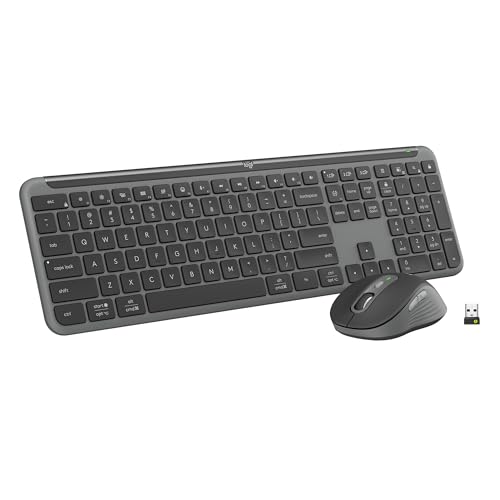
The Logitech MK955 Signature is designed for users who need to switch between personal and work computers seamlessly, supporting multi-OS usability including macOS and Windows. It includes a full-size Bluetooth keyboard with laptop-style keys and a contoured mouse made from recycled plastic to align with eco-conscious setups.
Customization through the Logi Options+ app allows programmatic control over keys, buttons, and shortcuts enhancing workflow efficiency. The combo features quiet typing and clicking suitable for shared or quiet working environments.
Logitech Pebble 2 Combo for Mac

The Logitech Pebble 2 Combo pairs a slim, portable keyboard and mouse optimized for Apple’s ecosystem including macOS, iPadOS, and iOS. This compact set is made with recycled plastic, emphasizing sustainability.
It supports easy switching across up to 3 Bluetooth-connected Apple devices with a simple button press, making it perfect for users managing multiple Apple gadgets.
The minimalist design and lightweight construction make the combo convenient for mobile use or multi-device desktop setups.
Logitech MX Keys S Combo for Mac

The Logitech MX Keys S Combo is tailored for Mac users with a Mac-specific key layout and a stylish Space Gray finish. It includes a backlit keyboard with spherically dished keys shaped for fingertip comfort, delivering a laptop-like, fluid typing experience.
The combo supports USB-C charging and offers programmable functions customized through the Logi Options+ software for macOS. Compatibility spans MacBook Pro, MacBook Air, iMac, and iPad models.
The accompanying mouse features fast scrolling and smooth wireless performance enhancing productivity.
Buying Guide: Choosing The Best Wireless Keyboard And Mouse For Mac
Selecting the right wireless keyboard and mouse combo for your Mac setup involves balancing compatibility, connectivity, comfort, and features. Here are key factors to consider:
Mac-Specific Layout and Compatibility
Look for accessories designed with an Apple-specific keyboard layout including command, option, and function keys positioned as per macOS conventions. Verify compatibility with your macOS version and device model to ensure full functionality, especially for media and function keys.
Connectivity Options
Bluetooth 5.x is preferred for stable low-latency wireless connections and energy efficiency. Some devices offer multi-channel Bluetooth allowing switching between multiple Macs or Apple devices. USB dongle support is less common in Mac-optimized combos but may be useful for devices with limited Bluetooth.
Battery Life And Charging
Rechargeable batteries with USB-C charging provide convenience and sustainability. Some combos offer long battery life — measured in weeks or months — plus intelligent auto-sleep modes to extend usage time. Avoid models requiring frequent battery replacements.
Typing Comfort And Noise Level
Consider keyboards with scissor-switch or low-profile keys for quiet, precise typing that mimics Apple’s Magic Keyboard. Backlit keys enhance usability in low light. Comfortable mice with ergonomic shapes and quiet clicking add to a productivity-enhancing setup.
Multi-Device Support And Switching
If you use multiple Apple products simultaneously (Mac, iPad, iPhone), choose combos capable of pairing with several devices and switching seamlessly using dedicated keys or buttons.
Design And Build Quality
The design should match your Mac’s style and workspace aesthetics. Aluminum or stainless steel construction offers durability and an Apple-like premium feel. Compactness and portability may be important if you move between workspaces frequently.
Prioritize which features matter most for your daily workflow to select the best wireless keyboard and mouse combo that complements your Mac experience perfectly.