Finding reliable external storage that works seamlessly with a MacBook Pro is essential for backups, media libraries, and expanding workspace. This guide highlights five top options that pair well with macOS, emphasizing compatibility, speed, and security. Each pick includes key features to help you compare and decide.
| Product | Brand | Capacity | Connection | Key Benefit |
|---|---|---|---|---|
| WD 2TB My Passport for Mac | WD | 2 TB | USB 3.1/USB 3.0 | Mac-ready with password protection |
| WD 5TB My Passport Ultra for Mac | WD | 5 TB | USB-C/USB 3.1 | Ransomware defense and encryption |
| Seagate Portable 2TB External | Seagate | 2 TB | USB 3.0 | Plug-and-play with Windows and Mac |
| WD 2TB Elements Portable | WD | 2 TB | USB 3.0/USB 3.2 Gen 1 | Compact, plug-and-play |
| SSK Portable SSD 1TB | SSK | 1 TB | USB-C/USB 3.2 Gen2 | High-speed external SSD for Mac |
WD 2TB My Passport for Mac

Designed for Mac, this portable hard drive offers a slim, durable design ideal for carrying important files. It is Mac-ready and USB-C compatible for effortless connectivity, enabling straightforward backups and data transfer with a familiar Mac experience. The built-in password protection helps secure sensitive data while maintaining compatibility with macOS environments. The drive and software are tailored for users who want a reliable, easy-to-use storage solution for daily use, media libraries, and time-machine backups.
WD 5TB My Passport Ultra for Mac
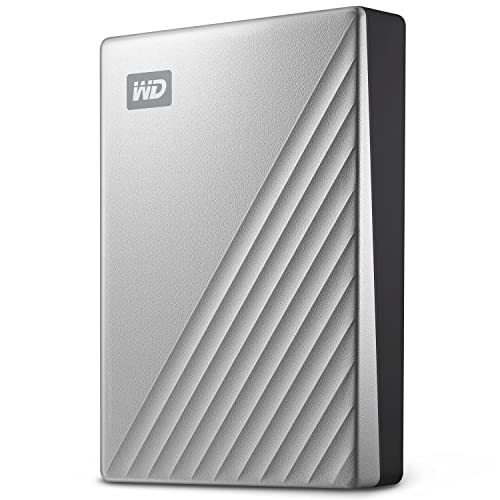
This larger-capacity option is designed for Mac users needing substantial space with robust security. It features USB-C and USB 3.1 connectivity, making it versatile for modern MacBooks and older models alike. The drive includes 256-bit AES hardware encryption and password protection, offering defense against unauthorized access while supporting regular backups of photos, videos, documents, and business files. Its refined metal exterior adds a premium look and durable build for travel or desk use.
Seagate Portable 2TB External

Seagate’s Portable Drive is a versatile choice for Mac and PC users who value simple backup workflows. With plug-and-play functionality, it recognizes automatically when connected, making it convenient for quick data transfers and quick backups. It supports cross-platform use and is suited for expanding media libraries, photos, and documents, especially when you want a dependable, no-fuss external drive that works with multiple devices and operating systems.
WD 2TB Elements Portable

WD Elements Portable emphasizes compact design and plug-and-play usability, making it a reliable companion for MacBook Pro users who need extra storage without bulk. It supports USB 3.0 and USB 3.2 Gen 1 interfaces, delivering efficient performance for backups, photo archives, and large media collections. The drive is known for straightforward setup and dependable cross-platform compatibility, suitable for laptops on the go.
SSK Portable SSD 1TB

SSK’s portable SSD delivers high-speed performance with USB-C and USB 3.2 Gen2 interfaces, ideal for MacBook Pro users who require fast data transfer for large files, apps, and media libraries. The 1TB capacity is well-suited for travel, with smart health monitoring features and SMART integration to track drive health. Its solid-state design reduces latency and improves reliability compared to traditional HDDs, making it a strong choice for professionals who value speed.
Buying Guide: Key Purchase Considerations
- Compatibility and formatting: Ensure the drive is compatible with macOS and formatted for HFS+ or APFS for Time Machine backups. Some drives ship pre-formatted for Windows; you may need to reformat.
- Drive type and speed: SSDs offer higher speeds and durability but at a higher price per gigabyte. HDDs provide large capacities at a lower cost, making them suitable for bulk backups and media libraries.
- Interface and bandwidth: USB-C with USB 3.1/3.2 Gen 1 or Gen 2 delivers faster transfers, especially important for large files. Adapters may be required on older Macs.
- Security and encryption: Look for hardware encryption and password protection to safeguard sensitive data. This is especially important for portable drives used on the go.
- Portability and durability: Consider the form factor, weight, and build quality. Metal enclosures tend to be more durable for travel than plastic shells.
- Backup software and features: Some drives include bundled backup utilities, ransomware protection, or Time Machine compatibility, which can simplify data protection workflows.
- Warranty and support: A longer warranty and responsive customer support reduce long-term ownership risk, especially for professional users.
- Future-proofing: If you anticipate expanding storage needs, opt for drives with larger capacities or high-velocity SSDs to minimize the need for frequent upgrades.
When choosing among these options, assess your typical workload: for large media archives and frequent backups, a capable HDD like the My Passport or Elements may suffice, while professionals handling video edits or large files may benefit from the speed of an SSD like the SSK Portable SSD. Cross-platform usage and security features should also guide your final decision to ensure seamless macOS integration and data protection.