Finding a reliable wide-format scanner is essential for architects, designers, engineers, and offices handling large documents. This guide highlights five top options, from portable wide-format A3 flatbeds to expansive 36-inch scanners, to help you compare capabilities, speeds, and paper handling. Each pick is evaluated on document size support, speed, versatility, and connectivity to suit modern workflows. Read on to see how these scanners perform for large drawings, blueprints, posters, and cad plans, with practical buying insights at the end.
| Product | Brand | Key Benefit |
|---|---|---|
| Plustek Wide-Format Color Duplex Document Scanner S30 | Plustek | Up to 12″ wide, long scans up to 200″ |
| Colortrac SmartLF 36-inch Wide Format Scanner | Colortrac | Massive 36″ wide color scanning |
| VIISAN VF3240 Large Format Flatbed Scanner | VIISAN | A3 large-format flatbed with fast 4-second scans |
| Plustek OS1180 Flat Scanner (A3) | Plustek | High-speed flatbed for A3 documents |
| Plustek OpticSlim 1680 | Plustek | High-speed tabloid-size flatbed with dual view |
Plustek Wide-Format Color Duplex Document Scanner S30

The Plustek S30 has practical office-scale versatility, supporting documents up to 12 inches wide and long scans up to 200 inches. Its duplex auto document feeder boosts productivity in high-volume environments, enabling two-sided scanning for faster archiving of forms, invoices, and blueprints. This model excels for mixed workloads where occasional wide-format documents intersect with standard letter-sized files, helping to avoid multiple devices. It is designed for office use, aiming to balance performance with cost efficiency.
Key features include flexible paper handling for diverse formats—ranging from standard office paper to blueprints and engineering drawings. The S30 reduces the need for separate wide-format equipment and streamlines workflow with fast duplex scanning. Its compact footprint makes it suitable for shared workspaces while delivering consistent results across varying document types.
Colortrac SmartLF 36-inch Wide Format Scanner
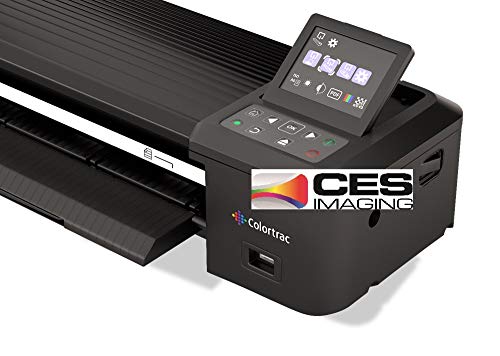
The Colortrac SmartLF 36-inch scanner is built for large-format color capture, making it ideal for architectural plans, city maps, and large posters. Its expansive 36-inch width supports full-width scans without the need to stitch multiple images. While designed for color accuracy and detail, users should consider space and power requirements for a dedicated large-format device. It is particularly appealing for studios and design firms handling frequent wide-format outputs and color-critical projects.
Highlights include robust color fidelity, efficient wide-format performance, and compatibility with professional workflows. The scanner supports smooth integration into CAD and publishing pipelines, enabling large documents to be digitized with consistent color and detail. As a larger investment, it’s best suited for teams that consistently require wide capture in a single pass.
VIISAN VF3240 Large Format Flatbed Scanner

The VIISAN VF3240 is an A3 large-format flatbed scanner designed for high-quality scans of photos, CAD drawings, and large documents up to 12″ x 17″. It features a frameless design and fast 4-second color scans at 200 dpi, with a maximum optical resolution of 2400 x 2400 dpi and 48-bit color depth. The device supports Windows and Mac, and its auto-scan capability and four-panel controls enable convenient one-touch operation for common tasks, such as emailing or saving to PDF. It is well-suited for studios, classrooms, and small businesses handling sizable documents.
Consider its flatbed limitations when comparing to feed-based scanners: it handles diverse media but may be slower for extremely high-volume workflows. Still, the VF3240 is a strong option for users needing manual placement control and high-resolution results on thick or fragile media.
Plustek OS1180 Flat Scanner (A3)

The Plustek OS1180 is a flatbed scanner optimized for A3 documents and graphics. Its maximum scan size is 11.7″ x 17″ with a fast LED-based light source for immediate readiness and no warm-up. The One-Touch button presets streamline use, targeting libraries, schools, and small offices that require quick digitization of large-format materials. This device is particularly advantageous for users prioritizing simplicity and speed in large-format scanning tasks, while preserving image quality across varied media.
Trade-offs include the lack of a feeder for batch processing, which makes it less suitable for heavy scanning workflows. However, for occasional large-format scans of posters, charts, and designs, the OS1180 offers a reliable and efficient option with straightforward operation.
Plustek OpticSlim 1680

The Plustek OpticSlim 1680 is designed for high-speed tabloid-size scanning with a focus on efficiency. It offers fast scanning in Gray mode at 3 seconds for 300 dpi and about 5 seconds for color at tabloid size, with dual-view capabilities to preview results quickly. The device emphasizes one-key operation and intuitive controls, enabling quick destination selection and file naming. It suits desks and studios that prioritize fast turnaround and simple workflows for large documents and artwork.
Consider its strengths for quick digitization tasks, while noting that flatbed speed and handling of very large originals may not match dedicated large-format feeders. It’s a solid fit for users needing rapid, high-quality scans of tabloid-scale materials with streamlined operation.
Buying Guide: Wide-Format Scanner Considerations
When choosing a wide-format scanner, consider document width and length, media types, and the planned workflow. Here are key purchase considerations and comparisons to help you choose wisely:
- Scan size and format: For architectural plans and large drawings, prioritize devices that support the full required width (e.g., 12″ to 36″ or more) and long-length scanning if needed. Flatbeds offer flexibility for unusually thick or fragile media, while feeders excel in high-volume scenarios.
- Color accuracy and resolution: If color fidelity matters (blueprints with color-coding, posters), look for higher optical DPI and color depth. Models like the Colortrac SmartLF emphasize wide-format color rendering, while others focus on speed.
- Speed vs. batch capability: Feed-based scanners provide higher throughput due to duplex scanning, while flatbeds offer control and media versatility. Balance speed with the expected workload to avoid over-investing or underutilization.
- Media handling: Consider whether you need to scan blueprints, maps, photos, or books. Some models handle fragile media well, while others are optimized for standard documents and large sheets.
- Software and compatibility: Ensure compatibility with your operating system and CAD or publishing tools. Some devices include software for OCR, PDF creation, and image enhancement; others rely on generic drivers and workflows.
- Space and integration: Large-format scanners require significant desk or bench space. Plan for power and data connections, and assess whether a dedicated workstation or shared office setup is needed.
- Maintenance and reliability: Look for devices with robust build quality and service options. A longer warranty or readily available replacement parts can reduce downtime in busy offices.
- Cost of ownership: While large-format scanners can be costly, evaluate total cost of ownership, including maintenance, software, and potential productivity gains from faster digitization and improved document management.
In summary, match the scanner to your typical documents, volume, and workspace. If you routinely process large-format color plans, a 36-inch Colortrac solution may be worthwhile. For mixed workloads, consider a combination of a fast feeder-based scanner and a flatbed for delicate items. Always verify driver support and software compatibility with your existing CAD and document-management systems.