Setting up a stable, ergonomic, and space-saving monitor arrangement is easier with the right VESA mount. This guide highlights five top options that fit a range of screens from 13″ to 49″ and support different mounting bases, including clamp, grommet, and wall-mount configurations. Each pick emphasizes stability, range of motion, and cable management to help you optimize your home office or gaming setup without clutter. Read on for quick product overviews, a buying guide, and practical considerations for choosing the best VESA mount.
| Product | Brand | Mount Type | VESA | Weight Capacity |
|---|---|---|---|---|
| WALI GSM001XLN | WALI | Gas-spring single monitor arm | 75×75 / 100×100 | Up to 33 lbs |
| WALI GSMP001N | WALI | Gas-spring single monitor arm | 75×75 / 100×100 | Up to 26.4 lbs |
| ErGear Single Arm | ErGear | Fully adjustable arm | 75×75 / 100×100 | Up to 19.8 lbs |
| HUANUO Dual Monitor Stand | HUANUO | Dual arms with clamping / grommet base | 75×75 / 100×100 | Each arm 4.4–19.8 lbs |
| Philips 221V8LB | Philips | Fixed stand with VESA mounting | 75×75 / 100×100 | Not specified |
WALI Heavy Duty Single Monitor Arm GSM001XLN
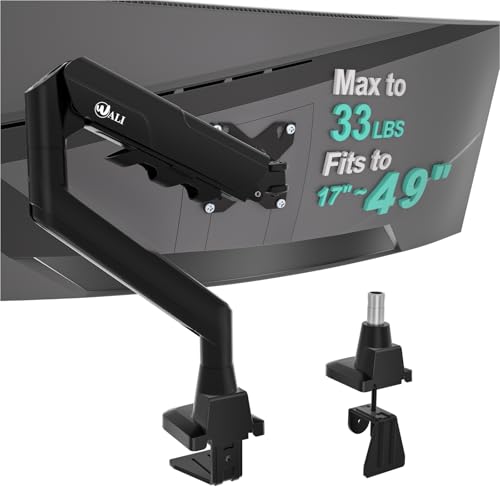
The GSM001XLN from WALI is a versatile single-monitor arm designed for 17–49 inch screens, including ultrawide models, with a robust 33 lb capacity. Its gas-spring mechanism provides zero-drift stability, letting you set a preferred position once and rely on consistent alignment during long sessions. The arm elevates monitors up to about 20.79 inches, helping you reclaim desk space by replacing bulky bases. Cable management runs through the arm, delivering a clean, organized desk area suitable for gaming and office work.
WALI Single Monitor GSMP001N With Gas Spring

This WALI GSMP001N model fits most 17″ to 34″ displays, with a maximum 26.4 lb load for flat screens and 19.8 lb for curved screens. The arm provides full adjustability: swivel, tilt, and rotation across wide ranges to optimize desk layout. A key feature is the gas-spring mechanism that extends up to about 19.3 inches from the desk and raises up to 17.3 inches, helping reduce neck and eye strain with ergonomic positioning.
ErGear Single Monitor Arm For 13–34 Inch Screens

The ErGear arm supports most 13–34 inch monitors up to 19.8 lbs with a broader 40% wider VESA head for added stability. It features a 17.5-inch height reach, up to 18.1 inches of arm extension, and tilt, swivel, and rotation options. The design emphasizes long-term performance with a durable core and smooth, reliable adjustability across daily use, making it suitable for both workstations and entertainment setups.
HUANUO Dual Monitor Stand For 13–32 Inch Screens

HUANUO’s dual-arm stand is designed for 13–32 inch monitors, each holding up to 19.8 lbs with VESA 75x75mm or 100x100mm patterns. It supports a wide adjustment range: height up to 17.5 inches, reach up to 18.1 inches, tilt up to ±80°, swivel ±90°, and 360° rotation. The product also notes dual-clamp and optional grommet mounting for secure desk attachment. Ergonomic positioning minimizes neck and shoulder strain while maintaining a clean desk profile.
Philips 221V8LB 22 Inch Class Monitor

The Philips 221V8LB delivers Full HD visuals on a 22-inch class display with a 100 Hz refresh rate and adaptive-sync technology for smoother motion in videos and games. It includes VESA compatibility for flexible mounting and common I/O options (HDMI, VGA). The combination of crisp imagery and adaptive sync makes it a solid choice for a balanced, all-around monitor in a VESA-based setup focused on clarity and responsive performance.
Buying Guide: Key Considerations For VESA Monitor Mounts
- Screen size, weight, and VESA compatibility: Ensure the mount supports your monitor’s size and weight, and matches the VESA pattern (75x75mm or 100x100mm) on the back of the display.
- Mount type and desk integration: Choose between gas-spring arms for easier reach and height adjustments, dual arms for multi-monitor setups, clamp bases for easy installation on desks, or grommet bases for a cleaner, flush look.
- Range of motion: Consider tilt, swivel, rotation, and extension length to achieve ergonomic eye level and reduce neck strain. Dual-arm models are beneficial for side-by-side configurations.
- Desk space and cable management: Look for integrated cable routing and space-saving designs that free up work surfaces and reduce visible clutter.
- Install simplicity and durability: Tool-free adjustments are helpful for quick changes, while robust build quality ensures long-term stability and smooth motion under frequent use.
- Ergonomic alignment: For extended use, ensure your monitor height aligns with your eyes to keep your head and neck in a neutral position, reducing fatigue.
- Compatibility with multiple screens: If you plan to upgrade to larger or heavier displays, verify weight limits and mounting head stability to avoid sag or wobble.
When selecting a VESA monitor mount, balance the device’s motion range, weight capacity, and your desk configuration. Gas-spring arms offer smooth, one-handed adjustments and are ideal for frequent repositions. For dual setups, ensure the base and arms provide stable support without excessive desk footprint. For wall-mounted options, verify wall stud locations and weight ratings. The right choice will improve comfort, organization, and the overall aesthetics of your workspace without compromising display performance.