The following article highlights top USB WiFi adapters ideal for gaming on a Windows PC. Each option emphasizes high speeds, low latency, and reliable connections to support fast online play, smooth downloads, and clear streaming. Read on to compare features, antenna configurations, and compatibility to find the best fit for your setup.
Summary of selected products:
| Product | Brand | Key Tech | Max Theoretical Speed | Notes |
|---|---|---|---|---|
| Archer TX20U Plus AX1800 | TP-Link | WiFi 6, USB 3.0 | 1800 Mbps | Dual band, WPA3 |
| Nighthawk A8000 | NETGEAR | WiFi 6E, USB 3.0 | AXE3000 (3000 Mbps) | 6 GHz support |
| Archer T2U Plus | TP-Link | WiFi 5/AC, USB | ~600 Mbps | Dual band, long range |
| Nineplus AC1300 | Nineplus | WiFi 5/AC, USB | 1300 Mbps | Long range, dual antennas |
| Archer TXE50UH TXE50UH | TP-Link | WiFi 6E, USB | AXE3000 | 6 GHz, MU-MIMO |
TP-Link Archer TX20U Plus AX1800 Adapter

The Archer TX20U Plus delivers AX1800 wireless speeds across 2.4 GHz and 5 GHz bands, designed to reduce latency for gaming, streaming, and large downloads. It uses USB 3.0 for performance and includes dual 5dBi antennas to improve coverage in typical home layouts. It supports WPA3 and Windows 11/10, making it a practical upgrade for desktop gaming rigs seeking faster, more reliable connections without upgrading internal network hardware.
NETGEAR Nighthawk WiFi 6E USB 3.0 Adapter (A8000)
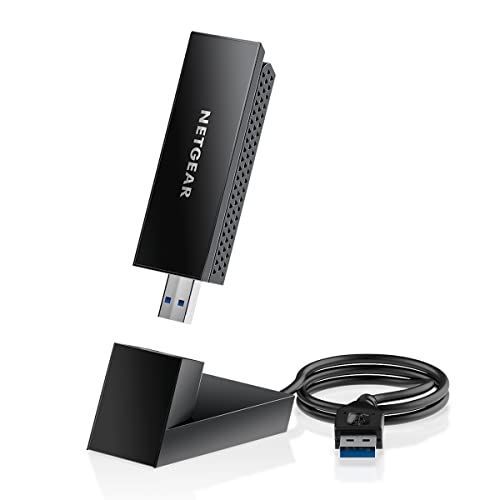
Access the exclusive WiFi 6E band for enhanced gaming, conferencing, and streaming. The A8000 plugs into a desktop or laptop via USB and offers AXE3000 performance (up to 3 Gbps combined). It targets stronger signals with a flippable antenna design and is compatible with any WiFi 6 or 6E router or mesh system, enabling improved reliability and lower latency in busy networks.
TP-Link AC600 USB WiFi Adapter (Archer T2U Plus)

This dual-band USB adapter supports 2.4 GHz and 5 GHz bands with forward-looking 802.11ac (Wi‑Fi 5) speeds. It emphasizes long-range performance with a high-gain antenna, delivering speeds suitable for gaming, streaming, and browsing without significant buffering. The compact unit is compatible with a wide range of Windows versions and Mac OS, making it versatile for mixed-device setups.
Nineplus 1300Mbps USB WiFi Adapter

This adapter targets Quick, stable dual-band Wi-Fi (1300 Mbps total). It utilizes dual 5dBi antennas to help reach farther distances and reduce dead zones. It is designed for Windows 11/10 users and provides easy setup with pre-loaded drivers, aiming to support HD gaming, streaming, and online meetings with reduced buffering.
TP-Link Archer TXE50UH AXE3000 USB 6E Adapter
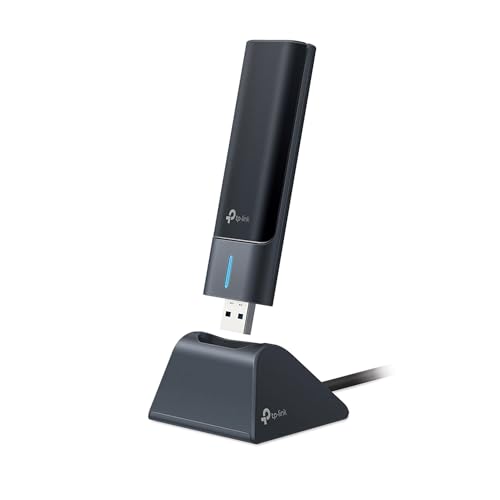
The Archer TXE50UH focuses on Wi-Fi 6E performance with TRI-Band USB Wi-Fi and ultra-low latency features. It delivers up to AXE3000 speeds, leveraging the 6 GHz band to minimize interference. MU-MIMO and OFDMA support improve efficiency across multiple devices, while WPA3 security provides robust protection for gaming sessions and streaming on Windows 11/10 systems.
Buying Guide: Key Considerations for USB WiFi Adapters
When selecting a USB WiFi adapter for gaming, consider these aspects to balance speed, latency, and reliability:
- Wi-Fi Standard and Bands: Wi-Fi 6/6E supports higher throughput and lower latency. 6E adds the 6 GHz band for less interference, which is beneficial for crowded networks and high-bandwidth gaming.
- USB Interface: USB 3.0/3.1 is essential for maximizing throughput, especially on AXE/6E adapters. USB-C can be convenient for newer machines and dock setups.
- Antenna Configuration: External high-gain antennas (2x 5dBi or more) improve range and signal stability, particularly in larger homes or through walls. Some models use internal antennas, which save space but may have shorter reach.
- Security Protocols: WPA2/WPA3 support improves protection on shared networks and during rapid-fire in-game sessions.
- OS Compatibility: Ensure the adapter supports your operating system (Windows 10/11 are common; some may list macOS or older Windows versions).
- Driver Support and Setup: Easy driver installation and automatic updates help maintain performance. Pre-loaded drivers can simplify setup on newer PCs.
- Latency and Gaming Features: Look for MU-MIMO, OFDMA, and beamforming where available, as these features can help manage multiple devices and reduce jitter during gaming.
- Price-to-Performance: Compare theoretical speeds with real-world results, and consider whether a more powerful model justifies the cost for your gaming needs and network conditions.
For gaming-focused uses, prioritize models with Wi-Fi 6/6E support, USB 3.x interfaces, and dual or tri-band configurations. If your router already supports Wi-Fi 6E, a compatible adapter can provide the lowest latency and most consistent connections in busy households.