If you’re setting up a home studio, a reliable USB preamp interface is essential for clear vocal and instrument recordings. This guide highlights five top USB audio interfaces, each offering dedicated mic preamps, instrument inputs, and robust software bundles. Read on to compare features and find the right fit for podcasts, music production, streaming, and more.
Summary of chosen products
| Product | Brand | Key Benefit | Amazon Link |
|---|---|---|---|
| Scarlett Solo 3rd Gen USB Audio Interface | Focusrite | Bright preamps, Air mode for acoustic clarity | View |
| M-Audio M-Track Solo USB Audio Interface | M-AUDIO | Versatile inputs and zero-latency monitoring | View |
| Behringer UFO202 USB Audio Interface | Behringer | Built-in phono preamp for vinyl digitizing | View |
| MAONO USB Audio Interface PS22 Lite | MAONO | High-resolution 24/192kHz recording with robust driverSupport | View |
| Scarlett Solo 4th Gen USB Audio Interface | Focusrite | Air mode and high headroom for studio-quality results | View |
The selections cover a range from beginner-friendly to more feature-rich options, with a focus on mic preamp quality, input versatility, and overall sound fidelity. Each product includes a dedicated mic input, some instrument/line inputs, and driver stability for PC or Mac. Use this guide to pick the right balance of features for your needs, whether you’re recording guitars, podcasts, or streaming sessions.
Focusrite Scarlett Solo 3rd Gen USB Interface

The Focusrite Scarlett Solo 3rd Gen focuses on high-performance mic preamps and a bright, clear signal path. Air mode adds extra clarity to acoustic recordings, making vocals and guitars stand out with less harshness. It features two high-headroom instrument inputs to capture guitars and bass with ample dynamic range. Gain halos help prevent clipping, and converters support up to 24-bit/192kHz for studio-quality capture and mixing. This interface is a compact solution for solo artists, podcasters, and creators seeking professional sound with minimal setup complexity.
M-Audio M-Track Solo USB Audio Interface
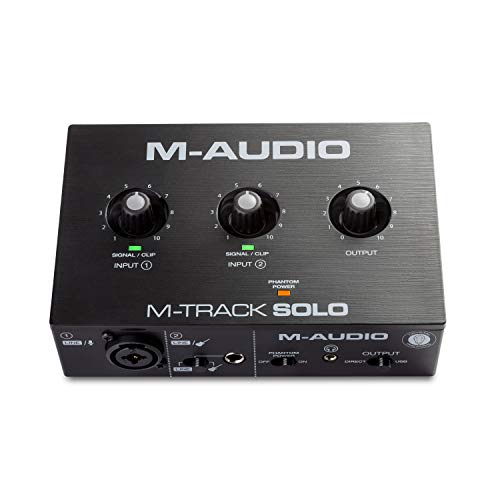
The M-Audio M-Track Solo provides essential flexibility for recording, streaming, and podcasting. It supports 48kHz audio resolution and includes a combo XLR/Line input with phantom power, plus an instrument/line input. For monitoring, there’s a 1/8″ headphone out and stereo RCA outputs, with a USB/Direct switch to enable zero-latency monitoring. This makes it a practical choice for creators who want straightforward operation and reliable performance across vocals, guitars, and line-level sources.
Behringer UFO202 Audiophile USB Interface

The Behringer UFO202 focuses on vinyl digitization with a built-in phono preamp, making it a practical tool for transferring analog records. It also includes a software bundle for vinyl restoration, noise reduction, editing, and recording. This interface suits users who want a simple setup to convert old records while maintaining compatible performance for voice and other line-level sources. It provides easy USB connectivity and broad software support for post-processing.
MAONO USB Audio Interface PS22 Lite

The MAONO PS22 Lite is designed for home studios and live streaming, delivering 24-bit/192kHz recording with a 106dB dynamic range. It supports both condenser and dynamic mics with up to 56 dB of preamp gain and provides 48V phantom power. A dedicated instrument input helps guitarists capture direct, warm tones. The PS22 Lite prioritizes a balanced, natural sound suitable for podcasts, voiceovers, and music tracking with minimal latency thanks to ASIO driver support.
Focusrite Scarlett Solo 4th Gen USB Interface

The Scarlett Solo 4th Gen combines a refined mic preamp and an improved Air mode to push vocals and guitar presence in the mix. With a large dynamic range and Focusrite’s latest converters, it offers studio-grade fidelity for solo artists and small studios. It’s designed for straightforward keyboard/mic setup and reliable performance across recording, streaming, and podcasting applications, making it a strong choice for long-term use with minimal learning curve.
Buying Guide
- Input options and instrument compatibility: Consider whether you need XLR mic inputs, instrument inputs (Hi-Z), line inputs, or a dedicated phono preamp. A balance of mic and instrument inputs supports a wider range of recordings.
- Preamp quality and signal integrity: Look for interfaces with higher headroom and clean gain stages to prevent clipping and preserve vocal warmth and guitar dynamics. Features like gain halos or LED indicators help monitor levels in real time.
- Conversion quality and sample rate: Higher resolution (24-bit/192kHz) generally yields better detail, especially for critical vocal takes and instrument tracks. Choose interfaces with dependable dynamic range and low noise.
- Direct monitoring and latency: Zero-latency monitoring for real-time playback is important for performers. USB/Direct switches or mixer-style monitoring paths reduce latency during recording.
- Software and compatibility: Many interfaces bundle DAW licenses or plugins. Ensure drivers are stable on your operating system (Windows or macOS) and that ASIO support is available if you’re on Windows.
- Size, portability, and build: Smaller interfaces are easier to transport for mobile setups, while sturdier builds suit desktop studios. Consider whether you need powered or bus-powered operation.
- Special features: Air mode, built-in phono preamps, or bundled plugins can influence your workflow. Choose based on your primary use—music production, podcasting, or vinyl digitization.
The options above cover a broad spectrum of needs—from vinyl digitizing with a built-in phono preamp to compact two-channel studio interfaces with high-quality mic preamps. For voice-led content, prioritizing clean preamps and reliable monitoring is key. For music recording, pay attention to instrument inputs and high-resolution conversion. Finally, ensure the chosen model fits your workflow, software, and budget without compromising audio fidelity.