Expanding USB connectivity on desktop PCs often requires a reliable PCIe USB card. This guide highlights top USB 3 PCIe cards that add multiple ports, support high transfer speeds, and operate across Windows, macOS, and Linux environments. Each option features independent power design and hot-plug capable USB 3.0 interfaces to maximize performance for external drives, peripherals, and demanding devices.
| Product | Brand | Ports | Key Benefit |
|---|---|---|---|
| ELUTENG 7-Port PCIe USB 3.0 Card | ELUTENG | 7 USB 3.0 | Independent power per port |
| YEELIYA 7-Port USB 3.0 Expansion Card | YEELIYA | 5 Type-A + 2 Type-C | Broad compatibility, MAC/Linux supported |
| ELUTENG 8-Port USB 3.2 Card | ELUTENG | 6 USB 3.0/2 Type-C | USB 3.2 Gen2 up to 10 Gbps |
| FebSmart 4-Port USB 3.0 Card (FS-U4-Pro) | FebSmart | 4 USB 3.0 | Self-powered, no extra cable needed |
| RIITOP 7-Port USB 3.0 PCIe Card | RIITOP | 7 USB 3.0 | No external power required |
Below are five top choices that balance port count, speed, and ease of use for a typical American home or office PC build. Each entry includes a detailed overview, port capabilities, and considerations to help you pick the right card for your setup.
ELUTENG 7-Port PCIe USB 3.0 Card

The ELUTENG 7-Port PCIe USB 3.0 Card adds seven external USB 3.0 Type-A ports to a PC via a PCIe slot. It features a two-phase independent power module that allows each output to receive power without needing an external supply, ensuring stable operation for high-drain devices. The NEC-based controller supports USB 3.0 with theoretical speeds up to 5Gbps, which speeds up large file transfers, HD video playback, and external storage access. A key advantage is that each port operates independently, reducing cross-channel interference and power contention. This card is compatible with Windows 11/10/8/7/XP/Vista, and it avoids PS3/PS4 compatibility issues.
Considerations include verifying your motherboard’s PCIe slot availability (x1 or higher) and confirming that connected devices do not exceed the total 5V/2A per-port or overall power budget. The built-in capacitors and low impedance design help maintain stability under load, particularly when multiple USB drives or peripherals run simultaneously.
YEELIYA 7-Port USB 3.0 Expansion Card
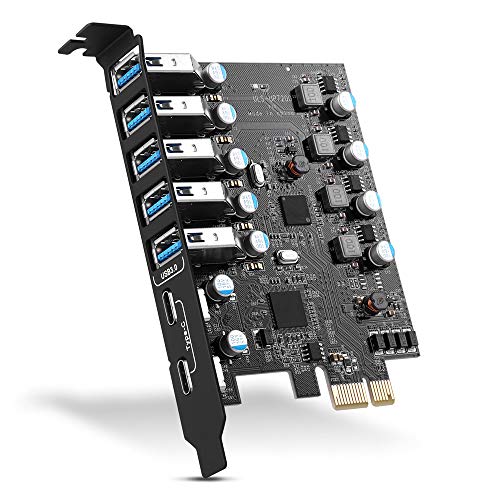
YEELIYA’s 7-Port USB 3.0 Expansion Card delivers a mix of Type-A and Type-C ports (5 Type-A and 2 USB-C) for broad device compatibility. This card is designed for Windows, Mac OS, and Linux environments, with driver installation only required for older Windows XP/Vista setups. It supports USB 3.0 transfer rates up to 5Gbps, enabling rapid file transfers and smooth operation of multiple peripherals such as external drives, webcams, printers, and USB hubs. The device is built to maximize throughput by offering backward compatibility with USB 2.0/1.1 devices and supports PCIe x1/x4/x8/x16 slots.
Performance is driven by the ASMedia/NEC controllers used, and users should consider whether the 5V/2A per-port limit is sufficient for their high-drain devices. The inclusion of two USB-C ports adds flexibility for newer devices and charging scenarios, though charging rates per port may vary by motherboard and driver support.
ELUTENG 8-Port USB 3.2 Card

The ELUTENG USB 3.2 Card offers eight ports with a blend of USB-A and USB-C interfaces, designed to run two devices simultaneously. It uses NEC720210/NEC720201 controllers and supports USB 3.2 Gen2 speeds up to 10 Gbps in theory. The design emphasizes reliability with independent power modules per port and solid-state patch capacitors to withstand higher temperatures. It includes protections that cut power to a port if a fault is detected, then automatically recover after resolving the issue. This card is compatible with PCIe x1, x4, x8, or x16 slots.
Practical considerations include ensuring your motherboard and OS support the NEC controllers and that total system power and cooling can handle multiple high-speed USB devices being used concurrently. The dual-port setup is ideal for users requiring fast external storage with minimal CPU overhead.
SINEFINE 4-Port PCI-E USB 3.0 Expansion Card
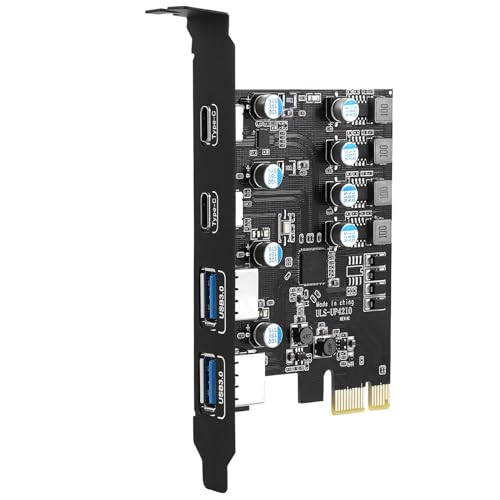
The SINEFINE UP4210 PCIe expansion card adds four USB 3.0 ports, with a mix of USB-A and USB-C as configured. It emphasizes a no-external-power-design for the two USB 3.0 ports but still aims to support up to 5Gbps transfer speeds. The card includes a built-in power module offering 12A max total current across all ports, including protection features such as voltage stabilizers and electrical fuses to safeguard connected devices. It supports PCIe 1X interfaces and is compatible with Windows, Mac OS X, and Linux, with driver requirements for certain legacy systems.
This option is well-suited for users who want a compact, low-power PCIe upgrade for additional USB ports without adding a separate power brick. If you connect high-draw devices like external HDD enclosures, verify total current and device power needs to avoid bottlenecks.
FebSmart 4-Port Superspeed USB 3.0 PCIe Card

FebSmart’s FS-U4-Pro expands a PC with four USB 3.0 ports via a PCIe X1 interface. It emphasizes a self-powered approach, delivering up to 5V/2A per port (10W total) from the motherboard without requiring an extra power supply. The card leverages the RENESAS UPD720201 controller for broad compatibility with AMD, ARM, and Intel platforms. It also advertises safety features, including electronic fuses and voltage-stable capacitors, to protect both devices and data during high-demand transfers. Windows 10 and Mac OS 10.8.2+ generally do not require drivers, while older Windows may require them.
Ideal for users who need reliable high-speed USB 3.0 expansion without additional cables, especially in compact builds or environments where a separate power adapter is undesirable. Always confirm the total bandwidth and per-port current to avoid overloading the PCIe slot’s power budget.
Buying Guide: Key Purchase Considerations
- Port mix and total bandwidth: Look for cards with a mix of USB-A and USB-C ports if you have newer devices, and verify if the total bandwidth is shared or per-port. Some cards offer dedicated channels that help reduce CPU load (UASP support) and maintain high transfer speeds.
- Power design: Self-powered modules per port help prevent power shortage for power-hungry devices. If a card requires external power, ensure your system can accommodate a power adapter and cabling options.
- Controller chipset and compatibility: Common controllers include NEC/Renesas and ASMedia. Confirm OS compatibility and whether drivers are required for your setup, particularly on older Windows or macOS versions.
- PCIe slot compatibility: Check that the card fits PCIe x1, x4, x8, or x16 slots; most USB 3.0/3.2 expansion cards work with x1, but larger slots offer more bandwidth headroom for multiple devices.
- Device protection and reliability: Cards with built-in safeguards (auto-recovery after fault, over-current protection, and capacitors designed for high-temperature operation) improve long-term reliability in busy USB environments.
- Operating system support: Windows, macOS, and Linux compatibility varies by card. If you primarily use Windows 10/11, most modern cards are plug-and-play, but some may require drivers on older OS versions.
- Use-case alignment: For large file transfers or media libraries, prioritize higher throughput and multiple dedicated ports. For peripheral expansion (keyboard/mouse/HDD), a lower-latency config with stable power may suffice.
In summary, choosing a USB 3 PCIe card depends on port needs, power delivery, and system compatibility. The options above provide a range of configurations—from compact, driver-light 4-port cards to robust 7- or 8-port solutions with mixed USB-C and USB-A interfaces. Consider your current devices, motherboard capabilities, and the workload you expect to run to select the best fit for your PC build.