Finding a reliable USB 3 hub that works seamlessly with Mac computers can boost productivity and keep peripherals organized. This guide highlights five top USB 3 hubs that pair well with MacBooks and iMacs, offering fast data transfer, power management, and multiple ports for keyboards, mice, drives, and accessories. Each pick emphasizes compatibility, performance, and ease of use to help you choose confidently.
Summary of chosen products:
| Product | Brand | Key Benefit |
|---|---|---|
| Powered USB Hub 3.0 UH720 | TP-Link | Seven USB 3.0 data ports + two smart charging ports |
| USB C Hub 4 Ports (5Gbps) | Anker | Compact, true plug-and-play with USB-C laptops |
| USB Hub 4 Ports 3.0 | Anker | Four-port expansion with high-speed data |
| 7-in-1 USB-C Hub | Anker | HDMI 4K, SD/TF, PD input, multiple data ports |
| Atolla 7-Port USB 3.0 Hub | atolla | One smart charging port + individual on/off switches |
TP-Link Powered USB Hub 3.0 UH720

The TP-Link UH720 7-port USB 3.0 data hub expands a single USB 3.0 port to seven external ports, suitable for keyboards, mice, printers, and external drives. It includes two smart charging USB ports that deliver up to 2.4A per port, designed for fast charging of smartphones and tablets while connected to the hub. The hub supports plug-and-play setup on Mac systems, with a 12V/4A power adapter ensuring stable operation for multiple devices. Transfer speeds up to 5Gbps help reduce wait times when moving large files between devices.
Anker USB C Hub 4 Ports (5Gbps)

Designed for USB-C laptops and Macs, this Anker 4-port hub delivers 5Gbps data transfer across all ports, supporting quick file sync and easy expansion for peripherals. Its compact, pocket-friendly form factor makes it ideal for on-the-go use, fitting neatly with MacBook setups. The hub emphasizes true plug-and-play connectivity, allowing Macs to recognize devices immediately without driver installation, and supports seamless integration with existing accessories.
Anker USB Hub 4 Ports 3.0

Providing four USB 3.0 ports, this Anker hub offers SuperSpeed data transfer up to 5Gbps, enabling rapid file transfers. It serves as a straightforward expansion tool for laptops and desktops, turning a single USB port into four functional ports. Note that this model is designed for data expansion and does not support charging devices via the hub, making it a stable option for high-throughput peripherals connected to a Mac.
Anker USB C Hub 7-in-1 (HDMI, SD, PD)

This 7-in-1 Anker hub combines an HDMI output for 4K@60Hz video, two USB-A 3.0 ports, a USB-C data port, and dual SD/TF card slots, all in a compact shell. It supports up to 100W USB-C PD input for charging (note: charging is not included in the package). The hub provides fast data transfer across its USB ports and is particularly suitable for Mac users needing external displays and media access from a single compact device.
Atolla USB 3.0 Hub With Smart Charging
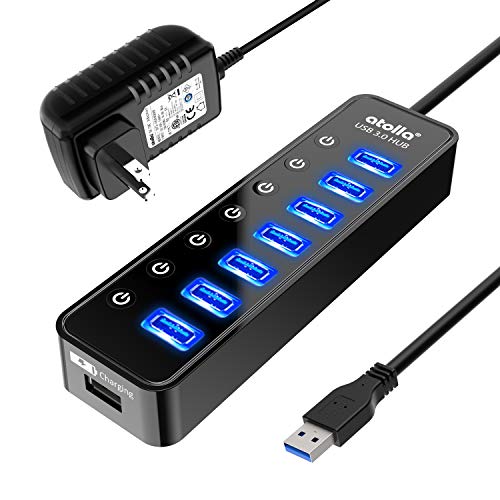
This Atolla hub offers seven USB 3.0 data ports plus a dedicated smart charging port, with individual on/off switches for each port. The included power adapter provides up to 2.4A charging per device where supported, helping manage power-hungry peripherals without draining the host laptop’s battery. The on/off switches enable selective use, which can reduce desktop clutter and minimize phantom power draw when devices are idle.
Buying Guide: Key Considerations For Choosing A Mac-Friendly USB Hub
- Ports and data speed: Look for USB 3.0/3.1/3.2 ports with up to 5Gbps or higher; ensure there are enough ports for your peripherals (keyboard, mouse, drives, SD cards, etc.).
- Power delivery and charging: If you plan to charge devices, select hubs with dedicated charging ports or Power Delivery (PD) input. Check the total power adapter rating and per-port charging current.
- Compatibility and drivers: Most Mac users benefit from plug-and-play hubs with broad OS compatibility. Avoid hubs that require Windows-specific drivers.
- Hub as a charger vs data hub: Some models emphasize charging while others focus on data transfer. For Mac setups, ensure the hub meets your primary need (expanded ports, fast charging, or both).
- Build quality and cooling: Aluminum housings and well-designed interiors help manage heat during long sessions. Thermal design reduces performance throttling on sustained transfers.
- Video and display considerations: If you need external displays, check HDMI/HDMI 2.0/4K support and whether video output is supported on your chosen ports.
- Port arrangement and footprint: Consider desk space and how cables will route to avoid clutter. Some hubs offer individual on/off switches for easier management.
- Future-proofing: If you anticipate new peripherals, choose hubs with extra ports or higher bandwidth to avoid frequent replacements.
In selecting a Mac-friendly USB hub, evaluate the balance between data transfer speed, power delivery, and the number of ports. Hubs with dedicated charging ports or PD inputs can be especially helpful for MacBook users who rely on multiple accessories while keeping the laptop charged. Always verify compatibility with macOS versions you use and consider the hub’s physical design to fit your workspace.