Using a TV as a monitor can enhance your viewing experience for work, gaming, or entertainment. This guide reviews the best products to help you connect your devices effectively, including adapters, wireless transmitters, and necessary accessories. Below is a summary of the selected products, perfect for optimizing TV monitor setups.
| Product | Brand | Key Feature |
|---|---|---|
| BENFEI VGA to HDMI Adapter | BENFEI | Converts VGA signal to HDMI with audio support |
| Qisoable Wireless HDMI Transmitter & Receiver | Qisoable | Wireless 165ft HDMI transmission with low delay |
| BENFEI HDMI to VGA 3 Feet Cable | BENFEI | HDMI to VGA cable supporting Full HD 1080p |
| BRAIDOL Wireless HDMI Display Dongle | BRAIDOL | Plug-and-play wireless HDMI dongle with 4K support |
| TVON TV Floor Stand for 13-50 Inch TVs | TVON | Height adjustable floor stand with tilt and rotation |
BENFEI VGA to HDMI Adapter for TV Monitor

The BENFEI VGA to HDMI Adapter offers a compact design that converts VGA signals from your computer or laptop to HDMI for your TV or monitor. It supports 1080p resolution and includes integrated USB audio support, combining audio and video through HDMI. The advanced IC chip ensures a stable, high-quality signal conversion. This adapter requires an HDMI cable (sold separately) and is ideal for business presentations or extending desktop displays to larger screens. Note it is uni-directional and does not support HDMI to VGA conversions.
Qisoable Wireless HDMI Transmitter & Receiver

This wireless HDMI transmitter and receiver system from Qisoable enables wireless streaming of HDMI video and audio signals up to 165ft (50m) using 2.4G and 5.8G dual-frequency channels. It supports 4K decoding and outputs 1080p at 60Hz with almost zero delay (<0.01s), making it suitable for work meetings, classrooms, or home theaters where cable clutter is undesirable. It supports duplicate and extended modes, maintaining stable transmissions even through obstacles. Installation is plug-and-play with no Wi-Fi or app required.
BENFEI HDMI to VGA 3 Feet Cable
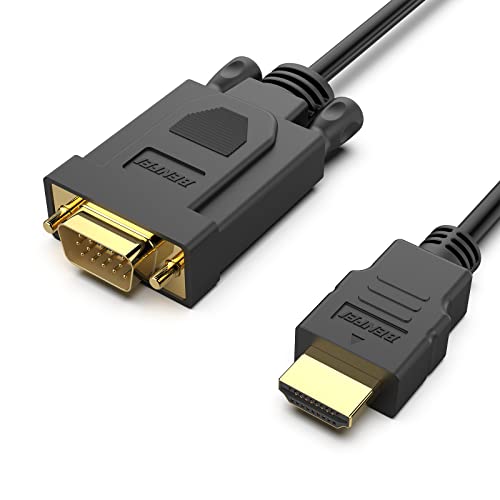
The BENFEI HDMI to VGA cable features a uni-directional design converting HDMI digital signals to VGA analog format, supporting resolutions up to 1920×1080@60Hz. This gold-plated cable ensures durability and corrosion resistance for strong signal integrity. It is suitable for connecting modern HDMI sources like laptops or Raspberry Pi devices to older VGA monitors or projectors. This cable does not function in reverse and requires compatible devices at each end of the connection.
BRAIDOL Wireless HDMI Display Dongle Adapter

The BRAIDOL Wireless HDMI Display Dongle supports seamless wireless streaming of video and audio from smartphones or laptops to larger screens, supporting 4K decoding and 1080p at 60Hz output. This adapter is plug-and-play, with no need for Wi-Fi, apps, or Bluetooth connections. Equipped with dual-band 2.4G and 5G antennas and a dynamic stability equalizer, it offers strong anti-interference and stable performance, perfect for home entertainment or presentations requiring easy wireless connections.
TVON TV Floor Stand Adjustable for 13-50 Inch TVs

The TVON TV Floor Stand supports most 13-50 inch LCD and LED TVs or monitors up to 44 lbs. This height-adjustable stand offers -2° to +20° tilt and can rotate between portrait and landscape modes. Its compatibility with VESA mounts up to 200x200mm makes it versatile for various screens, improving viewing angles for productivity or presentations. Portable and easy to adjust, it enhances any room or office setup where TVs are used as monitors.
Buying Guide for Choosing the Best TV Monitor Setup
When selecting the best TV to use as a monitor and the accessories needed, consider these key factors:
- Resolution and Size Compatibility: Choose a TV with suitable screen size and resolution to match your workspace. 4K TVs provide crisp images but require compatible adapters and cables.
- Connection Types: Identify your source device’s output (e.g., VGA, HDMI, USB-C) and ensure compatibility. Use uni-directional converters if needed, and be mindful that some adapters do not support two-way conversion.
- Signal Stability: For wired connections, use high-quality cables or adapters with built-in IC chips to maintain a stable video and audio signal. For wireless transmission, look for low latency and dual-band technology to minimize interference and lag.
- Plug-and-Play Ease: Devices that require no drivers, apps, or Wi-Fi offer a hassle-free setup, especially for repeated use in different locations.
- Flexibility and Adjustability: If using a TV as a monitor often, consider accessories like adjustable stands or mounts to optimize viewing angle and posture, reducing strain.
- Additional Features: Audio support over HDMI, fast charging ports on adapters, and compatibility with streaming protocols (AirPlay, Miracast) can add convenience depending on your use case.
Combining the right TV with compatible adapters and accessories will create a versatile, high-quality display setup suitable for professional or personal use.