Finding the best tablet for Photoshop can elevate your digital art, photo editing, and design projects. Tablets designed for Photoshop offer features such as high pressure sensitivity, customizable keys, tilt recognition, and compatibility with multiple operating systems. Below is a summary table highlighting key specs of the selected tablets optimized for Photoshop use.
| Product | Pressure Sensitivity | Active Area (inches) | Hotkeys | Stylus Type | Compatibility |
|---|---|---|---|---|---|
| XP-Pen Deco 01 V3 | 16384 Levels | 10 x 6 | 8 Customizable | Battery-Free, Tilt Support | Windows, Mac, Android |
| Wacom Intuos Small Bluetooth | Standard EMR (Battery-Free) | ~6 x 3.7 (Small size) | 4 Customizable | Battery-Free | Windows, Mac, Chromebook, Android |
| HUION Inspiroy H1060P | 8192 Levels | 10 x 6.25 | 12 Customizable | Battery-Free, Tilt Support | Windows, Mac, Android |
| UGEE M708 Large Drawing Tablet | 8192 Levels | 10 x 6 | 8 Hot Keys | Passive Stylus (Battery-Free) | Windows, Mac, Android, Linux |
| XP-Pen Artist 13.3 Pro | 8192 Levels | 13.3″ Screen | 8 Shortcut Keys | Battery-Free, Tilt Support | Windows, Mac |
XP-Pen Deco 01 V3 Drawing Tablet

The XP-Pen Deco 01 V3 graphic tablet stands out with 16,384 levels of pressure sensitivity and support for up to 60 degrees of tilt. This combination allows artists to achieve natural pen strokes, fine shading, and smooth line control that Photoshop users value. The stylus is battery-free, eliminating the need for charging, enhancing uninterrupted creativity. Its 10 x 6 inch active area offers ample space for detailed work without occupying excessive desk space.
Eight customizable express keys cater to both right and left-handed users, helping speed up workflow with personalized keyboard shortcuts. Notably, this tablet is compatible with Windows, Mac, and Android devices, making it versatile for artists who switch between platforms. The optimized Android support ensures accurate mapping even with different screen aspect ratios, ideal for mobile Photoshop editing or sketching.
Wacom Intuos Small Bluetooth Graphics Tablet

The Wacom Intuos Small offers industry-leading pressure sensitivity and electromagnetic resonance (EMR) technology that provides a natural pen-on-paper feel. Its lightweight, portable design supports wireless connectivity via Bluetooth or wired USB, allowing artists to work comfortably wherever they are.
Equipped with 4 customizable express keys, this tablet supports major creative software including Photoshop, Illustrator, and more. The tablet works seamlessly across Windows, Mac, Chromebook, and Android platforms. Its compact size is perfect for students, teachers, and creators who value mobility without sacrificing precision.
HUION Inspiroy H1060P Digital Art Tablet
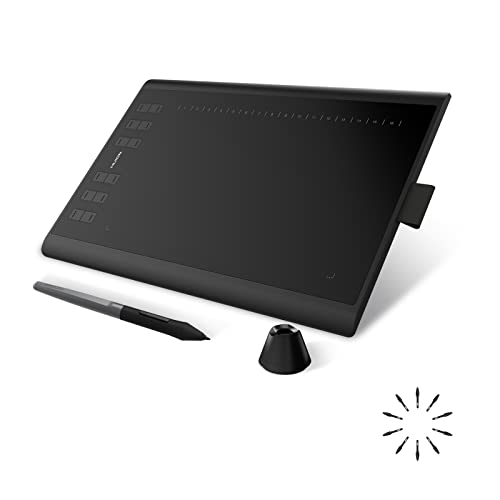
The HUION Inspiroy H1060P features a sizeable 10 x 6.25 inch working area and a slim design ideal for precise Photoshop editing and artistic projects. Its stylus offers 8192 levels of pressure sensitivity combined with ±60° tilt support for enhanced brush control and natural line variation.
It also comes with 12 customizable physical press keys and 16 programmable soft keys, offering broad options to tailor shortcuts like zoom, erase, and scroll. Compatibility spans across Windows, Mac, and Android, making it a flexible choice for serious Photoshop users who want extensive control options.
UGEE M708 Large Drawing Tablet
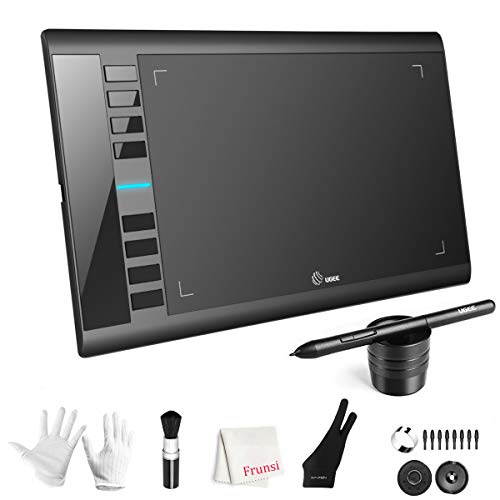
The UGEE M708 presents a large 10 x 6 inch active drawing space with a textured, papery surface that simulates natural drawing feel. It employs an 8192-level passive stylus, which detects pressure shifts to offer fine line control ideal for design and photo retouching in Photoshop.
Eight hotkeys allow for quick access to frequently used tools, speeding up workflow. The tablet supports multiple operating systems—Windows, Mac, Android, Chrome OS, and Linux—making it extremely compatible with a broad range of Photoshop users.
XP-Pen Artist 13.3 Pro Drawing Tablet with Screen
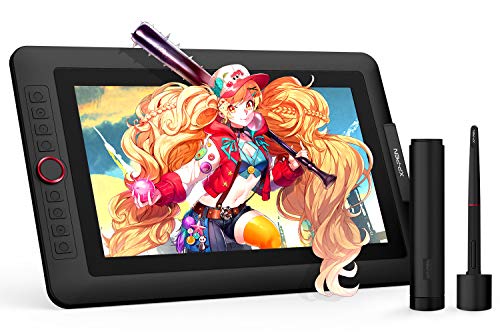
The XP-Pen Artist 13.3 Pro offers a fully-laminated, 13.3-inch Full HD display with a wide color gamut (123% sRGB), delivering vibrant and accurate colors essential for Photoshop editing. The screen supports 8192 levels of pen pressure and 60-degree tilt sensitivity, giving artists control over brush dynamics and shading directly on the display.
This tablet includes 8 shortcut keys and requires connection to a computer or laptop. Its highly responsive drawing surface and color accuracy make it ideal for artists who prefer working directly on the screen versus a separate pad. Compatible with Windows and Mac systems primarily used with Adobe Photoshop.
Buying Guide for Tablets Suitable for Photoshop
When selecting a tablet for Photoshop and digital art, several critical factors influence your experience and efficiency:
Pressure Sensitivity
Higher pressure sensitivity levels (e.g., 8192 or 16384) allow for finer control over brush size, opacity, and effects, offering superior precision. Tablets with tilt support can mimic natural brush angles to enhance shading and line work.
Active Drawing Area
A larger active area (around 10×6 inches or more) provides more room for fluid strokes and detailed work without constant repositioning. However, compact tablets offer portability if you prioritize mobility.
Stylus Type and Comfort
Batteries-free styluses are preferred for their lightweight, no-charging convenience, and consistent responsiveness. Ergonomic stylus design with customizable buttons improves user comfort during extended Photoshop sessions.
Customizable Express Keys
Shortcut keys and customizable buttons improve workflow by allowing you to assign frequent Photoshop commands like undo, zoom, brush changes, and eraser toggling, saving time and effort during complex projects.
Compatibility
Ensure the tablet supports your operating system (Windows, Mac, Android, Chrome OS) and Photoshop software version. Cross-platform compatibility is a bonus if you work across multiple devices.
Display Tablets vs. Non-Display Tablets
Display tablets (like the XP-Pen Artist 13.3 Pro) let you draw directly on the screen, providing an intuitive experience but usually at a higher price point. Non-display tablets (like the XP-Pen Deco or HUION devices) require hand-eye coordination to draw on the pad while viewing the monitor.
Portability and Connectivity
Consider whether you need wireless Bluetooth connectivity for working remotely or prefer wired connection stability. Size and weight are important if you plan to carry the tablet frequently.
Choosing one of these tablets will enhance your Photoshop artwork with precise control, natural pen feel, and workflow efficiency tailored to professional or beginner digital artists.