Reading books on a tablet or electronic device has become increasingly popular, combining convenience with interactive learning options. Selecting the best tablet to read books on involves considering features like screen type, interactivity, and ease of use, especially for young readers or learners. Below is a concise summary of highly rated products including learning pads, reading systems, and accessories designed to enhance your book-reading experience.
| Product | Brand | Key Features |
|---|---|---|
| LeapFrog LeapReader System Learn-to-Read 10 Book Mega Pack, Pink | LeapFrog | Interactive sound pen, multiple learning modes, 10 early reading books |
| Think Academy Interactive Electronic Learning Pad | Think Academy | Screen-free, supports creativity & concentration, 70 sound pages |
| Phonics Learning Pad – Electronic Phonics Reading Game | THE BAMBINO TREE | 720 phonics questions, audio reinforcement, multi-step learning system |
| Childrens Learn to Read Books Lot 60 – First Grade Set | Scholastic | 60 stapled readers, reading specialist design, print focused |
| Book Stand for Reading, 360° Rotating Hands Free Book Holder | OPTIXCELL | Adjustable height & angle, 360° rotation, storage tray for accessories |
LeapFrog LeapReader System Learn-to-Read 10 Book Mega Pack, Pink

The LeapFrog LeapReader System offers an innovative approach to early reading, combining tactile, audio, and visual learning. By touching the pages with the LeapReader pen, children hear letters and words pronounced correctly, fostering confidence through interactive stories and activities. The device features three modes to tailor reading sessions to individual learning pace, promoting independent reading skills. This Mega Pack includes 10 books focusing on short vowels, sight words, and simple vocabulary, making it a comprehensive tool for beginner readers. The system’s interactive nature helps improve word recognition and phonemic awareness in engaging ways suitable for young learners.
Think Academy Interactive Electronic Learning Pad for Kids

This screen-free electronic learning pad helps reduce eye strain by offering touch-and-learn activities without a digital display. Particularly ideal for preschoolers aged 3-5, it stimulates six major developmental skills: creativity, curiosity, concentration, logical thinking, imagination, and hand-eye coordination through 70 sound pages. The pad also includes card inserts for alphabet, numbers, and music, combining educational content with versatile game modes. With Exploration Mode for free discovery and structured Game Mode for focused learning, this device supports sustained engagement while nurturing early reading and cognitive skills safely away from screen glare.
Phonics Learning Pad – Electronic Phonics Reading Game

The Phonics Learning Pad delivers a comprehensive phonetic learning experience through 720 phonics and letter sound questions. Designed for ages 5-11, it teaches foundational to advanced phonics concepts in 13 progressive steps including vowels, digraphs, diphthongs, and silent letters. With American English audio, learners can hear correct pronunciation and match sounds to spelling patterns actively. This system promotes phonemic awareness and reinforces reading through auditory and visual learning, enabling faster mastery compared to traditional flash cards or worksheets.
Childrens Learn to Read Books Lot 60 – First Grade Set
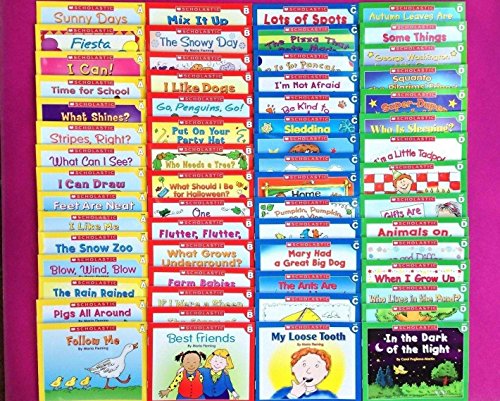
This set includes 60 stapled early reader booklets in four distinct levels (A-D), perfect for first graders and early-stage readers. Designed by reading specialists, the books emphasize attention to print over illustrations, helping readers focus on letters, words, and sentence structure. These booklets are ideal for classroom or home use to gradually build fluency and confidence. The compact format supports repeated reading and gradual skill advancement without overwhelming young learners.
Book Stand for Reading, 360° Rotating Hands-Free Holder

The OPTIXCELL Book Stand enhances comfort for reading physical books, tablets, or cookbooks with its 360° rotating base and adjustable height and angle. Its spring-loaded clips hold pages steady, allowing for hands-free reading that reduces neck and wrist strain during long sessions. The built-in organizer compartment keeps pens, sticky notes, and earbuds within easy reach, making it a versatile accessory for multiple settings including kitchen, office, or school. This ergonomic design supports better posture and convenience for readers of all ages.
Buying Guide: How to Choose the Best Tablet or Accessory for Reading Books
Selecting the ideal tablet or reading accessory requires thoughtful consideration of your specific needs and usage scenarios. Here are key factors to guide your decision:
1. Purpose and User Age
Identify if the device is for early learners, older children, or adult readers. Devices like the LeapFrog LeapReader and Think Academy Pad are specifically built for children’s reading development with interactive features. For older readers or multitasking, tablets with e-ink screens or physical book stands might be more appropriate.
2. Screen Type and Eye Comfort
Since prolonged reading can cause eye strain, consider screen types. E-ink displays mimic paper and reduce glare, ideal for extensive reading sessions. Screen-free or audio-enhanced learning pads avoid direct screen exposure, suitable for younger children. Devices with backlit screens might require adjustable brightness to protect eyes.
3. Interactivity and Learning Features
Interactive devices that combine touch, sound, and educational games foster engagement and reinforce reading skills. Features like phonics quizzes, word blending exercises, and audio pronunciation support comprehensive literacy development. For example, the Phonics Learning Pad provides structured phonetic challenges, while LeapReader encourages independent reading practice.
4. Book Compatibility and Content
Check if the tablet or system supports a wide variety of books or digital content. Some devices come with bundled books and downloadable content, broadening learning scope. Consider if the system aligns with the reader’s current level and offers growth potential.
5. Portability and Durability
Children’s learning devices should be sturdy, lightweight, and easy to handle. Portability allows reading anywhere, increasing usage frequency. Accessories like adjustable book stands add ergonomic value but are less portable.
6. Additional Accessories
Items such as book stands greatly improve reading comfort by enabling hands-free use and better posture. Look for adjustable and stable designs that suit different environments, especially if using physical books or tablets at desks, kitchens, or bedside.
By weighing these considerations, you can select the most suitable tablet or reading accessory that enhances your book-reading experience effectively and comfortably.