Finding the best tablet for senior citizens involves choosing devices that combine ease of use, large clear displays, long battery life, and reliable performance. This article reviews top tablets ideal for seniors in 2025, focusing on user-friendly features like vivid screens, simple interfaces, durable design, and ample storage. Below is a summary table of the selected tablets to quickly compare key features before diving into detailed reviews.
| Tablet Model | Display Size & Resolution | Processor & RAM | Storage & Expandability | Battery Life |
|---|---|---|---|---|
| Amazon Fire HD 10 (Newest) | 10.1″ 1080p Full HD | Octa-core, 3 GB RAM | 32 GB, Expandable up to 1 TB | Up to 13 hours |
| FEONAL 11 Inch Android 15 Tablet | 11″ 1280×800 HD Incell | Octa-core MTK8786, 16 GB RAM (8GB physical + 8GB virtual) | 128 GB, Expandable up to 1 TB | Not specified |
| Raemond 10 Inch Android 15 Tablet | 10″ 1280×800 HD IPS | Octa-core, 18 GB RAM (6+12GB) | 128 GB, Expandable 1 TB | Not specified |
| TUOHAITIME Android 14 Tablet | 10.1″ 1280×800 HD IPS | Octa-core 2.0 GHz, 10 GB RAM (4+6GB) | 64 GB, Expandable 512 GB | Up to 8-12 hours |
| TECLAST 13 Inch Android 15 Tablet T65 | 13.4″ 1920×1200 IPS | Octa-core 2.2 GHz, 20 GB RAM | 128 GB | Up to 8 hours |
Amazon Fire HD 10 Tablet for Seamless Entertainment

The Amazon Fire HD 10 offers a 10.1-inch Full HD display with vibrant colors, perfect for reading, streaming, and video calls. It boasts a powerful octa-core processor paired with 3GB RAM delivering 25% faster performance than its predecessor. Seniors will appreciate the long 13-hour battery life, minimizing frequent recharges. Storage options include 32 GB with up to 1 TB expandable via microSD, enabling plenty of space for apps and media. The tablet’s thin, lightweight design with durable aluminosilicate glass makes it easy to carry and handle.
This tablet stands out for its reliable streaming capabilities and durability, tailored to offer smooth, uninterrupted use for seniors engaged in entertainment or communication.
FEONAL 11 Inch Android 15 Tablet With Large Storage

The FEONAL 11 Inch Android 15 Tablet runs the latest Android 15 system offering a modern, secure, and user-friendly interface. Its high-speed MTK8786 octa-core processor combined with a substantial 16GB RAM (8GB physical + 8GB virtual) delivers fast and smooth multitasking. Designed with seniors in mind, it features a crisp 11-inch Incell HD display (1280×800) which supports multiple viewing modes including Reading and Eye Protection modes to reduce eye strain during extended use.
A massive 128GB internal storage with expansion up to 1TB accommodates apps, photos, and videos comfortably. The tablet’s dual stereo speakers enhance audiovisual experiences. Overall, it balances performance and comfort for seniors focusing on media consumption and daily productivity.
Raemond 10 Inch Android 15 Tablet for Smooth Multitasking
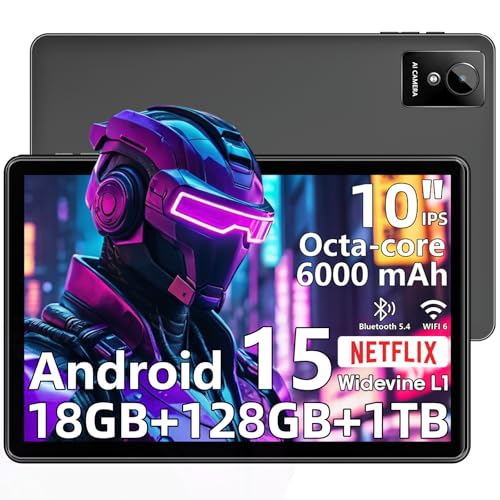
The Raemond 10 Inch Android 15 Tablet features an IPS HD display designed for sharp visuals and a responsive touchscreen, perfect for seniors who prioritize clear content viewing. Its octa-core processor together with a robust 18GB RAM (6GB physical + 12GB virtual) supports efficient app launches and multitasking.
Storage of 128GB with up to 1TB expandable memory ensures ample space for media, documents, and apps. The inclusion of WiFi 6 and Bluetooth 5.4 guarantees fast wireless connectivity. This tablet’s smooth performance and large storage capacity provide senior users a reliable and user-friendly experience for both leisure and communication.
TUOHAITIME Android 14 Tablet for Extended Use

The TUOHAITIME 10.1 Inch Android 14 Tablet comes equipped with a 2.0GHz octa-core processor and 10GB RAM split into 4GB physical and 6GB virtual memory for responsive multitasking. Its 1280×800 HD IPS touchscreen offers crisp images and an enjoyable viewing experience. The tablet supports up to 512GB expandable storage, which is useful for extensive media collections.
A notable feature for seniors is the 6000mAh battery combined with 18W fast charging, providing 8-12 hours of usage to minimize charging interruptions. Its lean Android 14 OS with minimal bloatware makes navigation simple and smooth, an advantage for those looking for straightforward usability.
TECLAST 13 Inch Android 15 Tablet With High Performance

The TECLAST T65 13.4 Inch Tablet impresses with its large 1920×1200 IPS display designed to ease viewing with vivid visuals and a wider screen area. Its screen technology includes TDDI to enhance brightness and touch responsiveness. Seniors can benefit from the smoother experience provided by the 120Hz refresh rate, which ensures fluid scrolling and animation.
This tablet houses an octa-core CPU clocked at 2.2GHz and 20GB RAM, delivering excellent performance for multitasking and media streaming. Storage of 128GB allows space for apps and media files. Its premium features make it suitable for seniors who prefer a larger tablet for comfortable use.
Buying Guide for Tablets Suitable for Senior Citizens
When choosing a tablet for seniors, several key considerations can enhance usability, comfort, and satisfaction:
Display Size and Quality
A large and clear display is critical. Tablets with screens 10 inches or larger and high resolution (at least HD 1280×800) offer better readability for users with varying eyesight. Look for IPS or Incell displays for wider viewing angles and vibrant colors. Features like Eye Protection or Reading Modes reduce eye strain during extended use.
Processor and Memory
A powerful octa-core processor paired with sufficient RAM (minimum 3 GB, ideally 8 GB or more) ensures smooth operation, even when multitasking or using media-heavy apps. Higher RAM improves responsiveness, which helps seniors avoid frustration with lags.
Storage Capacity and Expandability
Tablets with ample internal storage (at least 32 GB) and expandable memory slots (up to 1 TB or more) allow storing apps, photos, and videos without constant need to manage space. Expandable storage is especially useful for those who like saving many photos or large media files.
Battery Life
Long battery life reduces the hassle of frequent charging. Look for tablets that offer 8 hours or more of active use. Fast charging support is also convenient for seniors who prefer quick power-ups rather than waiting several hours.
Operating System and User Interface
Tablets running the latest Android versions or user-friendly Fire OS provide improved security, smoother navigation, and access to helpful features. Avoid bloatware or complicated UIs; instead, opt for clean interfaces with customizable easy modes suitable for seniors.
Durability and Portability
Lightweight and sturdy tablets with protective glass or rugged design stand up better to accidents. Tablets like the Amazon Fire HD 10 have reinforced screens that resist drops, suitable for everyday use by seniors.
Additional Features
- Good quality front and rear cameras for video calling and photos
- Clear stereo speakers for better audio quality
- Fast WiFi support (WiFi 5 or 6) and Bluetooth connectivity for accessories
- Optional cellular connectivity (4G or 5G) if staying connected on the go is important
Selecting a tablet balancing these aspects can significantly improve a senior citizen’s digital lifestyle, allowing enjoyment of multimedia, communication, and learning with ease and confidence.