Choosing the best stylus for laptop touchscreen can significantly enhance your digital interaction, offering precision and ease for writing, drawing, or navigating. Below is a summary table featuring top-rated stylus pens designed to work seamlessly across various touchscreen laptops, tablets, and smartphones.
| Stylus Pen | Brand | Key Features |
|---|---|---|
| Penyeah 4-in-1 Disc Stylus Pen | Penyeah | 4 interchangeable tips, high precision, universal capacitive compatibility, no battery needed |
| MEKO 3-in-1 Stylus Pen (2 Pack) | MEKO | Upgraded 3 tips including disc tip, high sensitivity, dual rubber sizes, flexible writing angle |
| Bopomofo 2-in-1 Stylus Pen Set (5 Pcs) | Bopomofo | Transparent disc tip, dual touch experience with rubber tip, lightweight alloy body |
| Digiroot 2-in-1 Universal Stylus | DIGIROOT | Clear disc precision, comes with 6 replacement tips, compatibility excluding some devices |
| ChaoQ 3pcs High Sensitivity Stylus Set | ChaoQ | No charging needed, dual rubber tips, ergonomic aluminum body, multi-device compatibility |
Penyeah 4-in-1 Disc Stylus Pen for Touch Screens
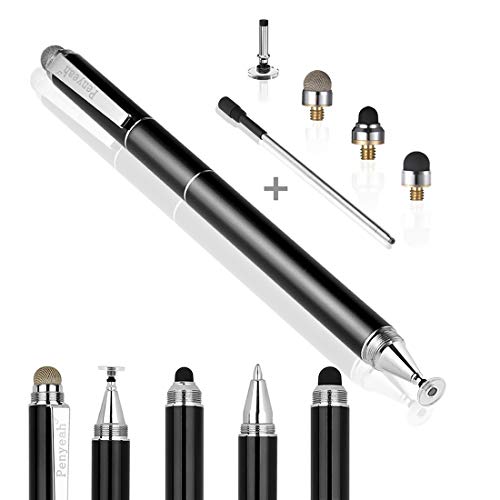
The Penyeah Stylus Pen is a versatile 4-in-1 tool with four replaceable tips: a 0.27″ clear disc tip for fine drawing, a mesh fiber tip, and two rubber tips in different sizes, plus a black ink ballpoint pen. This stylus supports all capacitive touchscreens including laptops, tablets, phones, and more.
Its high precision and sensitivity deliver quick and smooth responses without lag or setup, and the metal construction is durable and corrosion resistant. The stylus comes with a pocket clip for portability and allows users to customize usage depending on their needs.
MEKO 3-in-1 Stylus Pen for High Sensitivity
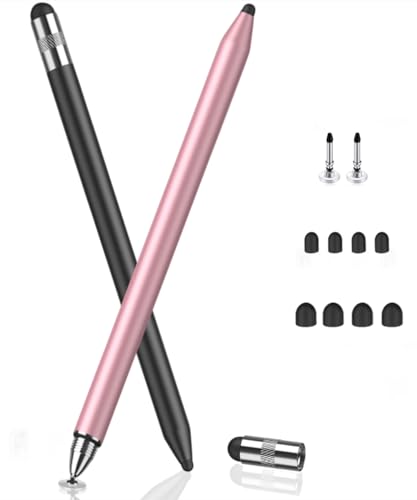
The MEKO Stylus Pens feature an upgraded design combining two rubber tips and a transparent disc tip for accuracy and multi-function use. It offers a 180° flexible writing angle to enhance comfort during prolonged use.
The dual-sized rubber tips provide smooth interaction without scratching screens, making it ideal for users with longer nails or those needing fine control. The pack includes two pens in black and rose gold, ensuring both style and practicality for various touchscreen laptops and devices.
Bopomofo 2-in-1 Stylus Pen Set for Multi-Device Use

The Bopomofo Stylus set includes five pens with a 2-in-1 design featuring a transparent disc tip for precise input and a rubber tip for general use. This design allows for both accurate writing or drawing and smooth navigation or scrolling.
Made from lightweight alloy, these pens need no pairing or charging. Their high sensitivity ensures seamless digital experience on any touchscreen—from phones to laptops. The combination of colors offers personalization options for daily use.
Digiroot 2-in-1 Universal Stylus with Replacement Tips
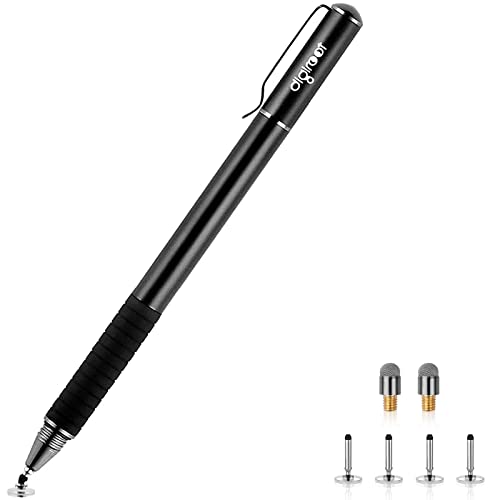
The Digiroot Stylus offers precise control through its clear disc tip, measuring 0.27 inches, combined with a 0.24-inch fiber tip. It comes with six replacement tips (four discs, two fiber), making it durable for long-term usage.
Compatibility extends across various touchscreen devices including laptops, tablets, and phones but excludes Chromebooks and remarkable2 tablets. The stylus requires no battery or setup, making it ready to use instantly.
ChaoQ High Sensitivity Stylus Pen 3-Pack

The ChaoQ Stylus Set includes three styluses with dual-sized rubber tips (5mm and 6.6mm) allowing users to toggle between detailed and bold strokes. Its aluminum body provides lightweight comfort and an ergonomic design reduces wrist fatigue for extended use.
No charging or Bluetooth connection is needed. It offers smooth, responsive control without scratching or lag and supports most capacitive touchscreens including laptops, tablets, and smartphones.
Buying Guide for Stylus Pens for Laptop Touchscreens
Compatibility with Devices
Ensure the stylus is fully compatible with your laptop’s touchscreen technology. Most universal styluses work with capacitive screens found on laptops, tablets, and phones, but some devices like Chromebooks or specialized tablets may require specific stylus technology. Check manufacturer specifications for full compatibility.
Tip Types and Precision
Styluses come with various tip types such as disc tips, fiber tips, and rubber tips. Disc tips provide higher precision and visible contact points, ideal for drawing and handwriting. Rubber tips offer smoother general navigation without scratching screens. Some pens include replaceable tips or dual-tip designs for varied tasks.
Build Quality and Comfort
Look for styluses made of durable materials like metal or high-grade alloy that maintain shape and functionality over time. Ergonomic designs reduce wrist strain during prolonged use. Weight and balance contribute to comfort and accuracy.
Power Requirements
Most capacitive styluses do not require batteries or charging, ensuring instant usability. Some active styluses offer additional features but may require power. Consider convenience in daily use when choosing between passive and active stylus types.
Additional Features
Some styluses feature magnetic caps, pocket clips, or customizable tips that enhance portability and usability. Price, color options, and included accessories can also influence your choice.
Use Case
Identify your primary purpose: detailed artwork, note-taking, casual browsing, or gaming. Styluses with precise disc tips benefit artists and writers, whereas rubber tips are better for navigation and scrolling tasks.