Finding the best speakers for your Mac desktop involves balancing sound quality, connectivity, and design that complements your workspace. Whether you want rich bass, crisp dialogue, or seamless Bluetooth pairing, this guide highlights top options suited to Mac desktops for various needs. Below is a summary table featuring key attributes of the selected products.
| Speaker | Connectivity | Power Output | Special Features |
|---|---|---|---|
| LXTNFU Computer Speakers | USB (with USB-C adapter) | Not specified | Clip-on design, plug and play |
| Creative Pebble V3 | USB-C, USB-A, Bluetooth 5.0 | 8W RMS, 16W Peak | Clear dialog enhancement, gain switch |
| XKX Desktop PC Soundbar | USB (with USB-C adapter) | Not specified | Adaptive channel-switching, touch controls |
| Tylubio Flowing LED PC Speaker | Bluetooth, USB | 2x5W | LED lighting modes, multifunction control knob |
| Edifier G2000 Gaming Speakers | Bluetooth, USB, 3.5mm AUX | 32W Peak Power | RGB lights, multiple EQ modes |
LXTNFU Monitor Clip-On USB Speakers

The LXTNFU Computer Speakers are designed with convenience in mind, featuring a spring-loaded clip that easily attaches to most monitor sizes. With two 1.4-inch magnetic speakers, they deliver clear, loud audio suitable for desktop and laptop use via USB connection, supporting plug-and-play compatibility with most systems. Though the bass is moderate due to size limitations, the speakers avoid common distortion issues and stable transmission is ensured by high-quality cabling. Keep in mind, they do not support TV or Xbox interfaces.
Creative Pebble V3 Minimalistic USB-C Speakers

The Creative Pebble V3 offers a powerful 8W RMS output with a custom-tuned 2.25-inch driver that is 50% louder than its predecessor. It sports a built-in gain switch for amplified audio, enhancing bass and volume for dynamic sound quality. The Pebble V3 is tailored for minimal clutter with a single USB-C cable connection and comes with a USB-C to USB-A converter, providing broad compatibility. Its Clear Dialog audio processing improves spoken audio clarity, perfect for watching videos or streaming without sacrificing background sound quality.
XKX Adaptive Channel-Switching PC Speakers

The XKX USB Plug-in Speakers deliver impressive loud sound with deep bass thanks to dual ultra-magnetic drivers and passive radiators. They feature an adaptive channel-switching mechanism with a G-sensor that keeps stereo channels correctly oriented, whether clipped to the top or bottom of a monitor. The compact design houses intuitive touch controls for volume adjustment and muting. The included USB-C adapter enhances connectivity options for modern Mac desktops and laptops.
Tylubio Flowing LED Bluetooth Desktop Speakers

The Tylubio PC speaker combines stereo sound output from dual 5W drivers with stylish LED lighting featuring multiple modes, including rainbow flow and color pulsing, adding ambiance to your desk setup. It supports Bluetooth and USB inputs, offering flexible wireless and wired connectivity. The multifunction control knob provides easy switching between inputs, playback control, LED mode selection, and Bluetooth reset options, delivering a user-friendly experience tailored for multimedia enjoyment.
Edifier G2000 RGB PC Gaming Speakers
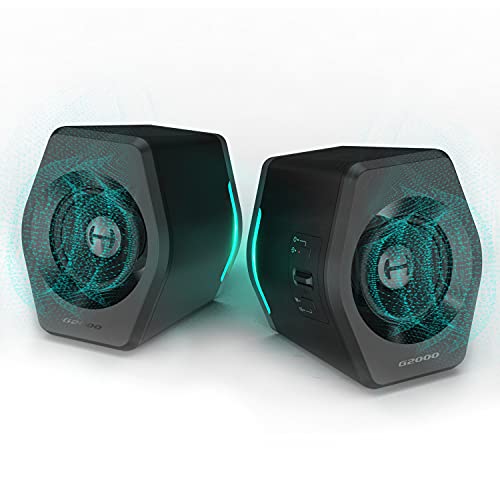
The Edifier G2000 gaming speakers deliver 32 watts of peak power through 2.75-inch full-range drivers and a backward megabass port. Designed for audiophiles and gamers alike, it offers selectable EQ sound modes for games, music, and movies, providing tailored audio experiences. Their broad compatibility includes USB, 3.5mm AUX, and Bluetooth inputs, making these speakers versatile for Mac desktops as well as other devices. RGB lighting adds to their gaming aesthetic.
Buying Guide for Choosing the Best Speakers for Mac Desktop
When selecting speakers for your Mac desktop, several important factors should guide your decision to ensure excellent sound quality and user satisfaction.
Connectivity Compatibility
Modern Macs often feature USB-C ports, so speakers with USB-C connections or included adapters offer seamless plug-and-play compatibility. Bluetooth support adds wireless convenience, but wired connections typically provide more stable audio fidelity. Verify that the speaker supports USB-C natively or offers adapters if your Mac relies on this port exclusively.
Sound Quality and Power Output
Look for speakers with sufficient RMS output for your room size. Around 8 to 32 watts RMS is typical for desktop speakers. Consider models with clear mids and highs plus enhanced bass if you enjoy immersive audio. Speakers with features like passive radiators or subwoofers deliver richer low-frequency sound.
Design and Space Efficiency
Speakers designed to clip onto monitors help free up desk space and reduce clutter, ideal for compact or minimalist setups. Consider the size and weight of the speakers, especially if portability or desk space is a concern. LED lighting is a bonus for aesthetic appeal but is secondary to sound quality.
Controls and Ease of Use
Simple volume controls, mute buttons, and input switching enhance usability. Touch controls and multifunction knobs provide intuitive, quick adjustments. Plug-and-play compatibility reduces setup complexity, important for users who want fast, hassle-free audio upgrades.
Audio Features
Clear dialog processing is valuable for watching videos or attending virtual meetings by enhancing speech clarity without increasing overall volume. EQ presets allow you to tailor sound profiles for gaming, music, or movies. Bass performance is a key consideration if you enjoy rich, full sound.
In summary, the ideal speaker for your Mac desktop will combine compatibility, sound clarity, power, and design features aligned to your personal usage and workspace constraints.