Finding the perfect silent wireless keyboard can enhance your productivity and create a peaceful work or gaming environment. Below is a summary table that compares some of the top-rated silent wireless keyboards available from trusted brands. Each offers unique features such as quiet typing technologies, ergonomic designs, and versatile connectivity options.
| Product | Brand | Connectivity | Key Features |
|---|---|---|---|
| Logitech MK295 Wireless Mouse & Keyboard Combo | Logitech | 2.4 GHz Wireless | SilentTouch tech, full numpad, multimedia shortcuts |
| Logitech MX Keys S Wireless Keyboard | Logitech | Bluetooth, USB-C Rechargeable | Low profile, programmable keys, backlit, fluid typing |
| AUSDOM 98Pro Silent Mechanical Keyboard | AUSDOM | Bluetooth, 2.4 GHz, USB-C Wired | Pre-lubed silent tactile switches, tri-mode, gasket structure |
| Logitech Signature Slim K950 Wireless Keyboard | Logitech | Bluetooth | Multi-device switching, sleek full-size, recycled plastic |
| HP 230 Wireless Keyboard | HP | Wireless | Low-profile chiclet keys, numeric keypad, shortcut keys |
Logitech MK295 Wireless Mouse & Keyboard Combo

The Logitech MK295 combo features SilentTouch technology which reduces typing and clicking noise by up to 90%, providing an almost noise-free typing experience. The keyboard includes a full numeric keypad and eight shortcut keys, granting quick access to play/pause, volume, mute, and internet controls. Its contoured design enhances comfort and supports precise tracking on most surfaces. Ideal for those who want an all-in-one wireless setup with a focus on silence and versatility, this combo ensures a lag-free wireless connection.
Logitech MX Keys S Wireless Keyboard – Fluid Typing

The Logitech MX Keys S Wireless Keyboard delivers a fluid, low-profile typing experience with its laptop-style, spherically dished keys. It supports programmable keys through the Logi Options+ app, allowing customization of repetitive tasks via Smart Actions shortcuts. Backlighting enhances usability in low-light environments. This keyboard boasts a solid build and ergonomically optimized angle to promote comfort, making it suitable for professionals seeking a precise, quiet, and highly customizable wireless keyboard.
AUSDOM 98Pro Silent Mechanical Keyboard

The AUSDOM 98Pro offers a unique combination of silent mechanical switches and tri-mode connectivity, including Bluetooth, 2.4 GHz wireless, and wired USB-C. It supports up to five simultaneous device connections and switching between them instantly. Its gasket structure design with sound-absorbing layers minimizes typing noise and resonance. The keyboard features 97 keys in a compact layout with tactile, pre-lubed silent switches for a responsive yet quiet typing experience, ideal for users who want a mechanical feel without the noise.
Logitech Signature Slim K950 Wireless Keyboard

The Logitech Signature Slim K950 focuses on multi-device convenience by allowing seamless switching between a computer, tablet, or phone. It is a sleek, full-size Bluetooth keyboard with familiar laptop-style typing and quiet key presses. The keyboard enables extensive key customization through the Logi Options+ app, enhancing productivity. Additionally, it uses recycled plastics in its design, contributing to sustainability without compromising performance or aesthetics.
HP 230 Wireless Keyboard with Low-Profile Quiet Design
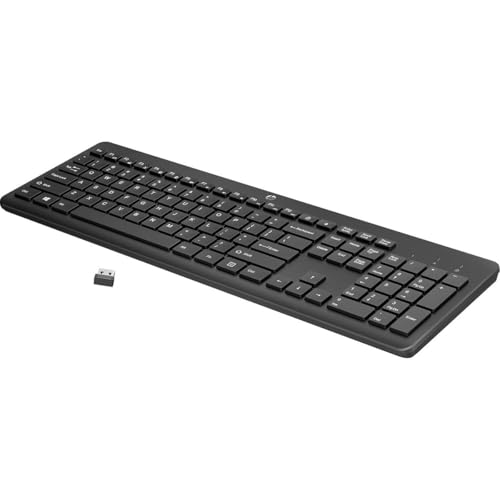
The HP 230 Wireless Keyboard features low-profile chiclet keys designed to provide quiet and accurate typing. It connects wirelessly for a clutter-free workspace with reliable, lag-free performance across Windows and Mac OS systems. The integrated number pad and 12 shortcut keys help improve workflow efficiency with quick access to popular functions. This keyboard is a great option for users wanting a minimalist, silent keyboard with ergonomic comfort and enhanced productivity functions.
Buying Guide For Silent Wireless Keyboards
When selecting a silent wireless keyboard, consider the following important factors to ensure you choose a device tailored to your needs and environment.
Typing Experience And Noise Level
The key factor in a silent keyboard is its noise reduction technology. Look for SilentTouch or pre-lubed tactile switches that minimize sound without compromising key responsiveness. Low-profile chiclet or scissor-switch keys typically offer quieter typing than traditional mechanical switches.
Connectivity Options
Wireless keyboards generally connect using 2.4 GHz USB receivers or Bluetooth. Some models like the AUSDOM 98Pro provide multiple connectivity modes including wired USB-C. If you use multiple devices, multi-device pairing and easy switching capabilities can enhance convenience.
Ergonomics And Design
A keyboard’s ergonomic shape, key spacing, and typing angle impact comfort during long use. Low-profile and contoured keyboards support natural hand positioning. Additionally, features like backlighting can improve usability in varied lighting conditions.
Additional Features And Customization
Programmable keys, shortcut buttons, and compatibility with customization software increase productivity. Rechargeable batteries with long life reduce maintenance. Consider the build quality and material sustainability if these are important for your workspace.
Compatibility
Ensure the keyboard supports your operating system, whether Windows, Mac, Linux, or Chrome OS, especially if you need multi-device support.
Overall, balancing silent operation with performance, comfort, and connectivity will help you find a wireless keyboard that fits your workflow perfectly.