The right laptop screen protector can reduce blue light, cut glare, and shield your privacy without sacrificing clarity. Below is a hand-picked selection of screen protectors designed for 14-16 inch and 15.6 inch screens with common 16:9 or 16:10Aspect ratios. Each option focuses on anti-glare, blue-light filtration, and easy installation, helping you pick a protector that fits your laptop and usage.
| Product | Brand | Key Benefit |
|---|---|---|
| F FORITO 2-Pack 15.6 Inch Anti Blue Light Screen Protector | F FORITO | Blue light filtering, anti-glare, 15.6″ fit |
| 2 Pack 15.6 Inch Blue Light Screen Protector | ANTOGOO V | Blue light blocking, anti-glare |
| MUBUY-GOL 2-Pack 15.6 Inch Screen Protector | MUBUY-GOL | High transparency, scratch-resistant |
| Supershieldz 14-Inch Screen Protector (3-Pack) | Supershieldz | HD clarity, real touch |
| SightPro 14 Inch Privacy Screen Filter | SightPro | Privacy filter, anti-glare |
F FORITO 15.6″ Anti Blue Light Screen Protector
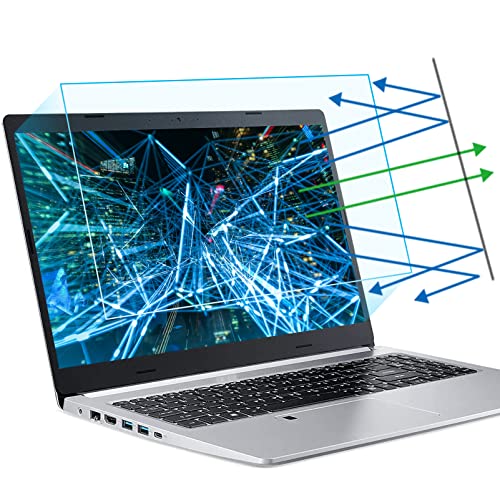
This 2-pack protector is designed for 15.6″ laptops with a 16:9 aspect ratio and covers popular brands like Acer, HP, Lenovo, Dell, and ASUS. It features a nine-layer blue light filtering system to help minimize eye fatigue from long screen time and an advanced anti-glare coating to reduce reflections in bright environments. The protector’s precise dimensions (13.6″ x 7.6″) ensure a snug fit for standard 15.6″ panels, and it emphasizes screen cleanliness by limiting glare-induced smudges.
Compatibility notes emphasize measuring length and width before purchasing, ensuring a correct fit for non-standard screens. The product focuses on reducing eye strain and shielding against blue light while maintaining screen clarity and touch sensitivity. This option is ideal for students, remote workers, and anyone seeking a budget-friendly pair of protective films for frequent laptop use.
ANTOGOO V 2 Pack 15.6″ Blue Light Screen Protector
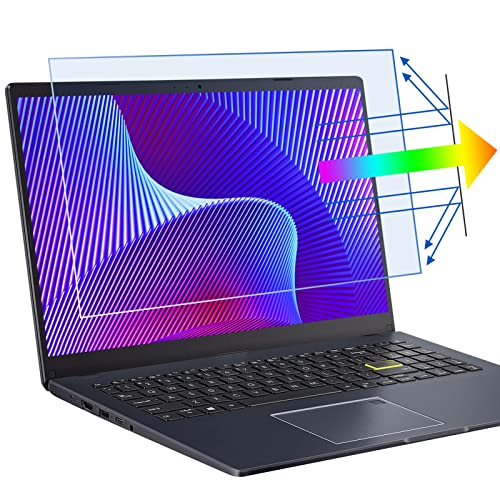
This protector targets 15.6″ laptops with 16:9 aspect ratio and claims an effective layered defense against blue light. The product highlights include multi-layer blue-light filtration to reduce eye strain from extended screen time. It also emphasizes scratch protection and overall screen safety, offering a dual purpose for daily work and study sessions. The packaging notes a diagonally measured 15.6″ display area, with a 13.6″ x 7.6″ filter footprint, aligning with common consumer laptops.
Users can expect reinforced glare reduction and a smoother viewing experience, particularly in bright work-from-home setups. The listing positions the protector as a practical upgrade for those who want additional eye comfort without sacrificing screen clarity or touch responsiveness.
MUBUY-GOL 2-Pack 15.6″ Anti-Scratch Screen Protector

This 2-pack offers a high-transparency PET film with a 5H hardness hard coat to resist scratches and maintain display quality. It’s designed for a 15.6″ screen with a 16:9 aspect ratio and lists a scratch-resistant, easy-installation experience with clean removal residue-free properties. The protector aims to preserve color accuracy and brightness, making it suitable for users who frequently carry laptops in bags or workspaces with potential surface contact.
Price-conscious buyers often choose this option for its balance of protection and clarity. The featured material and coating are intended to minimize image distortion while protecting the screen from everyday hazards like keys or rough surfaces.
Supershieldz 14-Inch Screen Protector

Designed for 14-inch screens, this three-pack of high-definition clear shields emphasizes maximum resolution and real touch sensitivity. While the note specifies compatibility with 14-inch displays, it highlights an HD transparent film that preserves touchscreen accuracy and color fidelity. The set targets keyboards and stylized touch input scenarios where screen clarity and tactile response matter most for daily navigation and work tasks.
Usage guidance suggests ensuring a proper fit for 14-inch devices and acknowledges that this option is best suited for users with standard 14″ laptops, Chromebooks, and 14″ Windows devices that prioritize touch experience and glare reduction.
SightPro 14 Inch Privacy Screen Filter

The SightPro privacy screen filter is tailored for 14″ laptops and uses a dual-attachment approach to provide flexible mounting options. It emphasizes privacy by darkening the display when viewed from the side, while preserving clarity straight-on. The filter also addresses glare and blue-light exposure, helping users protect sensitive information in public spaces and reduce eye strain during long usage, albeit not optimized for touch-enabled devices.
It’s especially suitable for travelers, students, and professionals who frequently work in public or shared environments and want a discreet screen experience without sacrificing on-screen readability when viewed directly.
Mao Yeye Laptop Privacy Screen 14 Inch

This 14-inch privacy shield is designed for 16:9 aspect ratio laptops and targets ThinkPad, Envy, Dell, Lenovo, Acer, Asus, and other brands. It offers a reversible design with a matte option for maximum clarity and glare-free viewing when privacy isn’t a concern, while the glossy surface can be swapped in to enhance privacy in public spaces. The filter aims to keep sensitive information out of sight at oblique viewing angles and reduce glare for comfortable daytime use.
Practical considerations include verifying width and height to ensure a proper fit and noting the dual-surface approach for adaptable privacy needs. It appeals to users who alternate between private and public settings and prefer a flexible filter that can be customized to lighting conditions.
Buying Guide: Key Purchase Considerations
- Screen size and aspect ratio: Measure width and height (not just diagonal size) to match the filter footprint. Common targets include 15.6″ (13.6″ x 7.6″) for many 15.6″ laptops and 14″ options for some ultrabooks.
- Blue light and glare reduction: Look for multi-layer blue light filtration and anti-glare coatings to minimize eye strain in prolonged use and bright environments.
- Privacy vs. clarity: Privacy filters reduce viewing angles; they can slightly dim the screen. Choose a product based on whether you need privacy in public places or maximum on-screen clarity for collaborative work.
- Scratch resistance and material: PET films provide clear protection, while tempered or hard-coat layers offer scratch resistance. Consider hard-coat or 3H-5H hardness-rated options for high-traffic surfaces.
- Installation and residue: Favor bundles that promise easy alignment, bubble-free application, and residue-free removal. PET films typically offer straightforward installation with minimal adhesives.
- Touch compatibility: If your device uses touch input, confirm that the protector preserves touch sensitivity and does not create lag or dead zones.
- Brand and model fit: Many protectors list compatible models or screen diagonal sizes. When in doubt, verify exact width and height measurements against your device.
Choosing the right screen protector involves balancing eye comfort, privacy needs, and display fidelity. For students and remote workers who spend long hours in front of a laptop, a blue-light filtering and anti-glare option is typically the most beneficial. Those working in public spaces may prioritize privacy filters, even if they marginally reduce perceived brightness. Always confirm fit dimensions and consider whether you prefer a matte or glossy surface based on lighting and usage patterns.