Choosing the best printer compatible with your iPhone can elevate your photo and document printing experience effortlessly. This guide covers top-rated wireless and portable printers designed for iPhone users, featuring quick setup, vibrant photo quality, and compact designs suitable for home, office, or travel.
| Product | Brand | Print Type | Connectivity | Special Features |
|---|---|---|---|---|
| Liene M100 4×6” Photo Printer | Liene | Thermal Dye Sublimation | Wi-Fi Hotspot | Water-resistant 4×6 photos, 100 sheets & 3 cartridges included |
| Portable Wireless Inkless Thermal Printer | TATTMUSE | Inkless Thermal | Bluetooth & USB-C | Compact, inkless printing, supports US Letter & A4 |
| Canon Ivy 2 Mini Photo Printer | Canon | ZINK Zero Ink | Bluetooth | Sticky-back 2×3″ photos, app photo customization |
| HPRT 4×6 Wireless Dye Sublimation Printer | HPRT | 300 dpi Dye Sublimation | Wi-Fi & App | Augmented Reality prints, waterproof & scratch-proof |
| KODAK Step Instant Smartphone Photo Printer | Kodak | ZINK Zero Ink | Bluetooth & NFC | Sticky-back photos, editing app with filters and stickers |
Liene M100 4×6” Photo Printer for iPhone

The Liene M100 is a portable 4×6 inch photo printer designed for iPhone and Android smartphones using thermal dye sublimation technology. It prints vibrant, full-color photos with a laminated surface that resists water, scratches, fingerprints, and fading. Included in the package are 100 sheets of photo paper and 3 color cartridges, ensuring you can start printing immediately. Its built-in Wi-Fi hotspot allows direct connection to your phone without external networks, providing a stable and fast printing experience. The minimalist and magnetic design enhances portability and storage convenience.
TATTMUSE Wireless Inkless Thermal Printer

The TATTMUSE portable printer is a lightweight, inkless thermal printer that weighs just 1.5 pounds and measures compactly for travel convenience. It supports multiple paper sizes including 8.5″ x 11″ US Letter and A4, making it versatile for printing documents, receipts, and boarding passes. Connectivity options include Bluetooth for wireless use with iPhones and Android devices and USB-C for laptop or desktop connection. It uses thermal paper only and prints in black and white without requiring ink, reducing maintenance issues like clogging or cleaning.
Canon Ivy 2 Mini Photo Printer
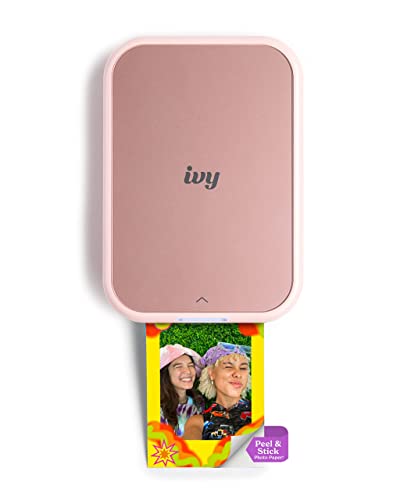
The Canon Ivy 2 Mini offers zero-ink printing using ZINK technology, embedding color dye crystals inside special paper to eliminate the need for ink cartridges. It produces 2″x3″ sticky-back photos that can be peeled and adhered to surfaces, perfect for scrapbooking and personalizing items. The printer connects wirelessly to iOS and Android devices through the Canon Mini Print App, allowing users to edit and customize photos before printing, enhancing creativity on the go.
HPRT 4×6 Wireless Dye Sublimation Photo Printer

The HPRT photo printer delivers professional studio-quality 4×6 prints in 60 seconds using high-resolution 300 dpi dye sublimation technology. It features a free HeyPhoto app to connect via Wi-Fi, providing options to print through home networks or direct wireless links. Prints are waterproof, scratch-proof, and fade-proof thanks to a protective laminating film. Additionally, the printer supports augmented reality features for interactive print experiences, allowing videos to be replayed by scanning the photos.
KODAK Step Instant Smartphone Photo Printer

The KODAK Step printer uses ZINK technology to produce durable, vivid 2×3” color photos with embedded dye crystals, eliminating ink cartridges. It connects seamlessly to iOS and Android devices via Bluetooth or NFC. The included app offers a rich editing suite with filters, borders, stickers, and text customization. Photos are sticky-backed for versatile use, with prints resistant to moisture, tears, and smudges, making it ideal for social media aficionados and creative personal projects.
Buying Guide for iPhone-Compatible Printers
Selecting the best printer for your iPhone depends on a variety of factors including print quality, portability, connectivity, and intended use. Here are key considerations to help you make an informed purchasing decision:
Print Technology and Quality
- Photo Printers: Dye sublimation (like Liene M100 and HPRT) produces high-quality, durable photos with vibrant colors and waterproof finishes, perfect for photo enthusiasts.
- ZINK Printers: Zero Ink printers (e.g., Canon Ivy 2, Kodak Step) use special embedded paper, providing convenience with no cartridges, though print sizes are generally smaller.
- Thermal Printers: Inkless thermal printers are ideal for basic black and white document printing and lightweight portability, often cost-effective and maintenance-free.
Connectivity Options
- Wireless Connection: Wi-Fi-enabled printers offer stable direct or hotspot connections without cables, suitable for home or office setups.
- Bluetooth & NFC: Best for on-the-go printing from iPhone or tablets, allowing flexibility and mobile use.
- USB-C & Drivers: Some portable printers also allow USB connection for laptops but often require driver installation.
Portability and Usage
- Portable Photo Printers: Compact, lightweight models like Canon Ivy 2 and Kodak Step are perfect for travel, quick photo prints, and creative projects.
- All-in-One or Document Printers: If printing documents, receipts, or multiple paper sizes are required, models like TATTMUSE’s thermal printer provide versatility in smaller dimensions.
- Paper and Cartridge Supply: Consider printers that offer bundled photo paper and cartridges, or inkless options for reduced printing costs over time.
Additional Features
- App Integration: Apps providing editing, filters, and augmented reality features enhance creative possibilities and print personalization.
- Print Size: Choose between 2×3” sticky-back prints for stickers or standard 4×6” photo sizes depending on your needs.
- Durability: Laminated prints and water/fade resistance are essential for keepsake photos or prints exposed to handling.