Printing invitations at home can be both fun and cost-effective when you have the right tools. Below is a summary of top-rated printers and cardstock papers ideal for producing professional-quality invitations, whether for weddings, birthdays, or special events.
| Product | Type | Key Features |
|---|---|---|
| Canon PIXMA TR7020a | Wireless All-in-One Printer | Duplex printing, wireless, Alexa integration, auto document feeder |
| Canon PIXMA TR4720 | Wireless All-in-One Printer | Print, copy, scan, fax, easy setup via app |
| Canon Ivy 2 Mini Photo Printer | Portable Photo Printer | ZINK technology, peel & stick prints, smartphone compatible |
| Joyberg White Cardstock 8.5×11, 230gsm | Cardstock Paper | Heavyweight 85 lb, double-sided matte finish, printer compatible |
| AnyDesign Floral Stationery Letterhead Paper | Decorative Letter Paper | 60 sheets, watercolor floral design, single-sided, 8.5×11 inches |
Canon PIXMA TR7020a Wireless Inkjet Printer

The Canon PIXMA TR7020a is a versatile wireless all-in-one printer designed for home and small office use. It offers duplex printing, which automatically prints on both sides of the paper – a handy feature for invitation cards. With the integration of Alexa, you receive notifications for ink levels, and can even reorder ink through voice commands, ensuring uninterrupted printing.
Other features include an auto document feeder, mobile printing compatibility, and multifunction 3-in-1 capabilities (print, copy, scan). This printer efficiently handles varied paper types and sizes, which makes it excellent for printing crisp, colorful invitations at home.
Canon PIXMA TR4720 All-in-One Wireless Printer

The Canon PIXMA TR4720 is a compact and easy-to-use 4-in-1 printer with functions including print, copy, scan, and fax. Its wireless connectivity enables mobile printing through the Canon PRINT Inkjet/SELPHY app for simple setup and operation.
This printer supports automatic document feeding for multi-page jobs and is suitable for printing detailed invitations with vibrant colors. The easy-install ink cartridges make maintenance simple, ideal for those new to home printing and crafting detailed invites.
Canon Ivy 2 Mini Photo Printer
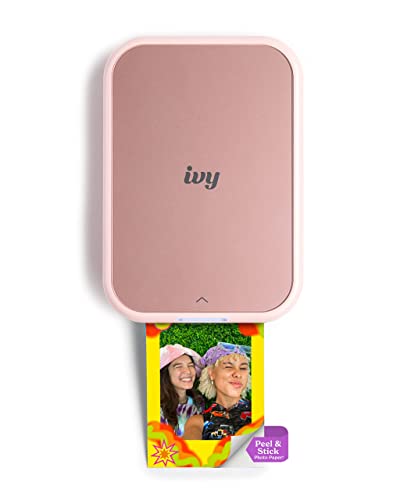
The Canon Ivy 2 Mini is a compact photo printer that uses innovative ZINK (Zero Ink) technology, which requires no ink cartridges. It prints vibrant, sticky-backed photos directly from compatible iOS and Android devices via the Canon Mini Print app.
This printer is great for creating peel-and-stick photo invitations and embellishments. Its portability allows for on-the-go printing, ideal for informal or creative invitations where physical photos add a personal touch.
Joyberg White Cardstock 8.5 x 11, 230gsm

The Joyberg White Cardstock is premium-quality paper with a weight of 85 lb (230gsm), ideal for printing durable invitations that feel professional. It offers a smooth matte finish on both sides, which ensures high-quality ink absorption without smudging.
Its compatibility with multifunction printers and photocopiers allows easy use for home printing projects that require thick, sturdy paper. This cardstock supports various pens, markers, and coloring tools, making it versatile for customized invitations or decorations.
AnyDesign Floral Stationery Letterhead Paper

The AnyDesign Floral Stationery contains 60 sheets of single-sided letterhead paper featuring a charming watercolor blue and white flower design. Sized at 8.5 x 11 inches, it provides ample space for printing detailed invitations or handwritten messages.
This paper’s elegant design is suitable for weddings, birthdays, and other celebrations, adding a fresh and polished floral touch to your invitations. It works well with standard printers and complements various crafting styles.
Buying Guide for Printers and Paper for Invitations
Printer Features to Consider
- Print Quality: Look for printers supporting high-resolution color output for crisp text and vivid images on invitations.
- Paper Handling: Ability to handle heavyweight cardstock (180gsm and above) is crucial for thick invitation papers.
- Duplex Printing: Automatic double-sided printing saves time and paper when creating multi-page invitations.
- Wireless Connectivity: Wireless, mobile app support, or cloud printing simplifies sending documents from various devices.
- Ink Management: Some printers offer smart ink reorder systems or zero-ink technology; choose based on budget and usage frequency.
Paper Type and Weight
- Weight: Invitation paper typically ranges from 80lb to 110lb (approx. 220-300gsm) to ensure durability and a premium feel.
- Finish: Matte finishes prevent glare and allow easier writing, while glossy or textured finishes add a luxurious touch.
- Size: Common sizes include 5×7 inches or standard letter size (8.5×11 inches), depending on invitation style.
- Compatibility: Confirm the printer supports the thickness and size of your chosen paper to avoid jams or poor print quality.
- Design Elements: Pre-designed stationery with floral or vintage patterns can enhance the invitation aesthetics without extra crafting.
Use Case and Volume
- Home vs. Portable Printing: Large all-in-one printers are better for higher volume and multi-function use, while compact photo printers suit casual or creative print jobs.
- Customization: App integration and support for custom templates allow flexibility in designing unique invitations.
- Budget: Consider total cost including ink, paper, and maintenance for sustainable printing needs.
Choosing the right combination of printer and paper ensures that printed invitations are professional, durable, and visually appealing, helping you set the perfect tone for any event.