For enthusiasts and small studios, a dedicated disc printer or compatible printing media can simplify producing professional-looking discs. This buyer’s guide highlights five relevant products that support high-quality disc printing, including standalone disc publishers, laser- or inkjet-ready discs, and reliable home printers with printable media options. The selections balance automated disc printing capability, media compatibility, and overall value to help you decide what best suits your needs.
| Product | Media Type / Printer Type | Key Benefit |
|---|---|---|
| Epson Discproducer PP-100III | Disc Publisher / Printer | Automated printing and duplication for up to 100 discs with high-quality MicroPiezo printing. |
| Verbatim CD-R 700MB 52X White Inkjet Hub Printable | Printable CD-R Media | Archival-grade, edge-to-edge dye printing on inkjet-ready discs for professional labeling. |
| Verbatim CD-R Blank Discs 700MB 80 Minutes 52X | Blank CD-R Media | High-speed recording and reliable archival-grade data storage for various projects. |
| DYMO DiscPainter CD/DVD Color Printer | Disc Label Printer | Direct-on-disc color printing without labels, quick setup for professional-looking discs. |
| Canon PIXMA TS4320 Wireless Color Inkjet Printer | Home/Small Office Printer | Compact, easy setup with color printing and compatibility with printable discs in some cases. |
Epson Discproducer PP-100III CD/DVD/Blu-ray Disc Publisher and Printer
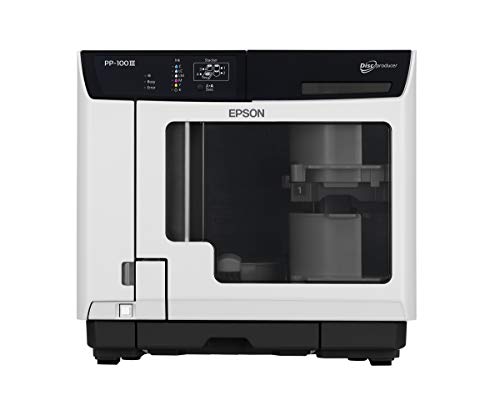
The Epson Discproducer PP-100III is designed for unattended, automated disc production. It handles up to 100 discs, enabling batch printing and duplication of CD, DVD, or Blu-ray discs with consistent results. The printer uses MicroPiezo technology to deliver sharp text and vibrant graphics, ensuring professional presentation for discs intended for distribution or archival projects. Economical operation is supported by six high-capacity ink cartridges, each with low ink sensors and a field-replaceable waste tank. This setup is particularly suitable for small studios or educational programs requiring reliable, long-run disc printing with minimal hands-on time.
Key features include automated printing, high-resolution disc output, and a focus on low total cost of ownership over time. While setup and maintenance are more advanced than consumer printers, the Discproducer offers robust service and support from Epson, helping to minimize downtime in production environments.
Considerations: The initial investment is higher than consumer printers, and space needs to accommodate the unit and disc stacks. It excels when you need consistent, large-batch disc printing rather than casual or sporadic projects.
DYMO DiscPainter CD/DVD Color Printer (1738260)

The DYMO DiscPainter is a dedicated disc label printer designed for quick, professional-looking disc labeling. It prints directly on CDs and DVDs as the discs spin, using multiple resolution and speed settings to balance quality and throughput. This model eliminates the need for adhesive labels and offers a straightforward workflow for home studios, educators, and small businesses producing smaller print runs. The DiscPainter is known for practical setup and the ability to achieve clean, photo-quality crowds of discs with minimal fuss.
Features include three print quality/speed settings to adapt to project requirements and efficient direct-on-disc printing. For users who frequently label discs rather than print large batches, this device provides a compact, reliable option with predictable results.
Limitations to consider: It is best suited for moderate volume labeling rather than high-volume production. For full-color, high-volume runs, a dedicated disc publisher like the Epson Discproducer may be more appropriate, though at a higher cost.
Verbatim CD-R 700MB 52X White Inkjet Hub Printable Disc

Verbatim CD-R discs provide reliable white inkjet hub printable surfaces for vibrant, edge-to-edge designs. With 700MB capacity and 52x write speeds, these discs are well-suited for personalized mixes, photo slideshows, or distribution media where crisp, full-bleed print quality is desired. The archival-grade discs are compatible with a wide range of inkjet printers that support hub printable surfaces, enabling a professional, branded look for media projects.
Important considerations include ensuring your printer supports hub-printable discs and maintaining proper storage to preserve archival potential. When paired with a compatible printer or DiscPainter, these discs help achieve high-impact presentation with reliable data integrity.
Verbatim CD-R Blank Discs 700MB 80 Minutes 52X Silver Inkjet Printable Surface

Verbatim’s CD-R blank discs offer high-speed recording up to 52x and a silver inkjet printable surface. With 700MB capacity and an archival-grade composition, these discs are designed for reliable data storage, backups, or customizable music and photo CDs. The inkjet printable surface supports full-bleed, vibrant labeling when paired with compatible inkjet printers or disc printers, making them a practical option for mixed-media projects and personal catalogs.
Tips for best results include using quality media as the foundation for consistent printing outcomes, keeping discs clean, and using inks or printers that match the surface specifications for optimal adhesion and color reproduction.
Canon PIXMA TS4320 Wireless Color Inkjet Printer

The Canon PIXMA TS4320 is a compact all-in-one printer ideal for home use. It supports wireless printing, scanning, and copying with easy setup and a straightforward interface. While not a dedicated disc printer, it supports printing on printable CDs and DVDs when used with appropriate printable media and software. It is suitable for households that need a versatile device for documents, photos, and occasional disc labeling, offering convenient mobile printing and a compact footprint.
Considerations include evaluating whether your disc projects require automated disc printing versus occasional surface labeling, and ensuring your media choice is compatible with the printer’s print surface and software tools for color accuracy and alignment.
Buying Guide: Key Purchase Considerations And Comparisons
When choosing a printer or media for disc printing, consider the following angles to ensure you select the best solution for your workflow, budget, and desired output.
- Volume and workflow: If you require high-volume, unattended disc production, a dedicated disc publisher like the Epson Discproducer offers automation and scalability. For small batches or occasional labeling, a DYMO DiscPainter or a consumer inkjet printer with printable media may be sufficient.
- Media compatibility: Printable discs come with hub-printable or full-face printable surfaces. Verify that your chosen discs are compatible with your printer or labeling device, especially for edge-to-edge printing and color fidelity.
- Print quality vs. speed: Disc publishers emphasize consistency and quality across many discs, while consumer printers optimize for speed and convenience. Evaluate your priority: photo-realistic disc art or quick turnaround prints for a few discs.
- Cost of ownership: Upfront costs vary widely—from consumer printers to industrial disc publishers. Account for ink, consumables, maintenance, and potential service support when calculating long-term value.
- Media archival quality: If discs store important data or media long-term, prioritize high-grade CD-R discs with archival-life claims and low risk of data degradation.
- Software and workflow integration: Look for systems that integrate with your design software, templates, and batch processing needs. Some devices offer dedicated software for layout, color management, and automation.
- Space, maintenance, and downtime: Large disc publishers require suitable space and regular maintenance routines. Smaller devices may be easier to manage but might require periodic reprints for consistency.
- Warranty and support: A vendor with robust service options is valuable for production environments. Confirm service response times and replacement policies to reduce downtime.
In summary, choose a solution that aligns with your production needs, media preferences, and long-term cost considerations. For batch production with minimal manual intervention, the Epson Discproducer offers the most automation. For smaller-scale projects or label-heavy workflows, the DYMO DiscPainter and high-quality Verbatim media provide dependable options. Home users may find a compact Canon or HP printer with compatible printable discs suitable for occasional disc printing alongside regular document and photo printing.