Searching for the best pen display tablets can be challenging with so many options. This guide focuses on five highly capable models that blend screen quality, stylus performance, and usability for Windows, Mac, and more. Each pick is evaluated on color accuracy, tilt support, shortcut customization, and overall workflow efficiency to help you choose a device that fits your creative style.
| Product | Brand | Display | Key Strengths | Amazon Link |
|---|---|---|---|---|
| XP-Pen Artist13.3 Pro | XP-Pen | 13.3″ FHD | Tilt, 88% NTSC color, 178° viewing | https://www.amazon.com/dp/B07VPHR6GD?tag=handyhomtrc-20 |
| XP-Pen Artist12 | XP-Pen | 11.6″ FHD | Battery-free pen, 6 shortcut keys, anti-reflective | https://www.amazon.com/dp/B07GNK18VJ?tag=handyhomtrc-20 |
| XPPen Upgraded Artist13.3 Pro V2 | XP-Pen | 13.3″ FHD | 16K pressure, 8 keys, red dial | https://www.amazon.com/dp/B0DHGVXB59?tag=handyhomtrc-20 |
| HUION Kamvas 13 Gen 3 | HUION | 13.3″ Full-Laminated | Canvas Glass 2.0, 16384 levels | https://www.amazon.com/dp/B0D813G71Q?tag=handyhomtrc-20 |
| VEIKK VK1200V2 | VEIKK | 11.6″ Full-Laminated | 120% sRGB, 6 shortcuts | https://www.amazon.com/dp/B098B6LKJS?tag=handyhomtrc-20 |
Note: Each model requires connection to a computer or laptop, and most include a stylus with varying levels of pressure sensitivity and tilt support. Color accuracy varies by display technology; consider color gamut needs for photo editing, illustration, or design work when comparing these options.
XP-Pen Artist13.3 Pro with Screen
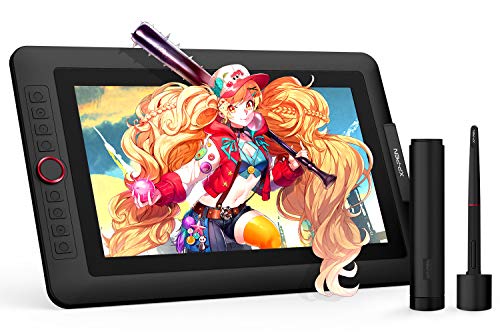
The XP-Pen Artist13.3 Pro is a 13.3-inch drawing tablet with a full-laminated display. It supports tilt input up to 60 degrees, enabling natural shading without constant software adjustments. The 88% NTSC color gamut (Adobe RGB ≈ 91%, sRGB ≈ 123%) along with a 178-degree viewing angle delivers vibrant colors and wide viewing comfort, suitable for detailed line work and color-critical tasks. Includes a 3-in-1 cable and adjustable stand for flexible ergonomics. This model is ideal for artists seeking a compact, screen-enabled drawing solution that travels well with a laptop setup.
Highlights: tilt support, accurate color reproduction, included stand, and adjustable shortcut keys. Potential considerations include the need for a connected computer and setup time to optimize drivers for specific software suites.
XP-PEN Artist12 11.6 Inch FHD

The XP-Pen Artist12 offers a compact 11.6-inch display with 1920×1080 resolution and 72% NTSC (100% sRGB). It ships with a battery-free PN06 multi-function pen and a glove to reduce friction during long sessions. A slim touch bar and six customizable shortcut keys help streamline common tasks, while the included anti-reflective screen protector minimizes glare. The device targets artists who want a portable, budget-friendly screen tablet that still delivers crisp color and responsive input when paired with a computer.
Pros include portability and solid color performance for its class. Considerations involve slightly limited color gamut compared with larger or higher-end models and a requirement to connect to a PC or Mac to operate.
XPPen Upgraded Artist13.3 Pro V2

The Artist13.3 Pro V2 elevates the drawing experience with Word-first 16K pressure Levels and a X3 Pro smart chip stylus for precise, smooth lines. The 13.3-inch screen is fully laminated, offering 99% sRGB coverage and a Red Dial Quick Key for rapid tool access. Eight programmable shortcut keys help streamline core tasks, and the tablet emphasizes easy driver setup for Windows users. This model suits artists who want high precision and a refined workflow in a mid-sized display tablet.
Key considerations include driver compatibility and the need to configure the Red Dial and keys to your preferred software, which may require a short learning period for beginners.
HUION Kamvas 13 Gen 3

HUION Kamvas 13 Gen 3 features a 13.3-inch Full-Laminated display with Canvas Glass 2.0 for reduced glare and accurate cursor tracking. The device uses PenTech 4.0 with 16,384 pressure levels and 2g IAF to deliver a natural drawing feel. It includes dual dial controls to support quick zoom and brush size changes, and it is compatible with PC, Mac, and Android. This model appeals to artists seeking robust color accuracy and enhanced control options in a compact, portable form factor.
Advantages include advanced pressure sensitivity and comfortable navigation via physical dials. Users should ensure their computer setup supports the required drivers for best performance and know that this device must be connected to a computer to function.
VEIKK VK1200V2 11.6 Inch
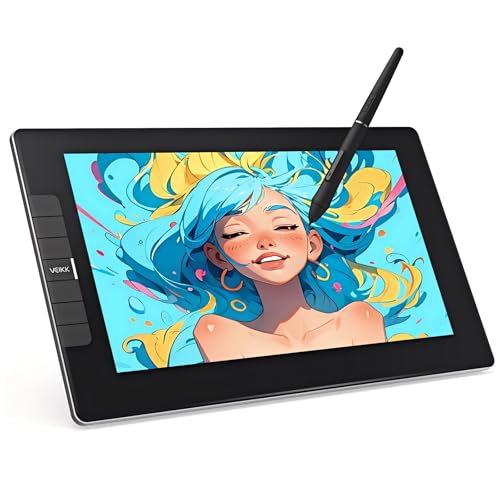
VEIKK VK1200V2 is an 11.6-inch full-laminated drawing monitor with six shortcut keys and 8192-level battery-free stylus. It delivers 120% sRGB color coverage and broad OS compatibility, including Windows, Mac, Linux, and ChromeOS. Its metal back shell provides durability and a non-slip surface, while portability remains a priority at about 1.78 pounds. This model is a good fit for users who want a value-focused screen tablet with reliable color and essential shortcut controls.
Considerations include ensuring software compatibility and driver updates across multiple operating systems, as well as verifying that the device will be used with a computer rather than as a standalone unit.
Buying Guide: Key Purchase Considerations
- Display size and portability: Choose a size that fits your workspace but remains comfortable to carry for on-the-go work. 11.6″ to 13.3″ screens are common mid-range options.
- Color accuracy and color gamut: Look for devices offering wide color gamuts (sRGB, AdobeRGB) and good color uniformity to ensure faithful artwork and photo edits.
- Pen sensitivity and tilt: Higher pressure levels (8192+), tilt support, and lag-free input contribute to more natural drawing and shading.
- Driver and software compatibility: Ensure the tablet supports your preferred software (Photoshop, Clip Studio, etc.) and that drivers are actively maintained for your OS.
- Shortcut keys and workflow: Physical dials and programmable keys speed up common tasks and reduce wrist movement during long sessions.
- Connectivity: Verify that you have the necessary ports (USB-C, HDMI, or dongles) and that the device is compatible with your computer’s OS.
- Ergonomics and stand options: An adjustable stand or tilt sensitivity improves comfort during extended drawing sessions.
- Budget versus features: Weigh the value of features like anti-glare glass, laminated screens, and multi-function pens against the price.
Across these options, users should align their choice with priorities such as portability, color-critical work, or advanced workflow features. For those who frequently travel or work at different locations, a compact model with strong color and tilt control may offer the best balance. For studio setups, a larger screen with robust shortcut customization and pen precision often delivers the most efficiency and accuracy.