Finding the best PDF reader tablet can enhance your reading, note-taking, and productivity experience, especially if you frequently work with documents on the go. Below is a summary of top tablets noted for their E Ink displays, note conversion features, and optimized reading apps, designed to make your digital reading experience as natural as paper. We’ve also included versatile SD card readers to complement your setup for easy media transfer across devices.
| Product Name | Key Features | Brand |
|---|---|---|
| Penstar eNote Paper Tablet Bundle, 10.3-inch | E Ink PureView Display, 9 Custom Shortcut Keys, MyScript Note Conversion | Penstar |
| Onyx E Ink Tablet Computer Go Series 7 Inch | 300 PPI E Ink Carta 1300, NeoReader App, White/Dark Themes | Generic |
| Onyx E Ink Tablet Go Series 6 Inch B/W eReader | 300 PPI Sharp E Ink Carta 1300, Customizable Reading Themes, NeoReader | Generic |
| SD Card Reader for iPhone, iPad, USB C and Lightning Dual Port | USB-C & Lightning Interfaces, Supports SD/Micro SD, No App Needed | CULGC |
| SD Card Reader for iPhone iPad, Dual Port Adapter, USB 3.0 | Dual Connectors Lightning & USB-C, Hot Swapping, Two-Way Transfer | Obcxin |
Penstar eNote Paper Tablet Bundle 10.3-Inch

The Penstar eNote Paper Tablet Bundle offers a paper-first E Ink experience featuring the Penstar PureView screen technology for superb clarity and authentic handwriting feel. Its 10.3-inch pen-only electronic notebook promotes focused thinking without distractions, thanks to a non-backlit display optimized for long reading and writing sessions.
Equipped with MyScript technology, the tablet instantly converts handwritten notes to editable text, enhancing organization and search capabilities. This feature is especially useful for professionals and students managing large volumes of notes.
Navigation is streamlined through 9 customizable physical shortcut keys, which allow users to switch between tools rapidly. Moreover, you can create custom profiles for both writing and reading, saving time while improving workflow efficiency.
Onyx E Ink 7 Inch Tablet Computer Go Series

The Onyx E Ink 7 Inch Tablet utilizes the Carta 1300 display technology at 300 PPI, delivering crisp textual content and vivid images that mimic printed paper quality. Its flush screen design not only looks sleek but also extends durability for everyday use.
This tablet comes with the native NeoReader app, providing a highly personalized reading experience with adjustable features including toggling between white and dark reading themes. Customize your setup to match your environment, whether you prefer a calming classic look or a futuristic high-tech interface.
Its compact 7-inch size makes it highly portable, suitable for users who want a robust E Ink tablet for reading PDFs and other eBooks wherever they go.
Onyx E Ink 6 Inch Tablet Go Series eReader

This 6-inch Onyx E Ink Tablet shares the standout Carta 1300 technology and 300 PPI sharpness seen in its 7-inch counterpart but offers a more compact alternative. Ideal for readers who want to hold their device easily for extended periods.
The tablet features the same NeoReader app with versatile theme options, allowing change between white and dark modes to reduce eye strain. Its minimalist, flush screen enhances visual clarity and makes this device durable for frequent use.
This is a great choice for anyone who prioritizes lightweight design without sacrificing an excellent PDF reading display.
CULGC Dual Port SD Card Reader for iPhone and iPad

The CULGC Dual Port SD Card Reader supports USB-C and Lightning interfaces, making it a versatile accessory for photographers and mobile users. It seamlessly connects with devices such as iPhones, iPads, MacBooks, and Android phones to transfer photos and documents without requiring additional apps.
This reader supports SD, Micro SD, and USB flash drives with high data transfer rates up to 5 Gbps, enabling rapid photo and video transfers. Its plug-and-play design ensures hassle-free operation, ideal for quick media management on the go.
Its compatibility with various USB devices extends its usability beyond just card reading, supporting peripherals like keyboards and guitars, adding convenience for creatives and tech enthusiasts.
Obcxin Dual Port SD Card Reader for iPhone and Android
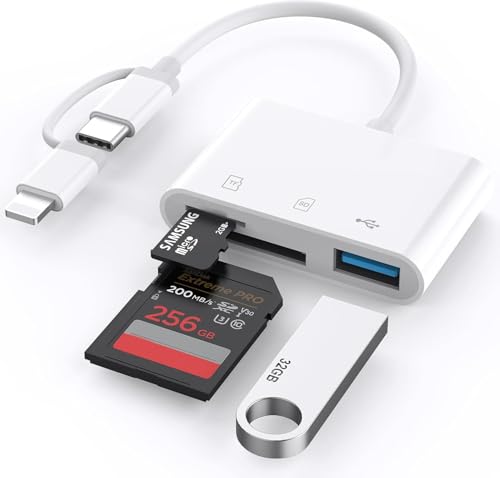
The Obcxin Dual Port SD Card Reader comes with USB-C and Lightning connectors designed for compatibility across Apple and Android devices. It supports a range of devices including iPhone models 5 through 16, iPads, MacBooks, and Android phones with USB-C.
It features two-way fast transmission with speeds reaching 20-30 MB/s, allowing both imports and exports of diverse file types such as movies, music, PDFs, and office documents. The plug-and-play functionality supports hot swapping and simultaneous reading of U disks combined with SD or TF cards (not two SD/TF cards simultaneously).
This adapter is a practical tool for users requiring fast and flexible file management across multiple device ecosystems.
Buying Guide for PDF Reader Tablets
Choosing the right PDF reader tablet depends on your specific needs, whether for reading, annotating, or note-taking. Consider the following key factors before making your purchase:
- Display Technology: E Ink displays like Carta 1300 provide paper-like readability with minimal eye strain, suitable for long-term reading. Brightness adjustment and anti-glare features improve usability in various lighting conditions.
- Screen Size: Larger screens (10 inches and above) offer more space for comfortable reading and note-taking, while smaller screens (6-7 inches) maximize portability.
- Writing and Note Conversion: Tablets with handwriting recognition and conversion to editable text enhance productivity, especially for students and professionals dealing with large volumes of notes.
- Customization and Controls: Shortcut keys and customizable user profiles improve navigation speed and tailor the device to your workflow, boosting efficiency.
- Reading App Features: Dedicated PDF reading apps with annotation tools, adjustable themes (dark mode), and library management contribute to a better reading experience.
- Connectivity and Storage: Consider devices that support expandable storage or come with SD card reader compatibility for easy transfer of large document collections.
- Battery Life and Portability: E Ink tablets typically offer long battery life, but always verify to meet your travel or daily use needs. Lightweight models enhance convenience.
- Compatibility with Accessories: SD card readers and USB adapters with dual interfaces (Lightning and USB-C) provide flexible data management across multiple devices, crucial for users integrating tablets into broader workflows.
Weighing these aspects will help you select a PDF reader tablet that fits your reading habits, enhances productivity, and integrates seamlessly with your digital ecosystem.