Choosing the best office wireless keyboard is essential for increasing productivity and maintaining comfort throughout your workday. Wireless keyboards eliminate clutter while providing ease of use and flexibility. Below is a summary table featuring some of the top wireless keyboard combos and standalone keyboards available on Amazon, designed to fit various office setups and preferences.
| Product | Brand | Key Features |
|---|---|---|
| Logitech MK270 Wireless Keyboard and Mouse Combo | Logitech | Reliable connection up to 33 ft, long battery life, full-size keys with number pad |
| Logitech MK295 Wireless Mouse & Keyboard Combo | Logitech | SilentTouch technology, full numpad, 8 shortcut keys |
| Logitech MK345 Wireless Keyboard and Mouse Combo | Logitech | Palm rest, spill-resistant design, compatible with Windows/macOS/ChromeOS |
| Arteck 2.4G Wireless Keyboard Stainless Steel Ultra Slim | Arteck | Rechargeable battery, stainless steel build, low-profile keys |
| Arteck Wireless Keyboard and Mouse Combo Stainless Steel | Arteck | Single USB receiver for both devices, rechargeable battery, ergonomic mice |
Logitech MK270 Wireless Keyboard and Mouse Combo

The Logitech MK270 combo offers a reliable 2.4 GHz wireless connection with a range of up to 33 feet, suitable for various office environments. The keyboard has a familiar full-size layout featuring a number pad and 8 multimedia keys for enhanced productivity. Thanks to quiet, low-profile keys, typing remains comfortable and distraction-free. Long battery life supports up to 36 months for the keyboard and 12 months for the mouse, complemented by on/off switches to conserve power. This plug-and-play setup ensures easy installation without hassles, making it a dependable choice for daily office use.
Logitech MK295 Wireless Mouse & Keyboard Combo with SilentTouch

Designed with SilentTouch technology, the Logitech MK295 combo delivers an ultra-quiet typing and clicking experience, reducing noise by up to 90%. The full keyboard layout includes a numeric keypad and 8 shortcut keys for easy access to functions like play/pause, volume, and web navigation. Its contoured mouse provides smooth, precise tracking on most surfaces and complements the quiet keyboard perfectly. The wireless connection is lag-free, ensuring responsiveness ideal for office tasks with minimal distraction.
Logitech MK345 Wireless Keyboard and Mouse Combo with Palm Rest

The MK345 combo is designed for comfort and durability. Featuring a palm rest and spill-resistant design, the full-size keyboard supports quiet typing with accessible media keys. Compatible across Windows, macOS, and ChromeOS platforms, this combo uses robust 2.4 GHz wireless technology providing up to 33 feet of connection range. Plug and play setup makes it ideal for users seeking cross-platform compatibility and ergonomic comfort for extended office use.
Arteck Stainless Steel Ultra Slim Wireless Keyboard

The Arteck 2.4G wireless keyboard combines a stainless steel frame with low-profile keys, offering a premium build and comfortable typing. It is ultra-slim and lightweight, making it portable for office or home use. Quick setup is achieved by inserting a nano USB receiver. Its rechargeable lithium battery supports up to 6 months on a single charge, minimizing maintenance. This keyboard is ideal for users valuing a durable, quiet, and sleek design with long-lasting battery life.
Arteck Wireless Keyboard and Mouse Combo with Rechargeable Batteries
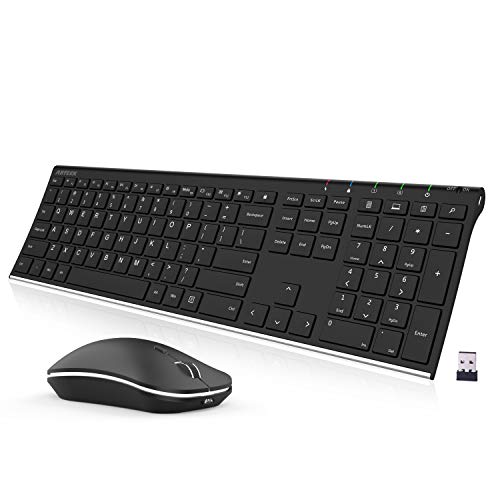
This combo includes a wireless keyboard and an ergonomic mouse sharing a single nano USB receiver, effectively saving ports on your computer. Both devices feature rechargeable batteries lasting up to 6 months for the keyboard and 4 months for the mouse per full charge. With a stainless steel keyboard frame and precision mouse design, this set offers durability and convenience ideal for office users seeking a clean and efficient wireless solution.
Buying Guide For Office Wireless Keyboards
When selecting the best office wireless keyboard, consider the following key factors to enhance your typing experience and compatibility:
- Wireless Range and Connection: A stable wireless connection with sufficient range (usually 30 feet or more) ensures flexibility in your workspace. Most office keyboards use 2.4 GHz USB receivers providing lag-free performance.
- Keyboard Layout and Size: Full-size keyboards with a numeric keypad improve productivity for data entry jobs. Compact keyboards save desk space but may lack a number pad.
- Typing Comfort and Key Design: Low-profile or scissor-switch keys reduce typing fatigue and noise, important in quiet office environments. Look for ergonomic features like palm rests and quiet keys.
- Battery Life and Power Options: Long battery life reduces maintenance. Rechargeable keyboards provide convenience but check charging times. On/off switches help extend battery life.
- Compatibility: Ensure the keyboard supports your operating system (Windows, macOS, Linux) and confirm plug-and-play ease to avoid driver installation issues.
- Additional Features: Multimedia shortcut keys, silent typing technology, spill resistance, and included mice may add to productivity and comfort based on your needs.
- Build Quality: Durable materials such as stainless steel frames increase longevity, especially in busy office environments.
By weighing these considerations, you can find a wireless keyboard that fits your office demands, enhances typing efficiency, and delivers a quiet, comfortable, and reliable experience.