Digitizing old negatives and slides preserves your precious memories with convenience and quality. The following review covers top-rated negative and slide scanners that offer features like high-resolution scanning, easy-load film inserts, built-in LCD previews, and compatibility with multiple film formats. A comparison table below summarizes key features of the selected models to help you choose the perfect scanner for your needs.
| Product | Resolution | Film Formats | Built-In Screen Size | Key Feature |
|---|---|---|---|---|
| KODAK Slide N SCAN Film & Slide Scanner | 22MP | 135, 126, 110 Film & Slides | 5” LCD | Quick Film Feeding Tray |
| Kodak Slide N Scan Max Digital Film Slide Scanner | 13/22MP | 135, 126, 110 Film & Slides | 7” LCD | Large Crystal-Clear Screen |
| ClearClick QuickConvert 2.0 Film & Photo Scanner | 22MP Interpolated | 35mm, 110, 126 Film, 4×6 Photos | 5” LCD | No Computer Required |
| Kodak SCANZA Digital Film & Slide Scanner | 14/22MP | 35mm, 126, 110, Super 8, 8mm Films & Slides | 3.5” LCD | Wide Film Format Support |
| Photo Slide Negative Scanner by DigitPro | 22MP | 135 Slides, Negatives & Photos | 2.4” LCD | 4GB SD Card Included |
KODAK Slide N SCAN Film & Slide Scanner Digitizer
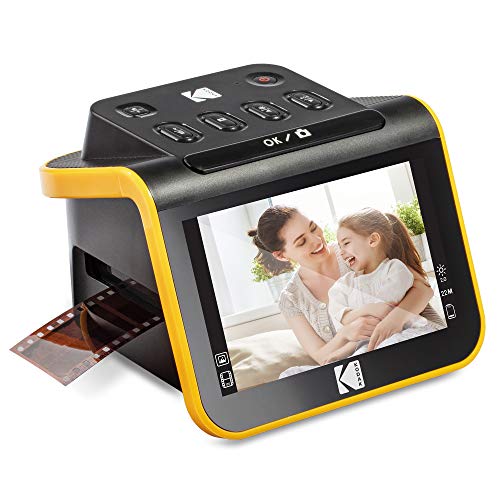
The KODAK Slide N SCAN offers a 22MP digital film scanner that supports 135, 126, and 110mm film and slides. With a large 5-inch LCD display featuring gallery mode, users can preview, edit, and share scans instantly. Its quick-feeding tray technology enables easy continuous loading, making scanning efficient. Accessories include adapters for popular film types and a cleaning brush. Images save directly to an SD card (not included), offering flexibility and convenience for archiving old photo memories.
Kodak Slide N Scan Max Digital Film Slide Scanner

The Kodak Slide N Scan Max enhances film digitization with a choice between 13MP and 22MP resolution. It accommodates the same film and slide formats as the previous model with a larger 7-inch crystal-clear LCD for effortless photo preview and editing. Its continuous loading film insert tray makes scanning fast, and it includes adapters along with a cleaning brush. The device saves photos directly to an SD card for easy memory transfer.
ClearClick QuickConvert 2.0 Photo, Slide & Negative Scanner
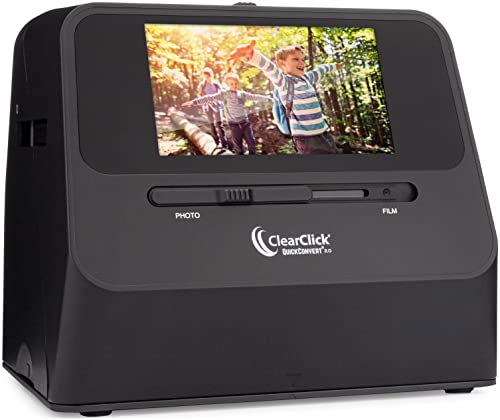
ClearClick QuickConvert 2.0 is a straightforward scanner that does not require a computer or drivers, making it an excellent plug-and-play option. It supports scanning of 4×6 photos, 35mm, 110, and 126 film. Although it lacks an autofeeder and scans one item at a time, it delivers quick scans in just 2-3 seconds. The built-in rechargeable battery and 5″ LCD provide portability and instant review capability. Images save on an SD card, reaching an interpolated resolution of 22MP.
Kodak SCANZA Digital Film & Slide Scanner
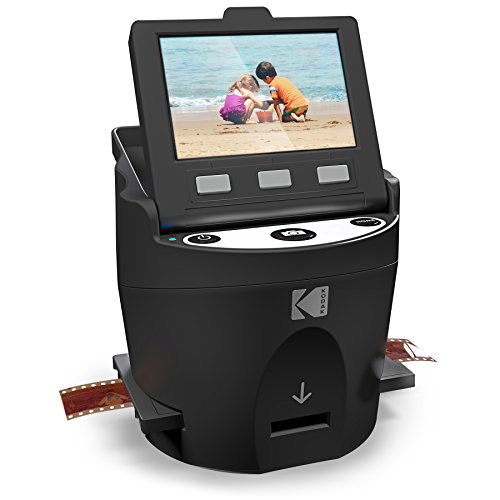
The Kodak SCANZA supports an extensive range of film including 35mm, 126, 110, Super 8, and 8mm films and slides. It offers flexible scanning with either a 14MP or 22MP sensor. The bright 3.5-inch adjustable LCD screen enhances viewing and operation, while the scanner comes equipped with multiple film adapters for easy and versatile media handling. Its one-touch buttons simplify the scanning process and speedy digital conversion.
Photo Slide Negative Scanner by DigitPro

DigitPro’s Photo Slide Negative Scanner offers a versatile tool for scanning photos, business cards, negatives, and 135 slides. It delivers high-resolution JPG images at 22MP. The standalone operation requires no PC connection, and it includes a convenient 2.4-inch color LCD screen with user-friendly settings for color, brightness, and resolution adjustment. The unit comes with a 4GB SD card, enabling immediate digital storage.
Buying Guide For Negative And Slide Scanners
When choosing a negative and slide scanner, consider these essential factors:
- Resolution: Higher megapixels ensure finer detail capture. For archival quality, choose models with 20MP or higher.
- Film Compatibility: Check supported film types (35mm, 110, 126, Super 8, 8mm). Multi-format adapters offer flexibility.
- Built-in Display: A screen allows instant preview and editing, which enhances usability. Larger LCDs provide better viewing angles.
- Ease of Use: Features like quick-feed trays and one-touch scanning simplify digitization, especially for large collections.
- Portability: Battery-powered or standalone units offer mobility versus those that require USB and a computer.
- Software & Editing: Some scanners include advanced software for color correction and dust removal. Determine if included tools meet your needs.
- Storage Options: Models saving directly to SD cards provide easy transfer and backup without computer dependency.
- Speed: Continuous load feeders and rapid scan times improve productivity, important when digitizing many photos or negatives.
- Accessories: Included adapters, cleaning brushes, and cables add value and improve scanning quality and maintenance.
Evaluating these areas ensures you select a scanner tailored to your workflow and desired scan quality, whether for casual sharing or professional-grade archiving.