MSR reader writer devices are essential for securely reading, writing, and managing magnetic stripe data. This guide highlights five reliable options that support multiple tracks and interfaces, including USB and Bluetooth. Each entry provides core capabilities, compatibility notes, and practical considerations for choosing a model that fits a business, hobbyist project, or educational lab. The summary table below helps compare key features at a glance.
| Product | Brand | Tracks Supported | Interface | Notes |
|---|---|---|---|---|
| Deftun Card Reader Writer USB Swipe Encoder 3 Tracks MSR605X | Deftun | 1/2/3 | USB | Read/Write/Copy/Edit/Erase |
| MSRX6 MSR X6 USB Swipe Magstripe Reader Writer | Deftun | 1/2/3 | USB | Windows/Mac software available |
| MSR X6 Swipe Card Reader Writer 3-Track | Koolrok | 1/2/3 | USB | Lacks smartphone app support |
| MSR X6BT USB & Bluetooth Swipe Card Reader Writer | Getmorv | 1/2/3 | USB & Bluetooth | PC and mobile device compatibility |
| MSR90 USB Swipe Magnetic Card Reader 3 Tracks | Deftun | 1/2/3 | USB (keyboard emulation) | Plug-and-play, no drivers required |
Product availability and compatibility can vary by platform and driver support. When selecting a device, consider whether you need Bluetooth connectivity, Windows or Mac software, or simple plug-and-play operation. For secure environments, evaluate how you will store and manage magnetic stripe data and ensure compliance with applicable data handling standards. The following sections review five top choices in detail.
Best Deftun MSR605X: Read/Write On All 3 Tracks

The Deftun MSR605X is a versatile USB-based MSR reader writer that handles tracks 1, 2, and 3. It supports read, write, copy, erase, and edit functions, making it suitable for lab testing, educational use, or controlled data replication tasks. USB power keeps setup straightforward, with a compact footprint for desktop use. Compatibility with Windows and Mac software is commonly available, though users should verify current driver support for their operating system. The device emphasizes complete track management in a single unit, aiding projects that require multi-track manipulation.
MSRX6: Compact USB MSR Writer

The MSRX6 model from Deftun targets portability with a compact 5.5 by 1.5 by 1.5 inch form. It operates via USB and provides software support for Windows and Mac. Note that this device does not integrate with smartphone apps like EasyMSR and is intended for use with a computer. Its smaller size makes it convenient for field testing or classroom demonstrations, while still offering essential read/write capabilities for three tracks.
MSR X6 Swipe Card Writer: 3-Track USB Option

Koolrok’s MSR X6 combines three-track reading and writing with a USB interface. It is designed to work with desktop systems and is compatible with MSR206/605X/606 profiles, offering broad interoperability in testing environments. Smartphone app support is limited or unavailable, so this unit is best for setups connected to a PC or laptop. The product supports straightforward data capture and manipulation for research, development, or teaching purposes.
MSR X6BT: USB & Bluetooth For Flexible Workflows

The MSR X6BT from Getmorv adds Bluetooth alongside USB, broadening deployment options to include tablets and mobile devices. It supports 1/2/3 tracks and includes compatibility notes for Windows, macOS, and mobile platforms. Free software for Windows and macOS is commonly available, facilitating development, testing, and demonstration workflows. The dual interface enables remote data capture and off-site demonstrations without wired connections.
MSR90: Plug‑And‑Play 3-Track Reader
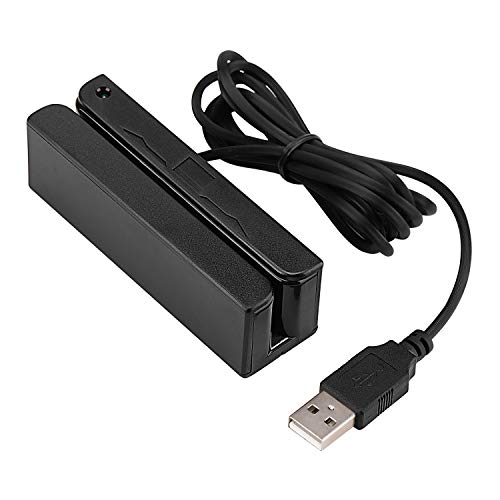
The Deftun MSR90 emphasizes plug-and-play usability, functioning as a USB keyboard emulation device without dedicated drivers. It reads up to three tracks and supports common card formats, including ISO7811 and AAMVA. LED indicators provide visual status cues during operation. This model is suited for quick deployments, kiosk integrations, or scenarios where native driver installation is limited or undesirable.
Deftun MSR-X6(BT): Bluetooth MSR Encoder

The Deftun MSR-X6(BT) variant offers Bluetooth connectivity for mobile and portable use. This model maintains compatibility with three tracks and provides a compact, portable solution for field testing or on-the-go data work. Bluetooth pairing enables convenient data transfer to tablets, laptops, or compatible devices without direct USB connections, expanding the range of deployment scenarios for reading and encoding magnetic stripe data.
Buying Guide
- Tracks and data formats: All listed devices support 1/2/3 track formats, but verify compatibility with your target card types (ISO 7811, AAMVA, etc.).
- Interface needs: USB is standard for desktop use; Bluetooth adds mobility but may require pairing and software support.
- Software and drivers: Windows and Mac compatibility varies. Check current driver availability and any bundled software for encoding or data management.
- Smartphone app support: Some models do not support mobile apps like EasyMSR; plan around PC-based workflows if needed.
- Security and compliance: Consider how you’ll store, transfer, and audit magnetic card data. Ensure devices and software meet your organization’s data-handling policies.
- Ease of use: Plug-and-play options are convenient for quick deployments; devices requiring drivers or specialized software may have steeper setup steps.
- Physical form factor: Portable mini units suit field use; larger USB devices may be more appropriate for desktop labs or office environments.
These MSR reader writer devices offer a spectrum of capabilities from plug-and-play to feature-rich software support. When choosing, align the model with your data handling needs, platform ecosystem, and deployment environment. The right selection supports efficient testing, development, and demonstrations while maintaining straightforward operations for users at various technical levels.