Choosing the right mouse for your Apple MacBook Air can enhance comfort and productivity. Below is a summary table highlighting five top wireless mice compatible with the MacBook Air, focusing on features such as connectivity, battery life, design, and compatibility.
| Product | Connectivity | Battery Life | Special Features |
|---|---|---|---|
| PEIBO Bluetooth Wireless Mouse | Bluetooth 5.2, 3.0, 2.4G USB Receiver, USB-C adapter | Auto sleep mode to save energy | 3 Adjustable DPI, dual-mode, rechargeable |
| Apple Magic Mouse | Wireless (Proprietary Bluetooth) | About 1 month rechargeable battery | Multi-Touch surface, smooth glide, optimized feet |
| Logitech M240 Silent Bluetooth Mouse | Bluetooth wireless | Up to 18 months | Silent clicks, compact, energy-efficient auto sleep |
| KLO Rechargeable Bluetooth Mouse | Bluetooth 3.0/5.2, USB 2.4G, USB-C | 7–30 days after 2–3 hour charge | 4 connection modes, auto sleep/wake, rechargeable |
| Logitech M196 Bluetooth Wireless Mouse | Bluetooth wireless | 12 months | Portable design, smooth tracking, ambidextrous |
PEIBO Bluetooth Wireless Mouse for MacBook Air

The PEIBO Bluetooth Wireless Mouse boasts dual-mode connectivity supporting Bluetooth 5.2, 3.0, and 2.4G USB receiver modes, making it highly versatile for MacBook Air and other devices like iPads and PCs. It offers plug-and-play ease with automatic switching between modes. The mouse includes a high-performance optical chip for faster, precise tracking with 3 adjustable DPI levels (800/1200/1600) to suit various tasks from office work to creative projects. Its auto sleeping mode and energy-saving design extend battery life, activating sleep after 8 minutes of inactivity. This mouse is ideal for users seeking flexibility and efficiency in daily use.
Apple Magic Mouse with Multi-Touch Surface

The Apple Magic Mouse is Apple’s official wireless mouse featuring a multi-touch surface that allows for intuitive gestures such as swiping and scrolling, enhancing macOS navigation. Its design includes an optimized foot structure for smooth gliding across desk surfaces. The Magic Mouse is wireless and rechargeable, providing about a month of use between charges, adding convenience for daily use. This mouse pairs seamlessly with the MacBook Air, delivering a sleek and integrated experience for users who prefer Apple’s ecosystem aesthetics and gestures.
Logitech M240 Silent Bluetooth Mouse for MacBook

The Logitech M240 Silent Bluetooth Mouse offers quiet clicking, reducing noise by 90%, which is advantageous in shared workspaces. It connects via Bluetooth with no dongle required, ensuring simple pairing with MacBook Air and other Bluetooth-enabled devices. The mouse provides up to 18 months of battery life supported by an auto sleep feature for energy efficiency. Its compact and portable design suits users who travel or switch workspaces often, while providing smooth, precise tracking for everyday use.
KLO Rechargeable Bluetooth Mouse with Multi-Mode

The KLO Rechargeable Bluetooth Mouse is a versatile choice featuring four connection modes (Bluetooth 3.0/5.2, USB 2.4G, and Type-C), providing adaptability across multiple devices including MacBook Air and iPads. It uses a durable lithium polymer rechargeable battery that offers up to 30 days of use after a short 2-3 hour charge. The mouse includes energy-saving features like auto sleep and wake modes, ensuring extended battery life during periods of inactivity. Its dual-port receiver improves compatibility with both USB-A and USB-C ports, making it highly practical for modern laptops.
Logitech M196 Bluetooth Wireless Mouse Compact Design
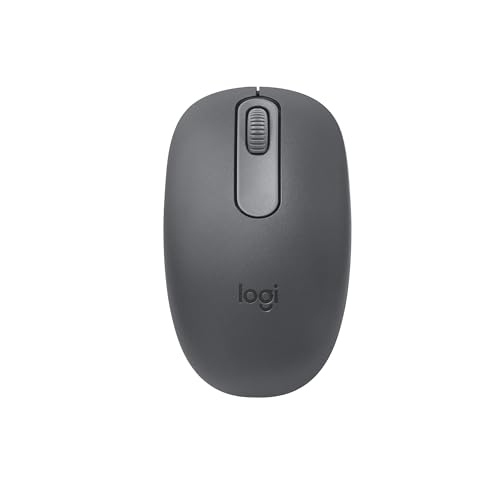
The Logitech M196 Bluetooth Wireless Mouse offers a lightweight, travel-ready design which is comfortable for both left- and right-handed users. It pairs easily through Bluetooth without any dongle. This mouse boasts smooth and precise tracking on nearly any surface, enhancing usability for MacBook Air users on the go. It provides reliable performance with a 12-month battery life and ergonomic form factor suited for users who prefer a compact and straightforward mouse for everyday productivity.
Buying Guide: How to Choose the Best Mouse for Your Apple MacBook Air
Connectivity Options
When selecting a mouse for the MacBook Air, consider the connectivity methods available. Most preferred mice offer Bluetooth connectivity for wireless convenience without dongles. Some models also feature 2.4 GHz USB receivers or multi-mode switching (Bluetooth + USB + USB-C) for enhanced compatibility across multiple devices, including other laptops or tablets.
Battery Life and Power Type
Long battery life is essential for uninterrupted use. Rechargeable mice with lithium polymer batteries can last weeks to months per charge and reduce battery replacement costs. Auto-sleep features save power by putting the mouse to sleep after inactivity. Mice with replaceable batteries may also appeal to some users for quick swaps.
Ergonomics and Comfort
Choose mice with comfortable shapes that support your hand for extended use. Compact and portable designs are ideal for travelers, while full-sized devices may better support prolonged desktop work. Ambidextrous or right/left-handed specific designs should fit your preference. Soft-touch and textured grips also improve comfort.
Tracking Precision and DPI Settings
High-precision optical sensors with adjustable DPI levels allow customization of cursor sensitivity. Lower DPI settings are suitable for detailed graphic work, while higher DPI aids fast cursor movement. Adjustable DPI makes a mouse versatile for various tasks.
Noise Level
Silent or quiet click mice reduce distractions in shared or quiet environments. Features that minimize click and scroll noise make a significant difference if you work in libraries, offices, or at home with others around.
Additional Features
Some mice offer multi-touch surfaces (like the Apple Magic Mouse) enabling gesture controls compatible with macOS. Others include jiggler modes to keep computers awake during tasks or downloads. Consider whether such extra functions benefit your workflow.
Compatibility
Ensure the mouse supports macOS compatibility, especially for advanced functions like gesture control. Cross-platform compatibility may be useful if you switch devices frequently. Check that the mouse supports the latest macOS versions and Bluetooth protocols.
By focusing on connectivity, battery endurance, comfort, precision, noise level, added features, and compatibility, you can select the best wireless mouse for your Apple MacBook Air tailored to your daily needs and preferences.